sbc setup on t53

Status
Not open for further replies.

NetAssure1234

Bronze Partner
Basic Certified
Joined
May 11, 2015
Messages
18
Reaction score
0
The instructions that are on the 3cx site to setup a T53 make no sense to me. I have tried for hours to try and follow the instructions and nothing i am looking at in the phone web page and in the 3cx a admin page look like what i see online . we are using 3cx version 18.0 update 6 (build 908) and the phone is updated to the correct software version. thanks for your help and clarification
https://www.3cx.com/blog/releases/v18-update-6/ I don't see any of this functionality the windows based 3cx console
https://www.3cx.com/sip-phones/yealink-t5-series/ i don't see any of this either
nor do I see anywhere #1 below. Select "Router Phone" where is that done??

onfiguring your Yealink T53, T53C, T53W, T54W, T57W as a Router Phone​

  1. Select "Router Phone".
  2. Choose your Yealink T5 model from the drop-down menu.
  3. Enter the phone’s MAC address without dashes or colons, and click “Add phone”.
  4. A pop-up with the extension number and the one-time code will appear. The PIN is valid for 14 days during which period you have to connect the phone to the network. If it is already connected, restart it.
  5. As soon as the phone boots up it will request:
    Your extension number
    The special 8-digit one-time PIN.


Last edited:
Hello,

I think this is probably the part you missed:
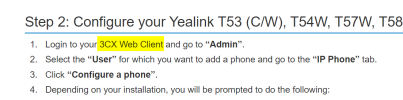
Taken from https://www.3cx.com/sip-phones/yealink-t5-series/
1675930030022.png

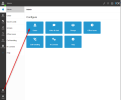
The webclient now has admin functionality built into it, and the router phone setup is done from there. You will not find these settings in the classic management console.

Just make sure your extension (you need a regular extension) has the correct rights like "System Owner" and you will find the menu here when you log in:
1675930193696.png
 
thanks . that helped and worked til i got to the "reboot your phone" and then when it asks for the code.....etc. this phone is in another office. and it does not ask for an extension number or code after reboot.
 
i used the provisioning link and that seems to have worked though it never asked for the extension or the code. always confused................
 
1676019619378.png

You haven't mentioned anything above, but was the device factory reset?
If it had existing provisioning data on it, it would not have asked for credentials..
 
This is my experience with setting a Yealink as SBC.
First I setup 1 T54W on site A. I was replacing a T48S that was provisioning as STUN. So delete the 48s from the user, and then add the T54w following the instructions from the web client (my extension was setup as the root admin in U6).
When the phone prompted for the user and password, I entered it, and was saying invalid, so I have to go to the phone's Web UI and setup the provision url as before. Then The user an password were accepted and finally the phone provisioned correctly.

Second scenario: Now site B, I was going to replace one of the T27G phones with a T53w in order to create the SBC and connect the other 5 T27 phones through it.
Again did the same procedure, delete the T27 from the user and add the T53W. Here were the nightmare stars. Each time I was receiving the error "RPS server failed" so It didn't allow me to setup the new phone (BTW was a new phone, never setup before). I tried to reset it to factory default, just in case, with no luck. I event read a suggestion to go to the Yealink website to delete the MAC Address from the RPS database with no luck to do so.
To make the story shorter, the solution was to add the phone through the Management console as a regular phone (STUN) and provisioned it, then reset it to factory again, delete the info from the user, and this time the add as a router phone on the web client worked as supposed to be. The reseted phone, just asked for the user and numeric code, and immediately start to provision and it worked after that.
From there just change the other phones to use the new created SBC and everything was fine.

My point is that the process has issues. Is not that simple as the 3CX instructions
 
This is my experience with setting a Yealink as SBC.
First I setup 1 T54W on site A. I was replacing a T48S that was provisioning as STUN. So delete the 48s from the user, and then add the T54w following the instructions from the web client (my extension was setup as the root admin in U6).
When the phone prompted for the user and password, I entered it, and was saying invalid, so I have to go to the phone's Web UI and setup the provision url as before. Then The user an password were accepted and finally the phone provisioned correctly.

Second scenario: Now site B, I was going to replace one of the T27G phones with a T53w in order to create the SBC and connect the other 5 T27 phones through it.
Again did the same procedure, delete the T27 from the user and add the T53W. Here were the nightmare stars. Each time I was receiving the error "RPS server failed" so It didn't allow me to setup the new phone (BTW was a new phone, never setup before). I tried to reset it to factory default, just in case, with no luck. I event read a suggestion to go to the Yealink website to delete the MAC Address from the RPS database with no luck to do so.
To make the story shorter, the solution was to add the phone through the Management console as a regular phone (STUN) and provisioned it, then reset it to factory again, delete the info from the user, and this time the add as a router phone on the web client worked as supposed to be. The reseted phone, just asked for the user and numeric code, and immediately start to provision and it worked after that.
From there just change the other phones to use the new created SBC and everything was fine.

My point is that the process has issues. Is not that simple as the 3CX instructions
Hi @ITGenSq

Thanks for sharing your experiences with us and providing feedback. We look forward to making some improvements in the next update!
 
  • Like
Reactions: ITGenSq
Is there an updated guide for this as I'm having the exact same issue!
 
Status
Not open for further replies.

Members Online Now

No members online now.

Forum statistics

Threads
111,831
Messages
589,277
Members
164,660
Latest member
RJenkinsROCK