- Joined
- May 11, 2015
- Messages
- 18
- Reaction score
- 0
The instructions that are on the 3cx site to setup a T53 make no sense to me. I have tried for hours to try and follow the instructions and nothing i am looking at in the phone web page and in the 3cx a admin page look like what i see online . we are using 3cx version 18.0 update 6 (build 908) and the phone is updated to the correct software version. thanks for your help and clarification
https://www.3cx.com/blog/releases/v18-update-6/ I don't see any of this functionality the windows based 3cx console
https://www.3cx.com/sip-phones/yealink-t5-series/ i don't see any of this either
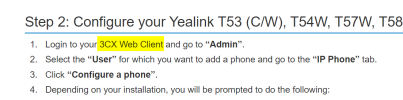
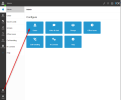
nor do I see anywhere #1 below. Select "Router Phone" where is that done??
https://www.3cx.com/blog/releases/v18-update-6/ I don't see any of this functionality the windows based 3cx console
https://www.3cx.com/sip-phones/yealink-t5-series/ i don't see any of this either
nor do I see anywhere #1 below. Select "Router Phone" where is that done??
onfiguring your Yealink T53, T53C, T53W, T54W, T57W as a Router Phone
- Select "Router Phone".
- Choose your Yealink T5 model from the drop-down menu.
- Enter the phone’s MAC address without dashes or colons, and click “Add phone”.
- A pop-up with the extension number and the one-time code will appear. The PIN is valid for 14 days during which period you have to connect the phone to the network. If it is already connected, restart it.
- As soon as the phone boots up it will request:
Your extension number
The special 8-digit one-time PIN.
Last edited: