- Joined
- Apr 4, 2022
- Messages
- 41
- Reaction score
- 6
Good afternoon.
We have implemented a vulnerability scanning system - Rapid7.
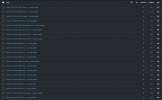
When scanning 3CX (v20, Linux, latest version), we obtained some very interesting results: 9,500 vulnerabilities, including a whole bunch of critical ones. (I’ve attached a screenshot.)
If we look by year, they date back to 2025 and earlier (all the way back to 2017).
As we understand it, are these some old leftovers from previous installations?
All vulnerabilities (categories 9-10) state:
"Configuration remediation steps:
Use `apt-get upgrade` to upgrade ******** to the latest version. "
But in that case, this contradicts what is written on the official website: https://www.3cx.com/docs/manual/installing-debian-linux-pbx/
"3CX created a Debian Linux ISO to make installation faster and management easier. You must dedicate your Debian Linux instance to 3CX.
* Do not install other packages or change the configuration.
* Do not install system updates via the command line! This is done by the 3CX system via updates after they have been tested!
* Any changes to the system will render your installation unsupported!".
In any case, we ran an apt full-upgrade on our test 3CX server, scanned again, and the results remained the same.
What do you recommend we do?
Maybe it would be easier to switch to Windows Server?
We have implemented a vulnerability scanning system - Rapid7.
When scanning 3CX (v20, Linux, latest version), we obtained some very interesting results: 9,500 vulnerabilities, including a whole bunch of critical ones. (I’ve attached a screenshot.)
If we look by year, they date back to 2025 and earlier (all the way back to 2017).
As we understand it, are these some old leftovers from previous installations?
All vulnerabilities (categories 9-10) state:
"Configuration remediation steps:
Use `apt-get upgrade` to upgrade ******** to the latest version. "
But in that case, this contradicts what is written on the official website: https://www.3cx.com/docs/manual/installing-debian-linux-pbx/
"3CX created a Debian Linux ISO to make installation faster and management easier. You must dedicate your Debian Linux instance to 3CX.
* Do not install other packages or change the configuration.
* Do not install system updates via the command line! This is done by the 3CX system via updates after they have been tested!
* Any changes to the system will render your installation unsupported!".
In any case, we ran an apt full-upgrade on our test 3CX server, scanned again, and the results remained the same.
What do you recommend we do?
Maybe it would be easier to switch to Windows Server?