Scheduled backup failure

Status
Not open for further replies.

ksanch

Customer
Intermediate Cert.
Joined
Aug 6, 2018
Messages
43
Reaction score
2
Hello,

We frequently receive error from the scheduled backup of our 3cx for reasons I don't understand. Could you please help ?
The Google Drive account used for the backup isn't full and the backup success most of the time.

Thanks you.
------------------------------------------------------------------------------------------------------------

Code:
3CX Phone System tried to backup but failed due to the following reason(s):

System.Exception: The service drive has thrown an exception: Google.GoogleApiException: Google.Apis.Requests.RequestError Rate Limit Exceeded [403] Errors [

                Message[Rate Limit Exceeded] Location[ - ] Reason[rateLimitExceeded] Domain[usageLimits] ]


   at Google.Apis.Requests.ClientServiceRequest`1.<ParseResponse>d__34.MoveNext()

--- End of stack trace from previous location where exception was thrown ---

   at System.Runtime.ExceptionServices.ExceptionDispatchInfo.Throw()

   at Google.Apis.Requests.ClientServiceRequest`1.Execute()

   at GoogleDriveImpl.GdFile.Close()

   at System.IO.Stream.Close()

   at System.IO.Compression.ZipArchive.CloseStreams()

   at System.IO.Compression.ZipArchive.Dispose(Boolean disposing)

   at _3cxNetBackupAndRestore._3cxBackup.FinishingTask()

   at _3cxBackupRestoreImpl.BackupRestoreUtils.Backup(IFilesystem filesystem, String instanceId, String cfgPath, String dbConnectionString, BackupConfig options, String fullpathFilename, Boolean sendEmail)

   at BackupRestoreSchedule.BackupJob.Execute(IJobExecutionContext context)
 
Hello I have the same problem. Someone knows the problem and how to solve it?
 
Hello,

Please note that our development team is aware of this issue and we are trying to come up with a solution. I will let you know if there is an update regarding this.
 
  • Like
Reactions: Damion and ksanch
Hello Yiannish ! Thanks for your answer, that's nice to hear. We wait for your update. Have a nice day
 
Hello Yiannish ! Thanks for your answer, that's nice to hear. We wait for your update. Have a nice day
Glad i could assist. You too
 
@ksanch
Our Dev Team got back to us, and the only way we managed to replicate this error/exception is when the GDrive disk space is either full, or nearing 100%.

Could you check if this is the case? How much disk space do you have left when this happens?

One more thing. Would you happen to be using the same GDrive account to store scheduled backups from multiple 3CX Systems? And if yes, are the scheduled to run at the same time?
 
Hi Nick,

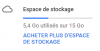
I have almost 10 Go available on my GDrive account:

upload_2018-8-23_9-0-25.png

We only have one 3CX System backuping there.
The last backup were successful. It seems it's a random issue, but why ? Last time were: 03.08, 30.07, 29.07, 22.07, 21.07, 09.07, 08.07, 16.06, 13.06, 05.06.
 
Thanks for the info, I'll pass on this information.
 
@ksanch
One more thing. Would you happen to be using the same GDrive account to store scheduled backups from multiple 3CX Systems? And if yes, are the scheduled to run at the same time?
I was seeing this as well a while back. Drive wasn't full. Multiple PBX's backing up to the same share, so similar data amount each day. Some days this error. It wasn't always the same server, but I noticed it was around the same time of day. I haven't seen it as much since I spread out some of the overlapping PBX backup times.
 
I am not sure if this may be a solution as I am a 3cx noob here. I started having this issue 3 weeks back. I trace back the time any changes I've made and found that I did some name changes to the backup location folder. Before the folder was like this (foldername) and I changed it to this (folder_name_backup). This is when the issue started as far as I could trace back. Today I rename the folder back to the original name (foldername) without the underscores and no special characters, then tested, and voila, automated back up successful, it started working again. This may resolved some of you issues. Good luck!
 
Hello, the issue happenned again this week-end saturday night.

I am not sure if this may be a solution as I am a 3cx noob here. I started having this issue 3 weeks back. I trace back the time any changes I've made and found that I did some name changes to the backup location folder. Before the folder was like this (foldername) and I changed it to this (folder_name_backup). This is when the issue started as far as I could trace back. Today I rename the folder back to the original name (foldername) without the underscores and no special characters, then tested, and voila, automated back up successful, it started working again. This may resolved some of you issues. Good luck!

The backup location is on the root location of my Drive account.
 
Hello, the issue happenned again this week-end saturday night.


The backup location is on the root location of my Drive account.
Sorry to hear it happened again ksanch. Some other solutions I've tried is disabling the backup and re-authenticating it again. I've also tried deleting the backup file after saving a copy of it (leaving a blank folder to start with. You may have already tried these yourself, but just giving you alternative options. Another thing you can try is creating a separate backup folder path away from the root GDrive folder and see if that works. My naming convention is as such: 3CX-BKUP/3cxbackupfolder. Good luck.
 
Yes I will try and let you know if it happens again. Thanks you !
 
Status
Not open for further replies.

Latest Posts

Forum statistics

Threads
111,893
Messages
589,597
Members
164,760
Latest member
SaschaA_