Send inside and did calls to user voicemail

Status
Not open for further replies.

raymond.norton

Gold Partner
Basic Certified
Joined
Apr 24, 2024
Messages
32
Reaction score
6
V20 Update 2
48 sc
Locally hosted

We want calls directed to users in a department to go to voicemail (most have dids). I have attempted to accomplish this via office hours for the department but the schedule is not applied. In researching, it seems the sip trunk default route to a digital receptionist may be the culprit, but I am not sure and do not want to cause the end users any grief by experimenting. There is an option for "department" Would that ensure the office hours would be applied, or is there a better way to accomplish what is needed?
 
All this information is also explained in the guideline here.

Keep in mind that :

''An important concept to understand is that the office hours of the endpoint/extension/system extension at which the call arrives are applied. So it does not matter from which IVR or SIP trunk the call came from, it only matters where it arrives.''
 
  • Like
Reactions: Evolute IT
A user would need to have their status changed to Away or DND to have this done after hours.

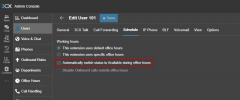
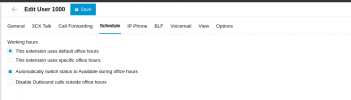
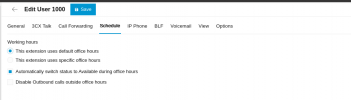
Enable the option in the "Schedule" page of the user to automatically switch status, as shown below

1725006369063.png

Once this is enabled, they can either follow the departments office hours and switch accordingly, or have their own custom schedule.
 
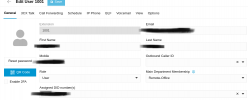
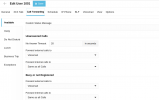
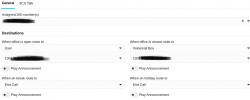
Thank you for your replies. I might be misunderstanding or missing something, but I have followed the doc and recommended settings prior to my post. Most users have assigned DIDs, but in further testing, I assigned a DID in call handling, directing calls to go to the assigned user's voicemail after hours. Dialing the user's DID and Call Handling DID ring through to the user instead of going to voicemail, although the office hours have ended. I am attaching some screenshots for review. Thoughts?
 

Attachments

  • User-G.png
    User-G.png
    47.5 KB · Views: 7
  • User-CF.png
    User-CF.png
    44.6 KB · Views: 7
  • Dept.png
    Dept.png
    18 KB · Views: 7
  • Office-Hours.png
    Office-Hours.png
    26.6 KB · Views: 7
  • schedule.png
    schedule.png
    25.1 KB · Views: 7
  • CallHandling.png
    CallHandling.png
    36.4 KB · Views: 7
Did your extension changed status?
 
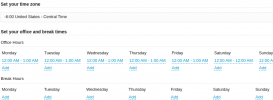
What office hours does the Remote-Office department have. The call handling will follow those hours. Also, your extension will follow those hours and not the custom schedule you defined, as you havent selected the relevant option. It will follow the "Remote-Office" department hours as it is currently configured

1725260961298.png
 
Per the pics, office hours are from 12:00 AM to 12:01 AM (for testing). The status of the extension does not change and calls do not go to voicemail, as configured. The extension is not a member of any other departments.
 
I inadvertently activated the assigned office hours for my test extension by logging into the webclient as user xxxx, selecting "Do Not Disturb" status for a few seconds, and selecting "Available" again. Office hours worked after that, with every change made. It worked for both the app and desk phone. Is there a way to mimic that action for 700 users? Testing further with a new extension to see if the action is needed for Office Hours to work correctly. Is there an underlying configuration issue that might cause this issue?
 
Status
Not open for further replies.

Latest Posts

Forum statistics

Threads
111,953
Messages
589,916
Members
164,851
Latest member
DrunkeMeister