Separate extension for branches

Status
Not open for further replies.

Networkbug

Customer
Basic Certified
Joined
Jun 10, 2022
Messages
28
Reaction score
4
Hello,

Need little help with extensions

HQ-101- Can reach all branches ( A & B)
Branch A-201 cannot contact Branch B-301 vice-versa but both can contact HQ.

Is there a group permission I have to apply?

Using 3CX V18 on Windows 10 pro 64bit

Thanks,
 
Extensions should be able dial (reach) all other extensions on the same PBX. Are they all on the same PBX, or are you using Bridge trunks?
Have you checked he 3CX Activity Log, to see why the calls are not going through? You may need to set the logging level to Verbose.
 
Extensions should be able dial (reach) all other extensions on the same PBX. Are they all on the same PBX, or are you using Bridge trunks?
Have you checked he 3CX Activity Log, to see why the calls are not going through? You may need to set the logging level to Verbose.
Sorry for not adding more information. I meant to block the extension from calling each other but both branches should be able to talk with HQ. Branch A and B should not be able to view or communicate with each other.
 
The group permissions will prevent some things being visible, but will not prevent extensions calling each other.

Normally you cannot block the dialing of other extensions on the same PBX, however, see the example on using forwarding, in this thread...

https://www.3cx.com/community/threads/prevent-calling-to-an-extension.76864/

If the sets are the type with an internal dial plan, you may be able to block certain ranges from being dialed, at the set.
 
  • Like
Reactions: Networkbug
The group permissions will prevent some things being visible, but will not prevent extensions calling each other.

Normally you cannot block the dialing of other extensions on the same PBX, however, see the example on using forwarding, in this thread...

https://www.3cx.com/community/threads/prevent-calling-to-an-extension.76864/

If the sets are the type with an internal dial plan, you may be able to block certain ranges from being dialed, at the set.
Thanks for this, The only way I can remove from directory is by adding them to different group which is not visible to user but the extension is reachable.
 
@Networkbug

See the new capabilities of the new sp4 multi-company mode https://www.3cx.com/blog/releases/v18-update-4/, be sure to test it before tying it in production. Additionally, there are management capabilities in this mode https://www.3cx.com/blog/releases/startup-call-handling/, and these are accessible to users that are set with manager rights, as well as the powerful receptionist views.
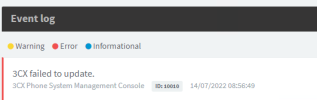
Hello.. Thanks for suggestion, I tried to update my version and got this error - I cannot restart the update.
1657882238575.png
 
Status
Not open for further replies.

Forum statistics

Threads
111,974
Messages
590,083
Members
164,900
Latest member
Silent_Guru