





3CX StartUP has surpassed 5000 sign-ups and it’s time for our first big update. We’ve fine tuned call handling with the addition of digital receptionists and call queues. The StartUP wizard has also been updated and improved to get you “started-up” in no time.
Route calls professionally with IVR
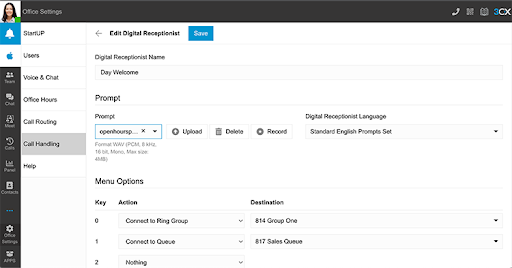
Press 1 for Sales, 2 for support! Give callers the option to press a key to choose which department or team they want to speak to. Callers can be connected to a ring group, queue, or another digital receptionist, to be presented with further options. Your team won’t be tied down with transferring calls all the time.
Busy? Queue that call

'Line up' your customers when agents are unavailable by creating call queues. Add team members to each queue, choose your polling strategy and maximum wait time. You can also tailor the configuration by uploading your own music on hold, enabling queue position announcements, and creating custom intro prompts.
Call queues are a StartUP PRO feature that have now been added for evaluation prior to the final release of StartUP.
Record your greetings from the Client
Greetings and prompts can be easily recorded, directly from the Web Client, without having to use a separate application to record prompts. Use it to record IVRs, queue intros and to create custom greetings for overriding office hours.
Check out the Play announcements section of our Getting Started Guide for more on how to record prompts.
Other fixes and improvements
- Added 'Call Handling' as a new section replacing 'Ring Groups' in 'Office Settings'. From here you can create your groups, queues and digital receptionists.
- Single Sign-on (SSO) is limited to Google only. Microsoft has announced it will be changing its current method, so we will not be supporting Microsoft SSO for the moment.
How to Get 3CX StartUP
- Existing customers: From the "Systems" page in the Customer Portal, click the "Add Systems" button in the top right corner. Select "3CX - Hosted" > "Up to 10 users - 3CX StartUP"
- New customers: Register for a new 3CX StartUP account and follow the 4 easy steps in the setup wizard.









 Copyright © 2026