Set Office Hours in Call Queues

Status
Not open for further replies.

arnie.cuenta

Customer
Joined
Aug 17, 2019
Messages
43
Reaction score
3
Is there a way where in I can set Office Hours on Call Queues?
 
Not within 3CX system , you setup the Office Hours on the sip / trunk being redirected to the queue

If you have Pro or Ent license, you maybe able to do something with CFD - ttps://www.3cx.com/docs/manual/call-flow-designer-manual/

Please explain why you want Office hours on queues, and someone may have another solution
 
Last edited:
Here is the flow. I created IVR in 3CX. So if there is a caller, it will be redirected to IVR. Then set the IVR's Menu Option that if the caller press 0 it will be connected to Call Queue 1 and if it presses 2 it will be connected to Call Queue 2. The Agents in Call Queue 1 is available only in the morning and agents in Call Queue 2 is available in the afternoon. What I wanted is that in case the caller called in the afternoon and presses 1 (which is Call Queue 1 that is only available in the morning), there should be an IVR saying that "Calls in Call Queue 1 is only available in the morning".
 
Create some dummy extensions and use the autoswitch function - https://www.3cx.com/3cxacademy/videos/intermediate/time-day-routing/

Working hours - extension will be Available
Out of hours - extension will be DND

Using the status you can route the calls

Main IVR - Option 1 goes to dummy extension - depending on status routes calls to queue or ivr.
Main IVR - Option 2 goes to another dummy extension - - depending on status routes calls to queue or ivr.
 
Last edited:
  • Like
Reactions: CentrexJ
Hi Arnie,

You can set custom office hours on specific DIDs or trunks, which will then go to the queue of your choice.

If you don't want to affect the DID (ie. if you have a single DID and then send calls to queues via an IVR) you can use a different method. Create an extension which will act as a Queue Forwarder and set specific hours for that extension under its Forwarding settings, Auto Switch menu.

During Office Hours "Available" should forward calls to the queue, and outside office hours "DND" should forward calls to the destination of your choice.
 
Hi Arnie,

You can set custom office hours on specific DIDs or trunks, which will then go to the queue of your choice.

If you don't want to affect the DID (ie. if you have a single DID and then send calls to queues via an IVR) you can use a different method. Create an extension which will act as a Queue Forwarder and set specific hours for that extension under its Forwarding settings, Auto Switch menu.

During Office Hours "Available" should forward calls to the queue, and outside office hours "DND" should forward calls to the destination of your choice.

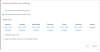
To test if it is working, I set the Auto Switch Menu of the created extension (see attached file) .Office Hours.png.
Then I set that extension status to DND. And when I try to call that extension, I am forwarded to the DND settings I set in that extension instead of the Auto Switch. Since that extension is still in the specific Office hours, supposed to be the status of that extension is Available, right?
 
The system will auto change the status of the extension.

During office hours it will be set to 'Available' , then set to DND outside of office hrs

You need to change the 'forward rules' for available and dnd.

As the phone is an dummy extension you need to change 'If I am busy or my phone is unregistered, forward calls to:' setting under available. (I would also change 'If I do not answer calls within' to the required settimg , just so that both settings are the same)
 
Last edited:
  • Like
Reactions: JohnS_3CX
Auto Switch just decides what hours you switch to the Available status. It does not decide the destination.

So edit the Availble Forwards to send all calls to the Queue, and edit the DND forwards to send all the calls to the destination outside your work hours.

The system will automatically switch you back and forth (hence applying the forwards you selected for each status)
 
Auto Switch just decides what hours you switch to the Available status. It does not decide the destination.

So edit the Availble Forwards to send all calls to the Queue, and edit the DND forwards to send all the calls to the destination outside your work hours.

The system will automatically switch you back and forth (hence applying the forwards you selected for each status)

The problem is that the Status is still Available even though I'm already out of Office Hours. Lets say I have 2 IVR's. The 1st IVR says "Your in Office Hours". The 2nd IVR says "Your out of Office Hours". And set the forwarding rules of extension 601 if Available forwarded to 1st IVR and if DND it will forwarded to 2nd IVR. Here is the issue. Even though I already configure the Auto Switch of extension 601 into "Office hours - Mon to Sat - 10pm to 11pm" and I'm going to call to extension 601 past 11pm, I'm still forwarded to 1st IVR.
 
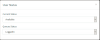
Can you check the status of the extension

Within 3CX management console - under extensions select the extension and click on the 'Status' buttom along the top.

What is the current status ?. Is it correct for the time of day ?
 
Can you check the status of the extension

Within 3CX management console - under extensions select the extension and click on the 'Status' buttom along the top.

What is the current status ?. Is it correct for the time of day ?
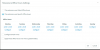
Here is the status 1591805035251.png
and the Auto Switch config is this

1591805109953.png
Since it is already 12:05AM the status should not be "Available", right?
 
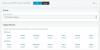
Is the time on the server correct,

Is the 3CX time zone correct - Settings - TimeZone and & Office Hours
 
Is the time on the server correct,

Is the 3CX time zone correct - Settings - TimeZone and & Office Hours

It is set to +8:00 which is the correct timezone.

1591806125210.png
 
I have just tested on ver 16.0.5.5611 and it changed the status correctly.

What version are you running ?

 
I have just tested on ver 16.0.5.5611 and it changed the status correctly.

What version are you running ?

Hi,

The version number is v16.0.612

1591807192410.png
 
Out of suggestions.

can you manually change the status to dnd, then check tomorrow to see if the status change to available @ 22:00
 
Out of suggestions.

can you manually change the status to dnd, then check tomorrow to see if the status change to available @ 22:00


Hi, Thank you all for the suggestions. The auto switch of the extension is already working. The extension will be switch to "Available" if it is within the Office Hours and DND if outside the working hours.
 
  • Like
Reactions: JohnS_3CX
Hi Arnie,

Glad to hear its ok, you probably had to just wait until the next event before you notive the auto-switch starting to work.
 
Status
Not open for further replies.

Forum statistics

Threads
111,952
Messages
589,906
Members
164,845
Latest member
tdzski5