Set Static IP on AWS Lightsail and now can't access PBX via FQDN

Status
Not open for further replies.

michael84

Silver Partner
Basic Certified
Joined
Jun 17, 2020
Messages
7
Reaction score
1
Hi Guys,

So, doing some late night maintenance (BAD IDEA) But we have recently setup multiple AWS lightsail PBX's and we received an allotment for more Static IP's for the Lightsail instances via our request to AWS.

The current PBX's were set with a static on the PBX, even though the Lightsail Instances were still running on Dynamic IP's, given we used up the initial quota for Static ones.

I've made the mistake of setting the static IP's on the Lightsail instances, while the PBX itself was set to static IP. So obviously now we have IP mismatches and I cant access the 'PBX admin console' via the FQDN or IP addresses.

So my question is, how do I fix this?

#1: Will the FQDN resolve itself to the new static IP given to the server once DNS propagation happens? Or will this not happen given I have set the PBX to a "static IP" that wasn't static, given the lightsail server was on a dynamic IP

#2 Will I need to rebuild the phone systems from scratch?

I would appreciate any help or feedback on this.

Kindest regards,

Michael
 
I just tested and I can access a 3CX server on Lightsail using the public IP rather than the FQDN. Where you may be getting into trouble is that 3CX thinks it has a different public IP. I assume your PBX is running on Linux and thus accessing the UI from the server itself (RDP to localhost) is not an option? I have no idea how to change what 3CX thinks is the public IP if you cannot access the console / web client.
 
I just tested and I can access a 3CX server on Lightsail using the public IP rather than the FQDN. Where you may be getting into trouble is that 3CX thinks it has a different public IP. I assume your PBX is running on Linux and thus accessing the UI from the server itself (RDP to localhost) is not an option? I have no idea how to change what 3CX thinks is the public IP if you cannot access the console / web client.
Hi Matthew,

Thank you for checking for me, how were you able to reach the lightsail server? Were you able to reach the admin portal via the ip address? Or you you mean you were able to see the IP via nslookup?

Kindest regards,

Michael
 
@michael84 The new IP should work, however you'd of course receive a certificate name mismatch warning in your browser.

TTL for a 3CX FQDN on a Pro license is 6 hours. You can try to query the 3CX name servers directly but note they vary a bit, for instance NS for 3cx.us is CloudFlare and [state].3cx.us is Google.

As I recall using Static tells 3CX to not update the FQDN. One suggestion I've read for IP changes is to set to Dynamic, wait until it updates, then set back to Static. Or restart 3CX services.
 
Hi Steve and Matthew,

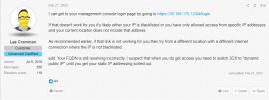
GOOD NEWS! I managed to resolve my issue and I thank you very much for your replies. I trolled the forums and I was lucky enough to come across a thread whereby I could access the WEBGUI by entering: https://:"NewStaticPublicIP"/#/login

I was able to access the PBX, change the IP from Static to Dynamic, which picked up the new Lightsail Static IP and then change the IP back to static on the PBX.

I'll attach a screen shot of the OG poster for their Kudos. But man I was sweating bullets, but lesson learnt!

Again I appreciate your time, Wishing you both a HAPPY NEW YEAR!

Kindest regards,

MichaelScreenshot 2023-12-29 052201.png
 
  • Like
Reactions: SteveITS
I learned something from your post, so we all benefited. Glad if we were able to help in some what. For the record, I was able to get to the console using the IP.
 
I learned something from your post, so we all benefited. Glad if we were able to help in some what. For the record, I was able to get to the console using the IP.
Hi Matthew,

Thanks for letting me know, I don't know why but I couldn't access the console at all from my side. I even cleared my DNS cache and still couldn't. But glad you could take something away from it too. It certainly saved me a lot of work haha. Thanks again and have a wonderful New Year!

Cheers,

Michael
 
Status
Not open for further replies.

Forum statistics

Threads
112,276
Messages
591,638
Members
165,393
Latest member
Carlos - EC Mates