Solved Setting up SMS with Telnyx - doesn't save when I click OK

Status
Not open for further replies.

survivalbloke

Customer
Joined
Nov 3, 2021
Messages
47
Reaction score
7
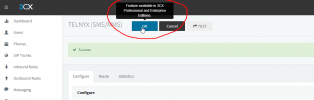
Odd behavior on this one. When I go through the setting up of SMS in 3CX, I enter in all the settings and click "test" which comes back green as a success. However, I can click "OK" but it doesn't save what I've done. I happened to notice upon mousing over OK, it tells me the feature is available in PRO and Enterprise versions - the former of which I have.

Any ideas?
sms.png
 
Go to the license tab and refresh your license.
 
where is the license tab? Can't find it anywhere.
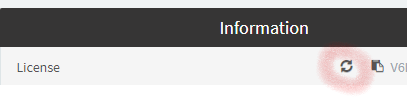
Just do this on the Dashboard. Hosted instances don't have access to the License settings (in Settings > License.)

1636073964660.png
 
Just do this on the Dashboard. Hosted instances don't have access to the License settings (in Settings > License.)

View attachment 25668
OK, thank you for that image. I did click that and it said reloading license but still I get the same issue. That sucks, this really sounded like a solution too.
 
OK, thank you for that image. I did click that and it said reloading license but still I get the same issue. That sucks, this really sounded like a solution too.
Have you tried clearing your cache? Do a CTRL+SHIFT+R on your keyboard and it should reload without cache. Try it after that.
 
OK, thank you for that image. I did click that and it said reloading license but still I get the same issue. That sucks, this really sounded like a solution too.
Same thing. I also tried in an incognito window. I did email support but I figured I might get it solved faster here.
 
Hi @survivalbloke ,

Could you do me a favor please?
Log into your Management Console using Chrome specifically, then:
  1. Go to the Dashboard --> Activity Log --> Settings and enable "Verbose"
  2. Go back to the Dashboard view
  3. Press F12 and go to the "Network" tab in the debug window
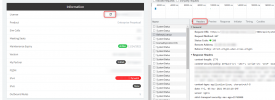
  4. Press the "refresh" icon
  5. In the debug window, find the "RefreshLicense" entry and take a screenshot of the response in the "Header".
    1636104232054.png
  6. Then, while still having the RefreshLicense" entry selected, go to the "Response" tab and copy all the text there.
  7. Finally, in the top-right corner of the Management Console, go to Support --> Generate Support Info. This will send an email with a download link to the admin email account. Download that too.
  8. In a PM, send me the:
    a) Screenshots from step #5
    b) Response text from step #6
    c) Support Info file from step #7. For this, you will have to upload it to a file sharing service of your choice (GDrive, Dropbox, WeTransfer, etc) and send me the download link.
  9. Double-check that you still have the problem with saving the SMS config.
 
Hi!

I have gone over the files and I seem to have found what is happening.
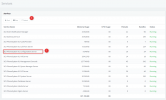
Can you please go to Dashboard --> Services and restart the Configuration Service please?
1636130017384.png


Then try the same again.
 
Hi!

I have gone over the files that I seem to have seen what is happening.
Can you please go to Dashboard --> Services and restart the Configuration Service please?
View attachment 25698


Then try the same again.
I'm not seeing "services" anywhere in the dashboard. - UPDATE - I found it, restarted, and it now is working correctly. Thanks! You're a genius!
 
Last edited:
Excellent!

I'll flag this as 'Solved' then and we'll be looking to find a more permanent solution for this.
 
Status
Not open for further replies.

Forum statistics

Threads
111,974
Messages
590,081
Members
164,899
Latest member
mazet