Shared Parking on 3CX App for Mobile

Robert McKeever II

Silver Partner
Advanced Certified
Joined
Aug 31, 2018
Messages
17
Reaction score
2
Hey 3CX Community,

Before we get too deep, I am aware of this thread - https://www.3cx.com/community/threads/shared-park-from-mobile-v20.123997/, but since this time I've found an alternate option that I thought would work. Me being a person who looks at all things and clicks around, I found that I could set system extensions as the SP0-SP3 that we use under the old dummy extensions we used in v16-18. So I updated them for our mobile app users to still be able to dial and get calls.
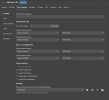
1740408975597.png

However, when I park a call and dial this or any park, I get "Destination is unavailable". This also happens with or without a call parked. All statuses are set to 1 second (if they have a forward timer) and no matter internal or external, they point to a park.

To add, these extensions are unregistered on purpose and hidden from the contact list as they've always been. i would like to not rock the boat and make a change when we've had this working for years before v20.

I do not want to switch our company to "parking orbit" just to fix the obvious issue.

Any ideas? :)

EDIT: I restested and I was wrong on the initial calling description. If there is no parked call, when you call the park from a desk phone, it states "canceled" and this also happen when you dial the dummy extension from the app. However, when a call is parked from a desk phone and you go to retreive it from the app by dialing the dummy extension, that's where it says "Destination is unavailable".
 
Last edited:
Sorry, I'm confused on how this helps me retrieve calls from a parked spot on the system by mobile app?
 
The script is designed to help a user park and retrieve a call automatically on any device.

The parking can be triggered by a dial code, similar to a parking orbit, and this would allow someone to park a call without a BLF key.
 
The issue is that a call comes into our system and a mobile user is then asked to grab a call from a specific shared park.

Our calls come into different numbers and to pass the calls around internally, we used shared parking. We also setup some of our clients like this as well. We also used to be able to transfer from mobile to the dummy extensions to pass calls from mobile to the office without doing a blind transfer.

The parking script doesn't allow for us to specifiy a park (based on what I am reading). It sounds like it throws it into a parking orbit, which is what we don't want.

Before, we had it set as "dial external number" with the number as "SPX" (X = the park number) in all forward options and statuses, and we could then set a custom status which worked until v20. This worked flawlessly for years.

I find it odd that the settings are there, but they don't work correctly or as simple as they should. We would like it to work as we previously had, with the newly found settings above. If there is a better way of handling this exact request of how we handle our calls, please explain. If the script is the way, please help me understand how, because reading it twice and reviewing the code, I am not grasping how it helps me in the exact issue I am having.

It would be nice if there was a button/checkbox added to select "non-human extension" or something like that to allow for what I call 'workarounds' like this. It would also be nice to simply have a BLF area in the app as well - like next to the status or "Q" log in/out button.

In summary, with the settings above in the picture, it would make sense to me that calling the dummy extension would still have it forward to the shared park no matter if a call is there or not.

Am I missing something?
 
The dummy extension approach doesn't work in v20. Staff can use the magnifying glass on the Keypad in the app to type in "sp4" after which "Call SP4" will appear, so they can tap on it.

Or use the web client, set to use the Smartphone as the dialer.
 
  • Like
Reactions: Evolute IT
I saw this also, but it was over a year ago you @SteveITS actually posted that.

I was hoping for an update by now since it had been so long. Thanks for the update.
 
The dummy extension approach doesn't work in v20. Staff can use the magnifying glass on the Keypad in the app to type in "sp4" after which "Call SP4" will appear, so they can tap on it.

Or use the web client, set to use the Smartphone as the dialer.
An update: I setup the extension as mentioned and found in other articles and I am still getting "Destination is unavailable".

So that tells me that what I want above will work, but there is a system issue that is preventing me from hitting the shared park I am trying to call since the symptom and result is the same...

Thoughts?
 
Robert I have the same thing setup as you do. I found that I can transfer the call to a shared park using a "dummy extension" However I can not retrieve the call. It seems that being able to do this is such a short step away. Im really hoping this comes back as we have many clients that have used this for years. Im keeping my fingers crossed. Park orbits are almost a non starter for most of these clients
 
Looks promising will it be coming to android also. Still doesn't help with single button voip phones on shop floor. There is a work around for them that I saw. Was just hoping to avoid a custom template. But blf support would be a huge step forward for us. Thanks for the info Charles
 
@Curtis C @Robert McKeever II

look here under Important Notes:
https://www.3cx.com/docs/shared-parking/

1740688130567.png

As others have already written, in a smartphone app you can retrieve calls by entering SP0 (note the capitalization) using the magnifying glass symbol, and soon you will be able to do this directly using the BLF buttons there.

However, this does not work with a DECT device, as you cannot access such parked calls.
 
  • Like
Reactions: fxbastler
in a smartphone app you can retrieve calls by entering SP0 (note the capitalization) using the magnifying glass symbol
FYI it no longer requires capital letters because it searches for you...will show as "Call SP0." In the past one could (only) dial the letters in upper case.
 
Until yesterday, I had to enter the name in capital letters on my Android smartphone, otherwise it wouldn't work.
The device is always up to date or has the beta version.
Since today, I can select the parking positions directly thanks to the new beta app :)
 
Oh! Well then I stand corrected, it is different on iOS.
 
  • Like
Reactions: fxbastler
The latest beta of the Android app has BLF in it. It works great for picking up calls that have been parked using Shared Parking.

Now I need to figure out how to do it with a Yealink DECT phone that doesn't have BLF keys.

John
 
  • Like
Reactions: fxbastler
Now I need to figure out how to do it with a Yealink DECT phone that doesn't have BLF keys.
Call Script only atm as far as I know :(

Changes to the base template did not work for us.
 
Call Script only atm as far as I know :(

Changes to the base template did not work for us.
I didn't think of using a Call Script....Duh! I'm usually looking for things to do with scripts. I love programming. Gotta take the time to learn C# one of these days.

John
 

Forum statistics

Threads
112,293
Messages
591,751
Members
165,425
Latest member
LachlanC
