Shared Parking Pick Up from Mobile and DECT - v20

charlesmurray

Bronze Partner
Joined
Mar 25, 2019
Messages
6
Reaction score
3
On v18, I used to often create several "dummy" extensions on systems and make them extension numbers such as 771, 772 and 773. These extension numbers correspond to the letters for SP1. SP2 and SP3. I would set the forwarding on these dummy extensions to go to Number and SP1, SP2 and SP3.

On v18, if you parked a call in one of the SP slots using a 3CX app or a deskphone, you could retrieve it on the 3CX mobile app or on a phone like a DECT phone that does not have BLF buttons. This was extremely handy on v18, as customers that come from systems like NEC, Panasonic, etc love to use shared parking. However being able to pick up a parked call from a mobile app or DECT is not normally available on 3CX, so this workaround was great for doing this.

I have tried this same config on v20, but if you try to pick up a parked call by dialling the dummy extension 771, 772 or 773, this now no longer works and you get a voice prompt error message, when you try it. Having set this on loads of systems, I am going to have a lot of disappointed customers now that they can no longer use this.

Does anyone have any alternative ways of picking up shared parking calls from 3CX mobile app or from DECT handsets (without BLF buttons)? Alternatively 3CX can you bring back this ability?

Also, parking orbits just don't cut it, I am afraid as there is not any indication on devices that do have BLFs.
 
I've not seen a great solution mentioned. Obviously someone can transfer the call instead of parking it, or if the person is near a PC they can log in to the web client and unpark the call, with "call using" set to their mobile.

It would be nice to have a menu of the shared parking slots if BLF buttons are not feasible. I would assume actual BLF would chew up data and battery, for instance, trying to update status...possibly could be limited to "only when viewing the shared parking tab" or something.
 
shared parking SP1 / SP2 /SP3 no longer work on V20 - this version cause to many issues
 
This is not good. This is how we had our cordless DECT phones able to answer calls that were parked on a shared parking location (SP1, SP2, etc.)
 
So an update on this for anyone following this thread.

v20 Update 3, Build 20.0.3.659, August 2024 now has the option of setting the transfer destination of an extension to a shared parking bay (look under system extensions when setting up the extension forwarding rules)

This is excellent news, so now we can create dummy extensions with that as the forwarding destination and now mobile and DECT users can transfer a call into a shared parking bay.

I'm still getting to grips with exactly which settings need to be enabled for both the dummy extension and the person trying to transfer the call (i.e. the user rights) as it didn't seem to work 'out of the box', I ended up making all the extension park of the same department and giving them all full rights to everything, so now it's just the fun job of disabling things bit by bit until it breaks and I'll have an idea of exact permissions user and dummy need for it to work, unless a member of support can save me the job? :-)

However...

Sadly this is only half of the fix we need, as this only works for putting a call into a shared parking bay, there is still no current way of picking up a call on a mobile or DECT handset. In v18 you just followed the same process, i.e. dialled the same dummy extension, however this does not work in v20. Maybe just a Beta update issue and will be fixed in release, or maybe this need to be reported as a bug?

Other than that v20 is now looking very promising and a credit to everyone working on the mammoth task of building it from the ground up. I'm looking forward to migrating customers as soon as this SP issue is resolved in a release version.

Dave.
 
no current way of picking up a call on a mobile
Just to state it in this thread, one can use the magnifying glass on the keypad to type in “sp3” and will see “call Sp3” appear. But, the user has to know which SP to call. (Same issue with parking, they have to guess which SP is empty)
 
In a perfect world mobile users would be able to see the shared parking bays as 'extensions' in the team list and the colour of the 'extension' would show if a call was held in there (maybe even be clever and show the caller ID of the held caller by the side of it). This still leaves DECT users, and be great if dial codes would be available for them (saving need to create dummy extensions at all), appreciate they are never going to know which parking bay has which call etc. but the use case of DECT handsets makes that acceptable, i.e. a PA announcement to a workshop, "call for Joe on SP0" etc. At the moment I'd just be happy if we could use dummy extensions to pickup parked calls as well as place calls into parking (which is fixed as of update3)
 
Thanks @David Forster for keeping us updated. I jumped straight to it but still couldn't get a call to park from DECT.

At least I'm getting a definitive error message now: 'Terminated by Parking orbit (SP1)'

I'll keep looking into it with, hopefully, a solution soon!

Klaus
 
Thanks @David Forster for keeping us updated. I jumped straight to it but still couldn't get a call to park from DECT.

At least I'm getting a definitive error message now: 'Terminated by Parking orbit (SP1)'

I'll keep looking into it with, hopefully, a solution soon!

Klaus
Hi Klaus,

So setup your dummy extension to forward all calls (both external and internal) to system extension for a shared parking bay.

Give that extension all the rights you can, also give the user extension full rights and make sure they are all in the same department.

Incoming call to DECT can then be transferred to dummy ext which will put it in shared parking bay. (still can't retrieve a call from SPs on DECT/Mobile)

That's what has worked for me (on v20 update 3), as mentioned above still haven't had time to work out exactly what permissions each extension needs for this to work.

Dave.
 
So setup your dummy extension to forward all calls (both external and internal) to system extension for a shared parking bay.
Thanks Dave. I did actually do all of that - permissions/roles/departments etc - and still couldn't make it work. I'll pull it all down and rebuild in the light of a new day in case I missed something or there's garbage code from earlier versions getting in the way.

I do actually have an 'out of desperation' workaround running:
I setup an extension with a rule to ring for 5 mins and then return to a queue;
then added the Windows app to a virtual machine, registered that extension and turned the speaker off;
we just blind transfer to that extension and then pick up using the *20*<ext> from wherever when ready.
Works fine and suits our purposes for the moment.

Could also be done with an old ip phone if needed. I did originally try with the extension registered on an old mobile phone but found out that some devices don't honour the PBX ring time setting and will move the call on after 30 or 60 secs.

Klaus
 
  • Love
Reactions: David Forster
Try as I might, I haven't been able to get the shared parking with 'dummy' extension working for a Yealink W60B DECT phone - parking or retrieval.
I can park calls that way from the iphone mobile app, but can't retrieve them using the dummy extension, have to dial SP1 direct to get it back.

Klaus
 
I've been beating my brain on this as well and I think I've figured out a workaround for RETRIEVING a shared parked call!

It involves creating another dummy extension along with creating a simple (well, simple after much trial and error lol) Call Flow/Processing Script specifically for retrieving.

Example:
600 = dummy ext configured to forward to SP0
610 = dummy ext assigned to CF script to retrieve from SP0

CFD:
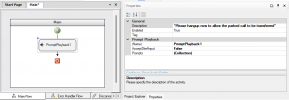
In the Main Flow, create a Prompt Playback component and have whatever phrase you decide to use be looped at least once to avoid the script initiating the call disconnect. (The caller needs to be the one to initiate the call disconnect by hanging up to ensure the Disconnect Handler Flow executes when the line is completely idle.)

1725005944007.png

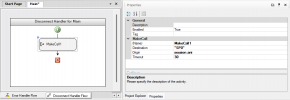
Next, in the Disconnect Handler Flow, create a "Make Call" component and configure it as illustrated below:
1725006026268.png
Define "Destination" to the appropriate SP location.

Build the script and upload it to your server.

Usage:
To retrieve a shared parked call, simply dial the appropriate retrieval dummy extension, wait to listen for the prompt to play, then hang up; your phone will start ringing almost instantly. Once answered, you'll immediately be connected to the parked party.

Sidenote:
The current version of the CFD only allows numbers to be used in defining the build extension, whereas should you create a call flow from scratch using the web interface, it allows you to define an actual dial code which allows the use of * and lowercase letters; hopefully the next version of CFD will incorporate this.
 
Last edited:
That's a great workaround. I too had been trying to do something similar with the CFD but struggled with the same problem with it not allowing non numeric characters, so great bit of out of the box thinking :) .

Hopefully this all becomes a moot issue if they allow the extensions to behave as they did in v18. Fingers crossed :-).

Everything else in v20 is looking good and opens the door for lots of future exciting new features. WhisperAI is amazing in early trials, now just a case of getting that data into a usable format for agents and managers (appreciate could export to a crm).

Well done :)
 
  • Like
Reactions: RAPP81
Thanks!

Not sure if you caught my edit/redact about another workaround should one desire to define a dial code to the retrieval CF; I was prematurely confident on the proper way to accomplish this but am confident now.

Best way to accomplish this bit if you don't want to deal with variable modifications is to first design-build-upload.

Next, copy/save the compiled script from the web interface into a text editor and keep track of the audio prompt file.

Delete the CF from the server.

Using the web interface, create a new Call Processing (or CF *the inconsistency is driving me bonkers!) script, ensuring the Name is defined exactly as stated in the script after "namespace". Define the dial code to your likening. Click OK.

Upload the audio prompt file.

Paste the script back in.

Save.
 
  • Like
Reactions: David Forster
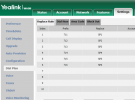
I was able to achieve this a much simpler way with Yealink DECT base. No need for dummy extensions or any CFD. Just use the replace function of the phone's dial plan editor. Works totally fine for both park and retrieve. Just use a 'Prefix' that is not anything your users would otherwise need to dial. To park, just transfer to the prefix from the handset. To pick up, just dial the prefix from the handset as a normal call. Enjoy.
yealinkw60.png
 
@fthomas_mcallen , that is amazing !!!

I can confirm that works on Yealink W70B too :)

What on earth made you think you could enter non numerics in the dial plan? Great discovery :-)

Dave.
 
  • Like
Reactions: jed and Evolute IT
Dave - we try things. Sometimes they work.
 
Dave - we try things. Sometimes they work.
Core user interaction procedure: If the program doesn't tell you you can't do it, then obviously it's allowed.

/s
 

Forum statistics

Threads
111,953
Messages
589,913
Members
164,848
Latest member
latoya@bautistafamilycare