SKYPE Out failing

Status
Not open for further replies.

thames

Customer
Basic Certified
Joined
Apr 4, 2011
Messages
175
Reaction score
12
Hi Folks

New here. Just installed my first 3CX system as a potential reseller but having trouble getting the system to dial out using the SKYPE (or any other) gateway. When I make a call from the only phone I currently have registered (my iPhone running the Acrobits Groundwire app), I get these two lines in the log file:

23:31:27.053 [CM503016]: Call(5): Attempt to reach <sip:[email protected]> failed. Reason: Not Acceptable HereReason Unknown
23:31:27.042 [CM503003]: Call(5): Call to sip:[email protected]:5060 has failed; Cause: 484 Address Incomplete; from IP:63.209.144.201:5060

Can anyone tell me why this is happening and what I need to change to make it work?

I'm having similar trouble getting calls out to the OrbTalk gateway, except the error is different. I'll address that one in a new post once this one has been solved, with your help.

Thanks
Chris
 
It looks like you are sending incorrect telephone numbers to them. I would review your outbound rules and adjust as necessary .
 
Hi Leejor

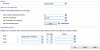
Here is a shot of my outbound rule. Could you suggest a change?

Many thanks
Chris
 

Attachments

  • OutboundRuleSKYPE.jpg
    OutboundRuleSKYPE.jpg
    75.7 KB · Views: 1,185
The first log showed a 9 at the beginning, I'm assuming that you then changed the outgoing rule to strip off the 1 digit (the 9). The second log seem to indicate that you are sending an incomplete phone number. I don't know what country you are trying to call or what format Skype Out expects, as I don't use that service. You should contact them for the required digit format and length.
 
Hi

Thanks - your reply reminded me that SKYPE doesn't want just the national number but requires the country code too. So... I changed the outbound rule to reflect that and it seems to get further (see text from log below). However, when it gets to the actual call stage, there appears to be an issue with credentials. Now - this is what I'm seeing when I use OrbTalk as well. The call appears to go fine and then I get the same error about credentials not matching. Any help here would be sincerely appreciated.

Thanks
Chris

Log extract:

09:55:57.122 [CM102001]: Authentication failed for SipReq: REGISTER 127.0.0.1:5060 tid=0a66660d6f44cb3e cseq=REGISTER [email protected]:6062 / 2 from(wire); Reason: Credentials don't match, check that authorization-ID and password match the ones in extension settings
09:55:43.455 [CM503008]: Call(9): Call is terminated
09:55:41.293 [CM505003]: Provider:[Skype for SIP - Worldwide] Device info: Device Not Identified: User Agent not matched; Capabilities:[reinvite, replaces, able-no-sdp, recvonly] UserAgent: [] PBX contact: [sip:[email protected]:5060]
09:55:41.291 [CM503002]: Call(9): Alerting sip:[email protected]:5060
09:55:37.820 [CM503025]: Call(9): Calling VoIPline:00441344412124@(Ln.10000@Skype for SIP - Worldwide)@[Dev:sip:[email protected]:5060]
09:55:37.812 [MS210002] C:9.2:Offer provided. Connection(transcoding mode): 87.194.206.168:9008(9009)
09:55:37.788 [CM503004]: Call(9): Route 1: VoIPline:00441344412124@(Ln.10000@Skype for SIP - Worldwide)@[Dev:sip:[email protected]:5060]
09:55:37.784 [CM503010]: Making route(s) to <sip:[email protected]>
 
This happened to someone once before (yours might be a different issue), check that you entered the user info/password directly, not a cut and paste. They did that and introduced an unintended space that went unnoticed.
 
Hi Petrik

Yes I did. But I was trying to get to numeric prefixes rather than the alpha which I also have set up. I have now resolved the SKYPE issue and am making calls out through this gateway just fine. My problem was that I didn't have the outbound rule setup correctly and SKYPE was rejecting the call.

Many thanks to all.
Chris
 
Status
Not open for further replies.

Members Online Now

Forum statistics

Threads
111,860
Messages
589,437
Members
164,700
Latest member
Apollo Cloud