SMB Instance time may be incorrect?

etabora

Titanium Partner
Basic Certified
Joined
Feb 2, 2023
Messages
12
Reaction score
4
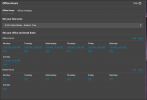
I have a client with an SMB instance that is seeing issues with their call handling rule forwarding properly, I notice that unlike our other customers with a proper license we are not able to verify the system time via any of the diagnostic tools usually displayed within the dashboard. Our department is set for Eastern Time however sometimes the Ring Group forwards to the "when office is closed" destination when they are supposed to be open. For example our office hours on the department which our Ring Group is in is 7AM - 9PM, 7 days a week, after opening at 7AM they still forward to the closed destination. If any one can provide any insight as to what I might be doing wrong I'd love to hear it.
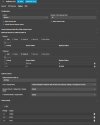
1773087198703.png
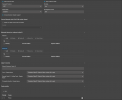
1773087439697.png
 
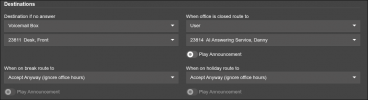
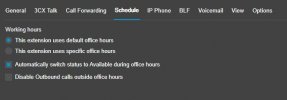
what are your call forwarding and schedule settings for users in that ring group?
 
if these aren't correct it will automatically forward do a voicemail
 

Attachments

  • tmp_schedule.jpg
    tmp_schedule.jpg
    19.5 KB · Views: 4
  • tmp_callForward.jpg
    tmp_callForward.jpg
    66.3 KB · Views: 4
if these aren't correct it will automatically forward do a voicemail
Yes I've confirmed there's no forwarding or custom schedule settings causing the forwarding.
 
What's weird is the customer used to just accept calls 24/7 but once they called us to setup hours and forwarding to an outside agency we started seeing this issue. It worked for almost a week straight before they had issues over the weekend and I haven't been able to pinpoint the problem since.
 
So if you turn the hours off, it goes back to normal and calls go through?

You're forwarding the calls to different DIDs that are not one of your/your clients Trunks?

It sounds like there is a configuration that the shared instance is caching, maybe when you were testing it decided to keep the wrong one -it does this to me when setting up SBCs, it won't remove the wrong MAC or IP address from the configuration, even when deleting and creating a completely new SBC. It remembers the MAC address of the phone.

How are your Trunk settings?
 

Attachments

  • tmp_etabora.jpg
    tmp_etabora.jpg
    52 KB · Views: 5
So if you turn the hours off, it goes back to normal and calls go through?

You're forwarding the calls to different DIDs that are not one of your/your clients Trunks?

It sounds like there is a configuration that the shared instance is caching, maybe when you were testing it decided to keep the wrong one -it does this to me when setting up SBCs, it won't remove the wrong MAC or IP address from the configuration, even when deleting and creating a completely new SBC. It remembers the MAC address of the phone.

How are your Trunk settings?
Yes, currently, I have the customer using the override office hours setting from the webclient as a workaround, this works as expected.

Yes I am forwarding to DIDs not a part of the trunk. It's a 3rd party AI answering service via extension 23814's forwarding rules.
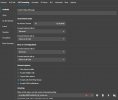
Here's my trunk settings
1773099355128.png
The other two codecs i'm using, cut off at the bottom are PMCA and g729
and at the top 10 sim calls and limit to, the same department my ring group and users are in.
 
using Vox Telesys if it means anything to you
 
For testing purposes:
  1. Have the manager/reception login and "override office hours" again and do as below. Someone else may have overridden them over the weekend you mentioned when the issue started, for an unknown amount of time. Unfortunately there is no audit trail in the event log or anywhere I've seen that would alert someone of such a change. Test and see. Screen Shot 2026-03-09 at 11.51.32 PM.png
  2. Set all extensions to "available". (with Office Hours set to default as above).
  3. Vox telesys has trunk and configuration settings, you should add them to the 3cx instance if you are able to. One of those settings I see above is E164, convert inbound and do outbound conversion. Vox Telesys specifically requires the main trunk number and forwarded numbers to be in E164 format.
  4. Is there a reason you're having an extension 23814 forward to Vox? Instead of using "Forward to Outside Number". I still really think there's something wrong with those rules that's causing the issue:
    Screen Shot 2026-03-10 at 12.50.25 AM.png
  5. Increase your sim call limit to 20 +, If you're testing the system and you keep calling it back it can trigger the call limit. I've had it lock me out and send me to voicemail when it was set to 10, and it had been a couple minutes since I'd called back to check call and voicemail compliance. It uses 2 channels for one call for a forward like that. So you'd only get 5 sim calls with it at 10.
  6. If they have more than one "department" make sure they have the proper one selected and that the hours match. And I know you said you checked the custom scheduling per user, but I'd just be sure to double check the logic and that none of the other settings are creating a loop back to the voicemail.
  7. Just to cover all the bases, no "holiday's" have been set?

Outbound Rules, ideally adding Vox Telesys trunk:

1.) 10-digit pattern (standard US/CA)
  • Rule Name: Vox-10-Digit
  • Calls to numbers with a length of: 10
  • Route 1: Vox Telesys Trunk
  • Prepend: +1
2.) 11-digit pattern (already has '1')
  • Rule Name: Vox-11-Digit
  • Calls to numbers with a length of: 11
  • Route 1: Vox Telesys Trunk
  • Prepend: +
3.) "Catch-All" for forwarding
This ensures the system-level Ring Group doesn't get blocked by user-only rules.
  • Rule Name: System-Forwarding
  • Calls to numbers starting with prefix: +,0-9
  • Calls from Extension(s): blank
  • Calls from Departments: blank
  • Route 1: Vox Telesys Trunk
 
For testing purposes:
  1. Have the manager/reception login and "override office hours" again and do as below. Someone else may have overridden them over the weekend you mentioned when the issue started, for an unknown amount of time. Unfortunately there is no audit trail in the event log or anywhere I've seen that would alert someone of such a change. Test and see. View attachment 51180
  2. Set all extensions to "available". (with Office Hours set to default as above).
  3. Vox telesys has trunk and configuration settings, you should add them to the 3cx instance if you are able to. One of those settings I see above is E164, convert inbound and do outbound conversion. Vox Telesys specifically requires the main trunk number and forwarded numbers to be in E164 format.
  4. Is there a reason you're having an extension 23814 forward to Vox? Instead of using "Forward to Outside Number". I still really think there's something wrong with those rules that's causing the issue:
    View attachment 51181
  5. Increase your sim call limit to 20 +, If you're testing the system and you keep calling it back it can trigger the call limit. I've had it lock me out and send me to voicemail when it was set to 10, and it had been a couple minutes since I'd called back to check call and voicemail compliance. It uses 2 channels for one call for a forward like that. So you'd only get 5 sim calls with it at 10.
  6. If they have more than one "department" make sure they have the proper one selected and that the hours match. And I know you said you checked the custom scheduling per user, but I'd just be sure to double check the logic and that none of the other settings are creating a loop back to the voicemail.
  7. Just to cover all the bases, no "holiday's" have been set?

Outbound Rules, ideally adding Vox Telesys trunk:

1.) 10-digit pattern (standard US/CA)
  • Rule Name: Vox-10-Digit
  • Calls to numbers with a length of: 10
  • Route 1: Vox Telesys Trunk
  • Prepend: +1
2.) 11-digit pattern (already has '1')
  • Rule Name: Vox-11-Digit
  • Calls to numbers with a length of: 11
  • Route 1: Vox Telesys Trunk
  • Prepend: +
3.) "Catch-All" for forwarding
This ensures the system-level Ring Group doesn't get blocked by user-only rules.
  • Rule Name: System-Forwarding
  • Calls to numbers starting with prefix: +,0-9
  • Calls from Extension(s): blank
  • Calls from Departments: blank
  • Route 1: Vox Telesys Trunk
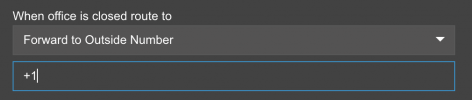
Thanks for your help, I've reset the office hours and changed my forwarding after hours to go directly to the outside number in E164 format, I don't remember the exact reason we did it this way prior but I think the previous outbound rules might've interfered with the original callerID passing through, I just tested and this appears to be working properly.

and yes this site only has one department and no holidays either, right now everything is set to your specification and I have reset the office hours, as of now it appears the calls are routing as expected and I'm just going to need to wait till the end of the week to confirm with my customer that this will continue to work.
 
  • Like
Reactions: destn
Checking back on this there is absolutely a time synchronization error I received a call today just a few minutes prior to writing this that my customer is still having calls forwarded to his "when office is closed destination" this morning when they should be receiving calls. I checked their 3CX after having followed steps here to set all extensions to automatically become available during office hours and noticed all their extensions were set to DND. This to me very clearly shows that the time has been out of sync but how can I correct it?
 
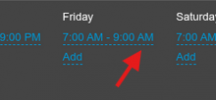
@etabora It is Friday, and I am thinking this should be 9 PM?
1773425313568.png
 
Also noticed strange behaviour with times a few weeks back. Was this confirmed to be an issue with SMB accounts?
 
Also noticed strange behaviour with times a few weeks back. Was this confirmed to be an issue with SMB accounts?
Nope, it was very much something @SteveITS pointed out in his last comment, totally a misconfiguration from my end.
 
  • Like
Reactions: Volkie

Members Online Now

No members online now.

Forum statistics

Threads
111,831
Messages
589,277
Members
164,660
Latest member
RJenkinsROCK