SMS: able to receive can't send

rbergthold

Silver Partner
Advanced Certified
Joined
Aug 24, 2021
Messages
159
Reaction score
37
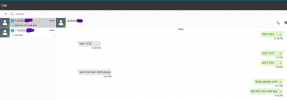
i am able to receive SMS messages just fine. However, whether I'm using the iPhone 3CX APP or the Web APP, i get the following error:

Failed to send message(s) to the provider 'voxtelesys' from '+14062721320' to '14068698931'. Exception: {"status":"Unauthorized","error":"Not Authorized"}

i've gone through the settings on both the 3CX side and the Voxtelesys side, and can't find an issue. So, I'm starting to question my sanity a little, lol!

Any thoughts or suggestions would be greatly appreciated:)
 
to note, also: I have tried sending via +1406869XXXX and 1406869XXXX and i can receive on both; just can't initiate or reply to SMS
 
Same here, after porting the numebrs from one provider to another and then updating the SMS API details to new provider issues occurred. Able to recieve SMS and reply to received SMS but not send to a new message.
 
Please ensure that the guide of the provider has been followed to the letter.

https://www.3cx.com/docs/sip-trunk/voxtelesys-usa/

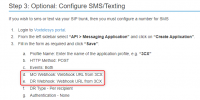
Ensure that the webhook URL has been copied to the provider in both the fields. Sometimes people do only add this to the

1727860586601.png

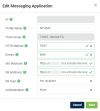
1727860831888.png

Ensure that the API key has also been created in addition to the Messaging Application and copied over to 3CX.

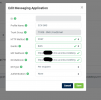
And finally, ensure that the number is SMS enabled, both in the portal and from the provider themselves.
 
1727880637521.png

yah. that was all done prior to me reporting issue. it was working prior to upgrade to version 20. i do have this question though: I have two SIP trunks on our NFR 3CX for testing purposes, could that be the issue? i'll test by disabling my other SIP trunk and report back.
 
Failed to send message(s) to the provider 'voxtelesys' from '+1406272xxxx' to '1406869xxxx'. Exception: {"status":"Unauthorized","error":"Not Authorized"}

same failure
 
You can have multiple SIP Trunks connected to the same account. This is not an issue, but it wouldnt be a best practice to have the same account on multiple systems.
 
i didn't think that was the issue either. just blindly looking for needle in haystack. When i have a little more time later this week, I will completely rebuild it on both 3CX side & Voxtelesys side. I just want to reiterate: It was working prior to v20 update. Our system is on Version 20.0 Update 3 (Build 659 Alpha). Nothing was touched in Voxtelesys Portal or 3CX before/after update.
 
Hi Nicholas,

Our issue was resolved upgrading to the latest version
Version 20.0 Update 2 (Build 715 Release)

Thanks Orhan
 
  • Like
Reactions: NicholasP_3CX
Orhan,

Other than upgrading to 715 Release, did you make any changes at all to your SMS SIP trunk on the3CX or on the Carrier? If not, i am going to try to update to 20.0.3.762.

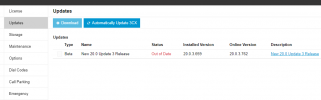
We are on Version 20.0 Update 3 (Build 659 Alpha). The updates page on our system is offering: 20.0.3.762

1727965283740.png
 
so, i've completely rebuilt my Voxtelesys SIP trunk on the 3CX. Still, I am able to receive inbound SMS. Still i cannot start an SMS or reply to SMS. The error is the same:

Warning3003010/04/2024 12:52 PMWeb ManagerFailed to send message(s) to the provider 'voxtelesys' from '+14062721320' to '+14068698931'. Exception: {"status":"Unauthorized","error":"Not Authorized"}
 
The only thing that had changed prior to it failing was firmware update:/
 
Hi @rbergthold,
Looks like I found the ticket in our system to your issue and it was resolved. With your approval, I would like to share the resolution in the thread incase anyone else has the same issue.
 
this resolved by updating IP for 3CX at VOXTELESYS. feel free to share as resolved
 
  • Like
Reactions: Kevin@voxtelesys
Thanks @rbergthold!

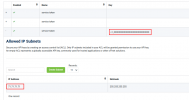
When using the Allowed IP Subnets for an API Token/Key it will restrict any outbound messages from being delivered unless they come from one of the IPs listed. If you want to set/update/remove an IP address you can click on your token to expand the subnet management as seen in the screenshot below.

1729527483716.png
On another note other things to check for if messages are not being delivered.

1. Using E164 format on the 3CX and Voxtelesys Portal (+15559991234)
2. Your numbers are associated with a 10DLC campaign
3. Check your message records on the portal, if the message reached Voxtelesys then it will show up here. if there is an error it will be listed in the error column. https://portal.voxtelesys.net/sms-search
 
Last edited:
  • Like
Reactions: Nathan@Voxtelesys

Forum statistics

Threads
112,065
Messages
590,584
Members
165,019
Latest member
rsaldin@advancedbrainspin