SMS missing on enterprises license.

Status
Not open for further replies.

Veritalx

Customer
Joined
Jul 28, 2021
Messages
6
Reaction score
1
It looks like my hosted 3CX Updated last night.
SMS and any related SMS portal is completely missing off of our management page and our end users' pages as well.
 
Hi @Veritalx,

Please note that the configuration of the SMS, since V18 Update 5, has been moved to the SIP Trunk configuration >> SMS tab. The messaging tab was still available in V18 Update 5, but the SMS should of been configured in the SIP Trunk and not the Messaging section in V18 Update 5.
In V18 Update 6 the Messaging section has been removed completely from the Management Console.

Please find our guide regarding the SMS configuration in V18 Update 6 here: https://www.3cx.com/docs/manual/sip-trunks/#h.uphdz78dxdph

Now regarding the SMS option in the extensions' configuration, this is no longer required, as the SMS option is enabled by default for all extensions.
The only prerequisite is that an SMS enabled DID is pointing to a destination that the extension is part of(Call Queue, Ring Group, Extension Group, or directly to the extension) and the extension will be able to use that DID in order to initiate SMS conversations.
 
  • Like
Reactions: Evolute IT
Thanks for the help.
The documentation provided does not have anything to do with any options we have available. To clarify, we do not have a 3CX startup instance. We have a 3CX hosted enterprise license.
The provided documentation does not help at all with the new setup of this.
 
Hi @Veritalx,

Please note that the guide provided, does not apply only for StartUP instances, but for dedicated instances as well.

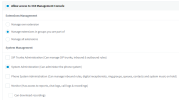
If you login to the Web Client of an extension that has enabled the option "System Administration (Can administer the phone system)" from the Rights tab in extension configuration, you do not have the Admin section on the bottom left in order to configure the SIP Trunk?

Keep in mind though, that only preferred and supported providers can be configured from the Web Client >> Admin section.
Supported Dedicated SIP trunks must be configured using the Management Console.

1675184943025.png


1675185424781.png
 
  • Like
Reactions: Evolute IT
  • Like
Reactions: Evolute IT
  • Like
Reactions: mrossbach
Hi @Veritalx,

Please note that the guide provided, does not apply only for StartUP instances, but for dedicated instances as well.

If you login to the Web Client of an extension that has enabled the option "System Administration (Can administer the phone system)" from the Rights tab in extension configuration, you do not have the Admin section on the bottom left in order to configure the SIP Trunk?

Keep in mind though, that only preferred and supported providers can be configured from the Web Client >> Admin section.
Supported Dedicated SIP trunks must be configured using the Management Console.

View attachment 33822


View attachment 33824
Apparently Despite the user having all the boxes checked they needed to be moved in to a new user group installed by the update that has identical permissions to the one that we had already created in this system. Annoying...
How are SMS'S routed now? We had our main SMS number routed to a ring group to add certain people to be able to receive support SMS. That same number is being pointed at our main Digital Rep. Do we now need a whole separate number just to control who receives texts? Our webhook and SMS is in there just as instructed and still 0 Functionality....
 

Attachments

  • 1675367278648.png
    1675367278648.png
    34.5 KB · Views: 6
  • 1675367298799.png
    1675367298799.png
    23.2 KB · Views: 6
Apparently Despite the user having all the boxes checked they needed to be moved in to a new user group installed by the update that has identical permissions to the one that we had already created in this system. Annoying...
How are SMS'S routed now? We had our main SMS number routed to a ring group to add certain people to be able to receive support SMS. That same number is being pointed at our main Digital Rep. Do we now need a whole separate number just to control who receives texts? Our webhook and SMS is in there just as instructed and still 0 Functionality....

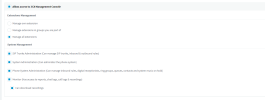
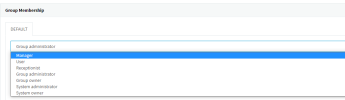
Please clarify what is the role that the extension has. (can be checked from Rights tab in extension configuration)
1675368743674.png
 
Apparently Despite the user having all the boxes checked they needed to be moved in to a new user group installed by the update that has identical permissions to the one that we had already created in this system. Annoying...
How are SMS'S routed now? We had our main SMS number routed to a ring group to add certain people to be able to receive support SMS. That same number is being pointed at our main Digital Rep. Do we now need a whole separate number just to control who receives texts? Our webhook and SMS is in there just as instructed and still 0 Functionality....
System owner.
 
System owner.

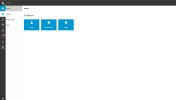
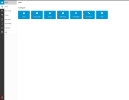
if you login to the Web Client using the System Owner extension, you are not able all the sections of the Admin section?

1675371223744.png
 
if you login to the Web Client using the System Owner extension, you are not able all the sections of the Admin section?

View attachment 33939
This has been fixed.We had to unset and reset the account to user owner.
How do I set this update up so I can have a number that rings straight to a IVR also be text able like in the previous version.
 
How do I set this update up so I can have a number that rings straight to a IVR also be text able like in the previous version.
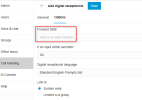
Just set up your Digital Receptionist through a WebClient and go to the options tab. You will see the "Forward SMS" option.
Use that to send your SMS to a different destination. Your calls will still be routed to the IVR.
1675850681755.png
 
Status
Not open for further replies.

Forum statistics

Threads
111,974
Messages
590,081
Members
164,899
Latest member
mazet