SMTP Settings not available

Steve4606

Free User
Joined
Apr 30, 2026
Messages
1
Reaction score
0
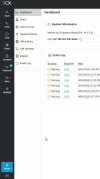
I received the email today notifying that the Basic Free edition no longer includes 3CX SMTP support. I followed the steps to make the change to a custom SMTP but can not find the SMTP settings. I attached a screenshot shwoing my options under the Admin settings. I looked under each items there and saw no SMTP options. What am I missing?
 

Attachments

  • 2026-04-30 17_39_30.jpg
    2026-04-30 17_39_30.jpg
    39.6 KB · Views: 18
You need to login with the system owner to adjust this settings. But anyway, i didnt got this email and for me its still working with 3cx smtp.
 
Since yesterday around noon, I've also been having issues with 3CX emails not sending. The log shows:
5.7.0 License key cannot use 3CX SMTP; please contact 3CX Customer Service.
However, in the settings under System -> Email, the dropdown menu is grayed out, so I can't define my own SMTP server. Do I need to update to the current version 20.07.x first to fix this?
 
3CX SMTP is not supported in the Free edition per this blog post.

need to update to the current version 20.07.x
That can only help, though u7 is not current stable. That is update 8a including the security fix. (note if you are running Debian you should enable automatic updates, at least from time to time, to install OS security updates too)
 
  • Like
Reactions: bitn2
The log shows:
5.7.0 License key cannot use 3CX SMTP; please contact 3CX Customer Service.
However, in the settings under System -> Email, the dropdown menu is grayed out, so I can't define my own SMTP server.
Same
I checked my own pbx, you will find the stuff under parameter in your pbx and can change it there.
1749634363580.png

also change the parameter MLFROMADDR
Tried that too
I made the changes and restarted the server. But it still sends through 3cx.net.
With the same result
Do I need to update to the current version 20.07.x first to fix this?
Does this actually change the ability to set SMTP and send emails?
I'm a bit hesitant to update 3cx as 3cx seam to want to remove functionality.
For reference I use
  • On premises 3cx server
  • Up to 2 simultaneous calls
  • Physical IP phones
  • Physical fax connected via ATA
  • Email of missed call voice recordings
  • I don't use soft phone, mobile phone app, messaging, video, remote phones, call transcription, call center, reporting
A grandfathered Standard Annual 4 Simultaneous Calls licence has been working well for years.
 
Email subject: 3CX | Action Required: End of 3CX SMTP Support for Basic Free (2SC/4SC)
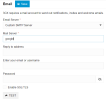
Suggest entering a "Customer SMTP Server" and links to manual page https://www.3cx.com/docs/manual/system/

1778297137249.png

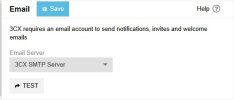
Unfortunately this option is disabled / selection is greyed out in my system.

Email SMTP server.jpg
 
Hello 3CX Support Team,

I am setting up a self-hosted 3CX system using the 3CX Debian ISO inside a virtual machine.

I created new users/extensions in the 3CX Admin Console, but the users are not receiving Welcome Emails. Password reset emails are also not being received, so I cannot log in to the new extensions to test softphones or IP phones.

When I first tested the built-in 3CX SMTP server, I received this error:

“5.7.0 License key cannot use 3CX SMTP; please contact 3CX Customer Service.”

After that, I tried using custom Gmail / Google Workspace SMTP with an app password. I also tested the same Gmail SMTP credentials separately using a Python script from the host machine, and the test email was successfully sent. From inside the Debian/3CX VM, internet connectivity, DNS resolution, and port 587 connectivity to smtp.gmail.com also appear to work.

However, 3CX still reports that outbound port 587 is not allowed or that SMTP cannot complete.

Can you please advise why the built-in 3CX SMTP is not allowed for my license, and why custom SMTP is still failing even though external SMTP tests are successful?

Also, is there any supported alternative way to manually set user passwords or provision extensions so I can test local softphones and IP phones while this email issue is being resolved?

Please let me know if there are any specific logs or details I should provide.

Regards,
XMIND