- Joined
- Nov 11, 2019
- Messages
- 2
- Reaction score
- 0
Hi all,
This is a bit urgent..... Note: I inherited this system three weeks ago. Our provider is Flowroute.
Here's the problems:
I upgraded to Linux V16, and restored it from a Windows server backup. There were a couple of issues with V15 which I hoped would resolve with the upgrade. These issues are the following:
1. No outgoing caller ID at all. This was fixed somewhat in that caller ID does now provide a number. But most callers ID recipients are receiving "Spam Risk" along with the the number.
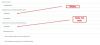
2. Ring groups and ring queues work fine when dialed internally. Externally, the first ring queue specified in the trunk rings when the external number is called. However the second will not ring no matter what the settings are here:
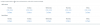
I have two ring queues:
4002 for office hours
4500 for noon-office hours.
If they are swapped the first one still works.
What has been done so far:
1. Backup from V15 Windows Server.
2, Restore to V16 Linux server.
3. Deletion and reconfiguration of sip trunk based on default template (this solved part of the caller ID problem- but people receiving calls still see "Spam Warning" with the phone number underneath.
Where do I look to resolve this?
This is a bit urgent..... Note: I inherited this system three weeks ago. Our provider is Flowroute.
Here's the problems:
I upgraded to Linux V16, and restored it from a Windows server backup. There were a couple of issues with V15 which I hoped would resolve with the upgrade. These issues are the following:
1. No outgoing caller ID at all. This was fixed somewhat in that caller ID does now provide a number. But most callers ID recipients are receiving "Spam Risk" along with the the number.
2. Ring groups and ring queues work fine when dialed internally. Externally, the first ring queue specified in the trunk rings when the external number is called. However the second will not ring no matter what the settings are here:
I have two ring queues:
4002 for office hours
4500 for noon-office hours.
If they are swapped the first one still works.
What has been done so far:
1. Backup from V15 Windows Server.
2, Restore to V16 Linux server.
3. Deletion and reconfiguration of sip trunk based on default template (this solved part of the caller ID problem- but people receiving calls still see "Spam Warning" with the phone number underneath.
Where do I look to resolve this?