Solved Specific extension cannot call other extensions

Status
Not open for further replies.

Tuyen

SMB User
Joined
Apr 26, 2021
Messages
16
Reaction score
1
Hello,
I am facing an issue with a specific extension
I cannot delete and recreate this extension (10) to reset. So I have to find the problem and fix it. I can receive calls on this extension, but I cannot call any other extension.
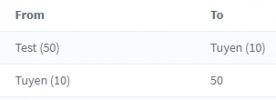
As you can see in the call log, when 50 calls 10, we can see Test -> Tuyen (I can receive calls)
But when 10 calls 50, I don't see Tuyen -> Test

Any suggestion ?
  • 3CX Version, Standard Annual 16.0.9
  • Server OS, Raspberry Pi
  • Is the 3CX Server Hosted and where? Self-hosted
  • IP Phone Make/Model/Firmware : Gigaset A510IP
  • Provisioning Method: Local / VPN / STUN / SBC : SIP (UDP: 5060)
  • Trunk Provider or Gateway Make/Model : N/A ?
  • Has the Firewall Checker passed: NO (testing port 5060... Mapping does not match 5060. Mapping is 1030.). I configured NAT 5060 for both TCP and UDP, still failed.
  • Are custom Phone Templates being used: NO

call logs.png
 
Couple of things

Can extension 10 call other extensions ?

Make outgoing calls ?

Not knowing the phone, has extension 50 blocked calls from extension 10. Does the phone have a web gui that you can check.

With 3CX management , under extension 50 Forwarding Rules is anything in Exceptions ?

1629369859863.png

You also need to resolve the firewall issue - what model of fire do you have ? Have you disabled ALG ?
 
extension 10 cannot call any other extension
But any other extension can call every extensions
I was using 3cx mobile app (iOS) as client for both extensions 10 and 50
Extension 10 cannot call out but Extension 50 can.

Both have no exceptions under Forwarding Rules
Not knowing the phone, has extension 10 blocked calls from extension 50. Does the phone have a web gui that you can check.
I don't understand. Shouldn't I check if ext 50 blocks calls from ext 10 ? The web GUI you are referring is http://.../webclient ?
 
Can you see extension 10 under Phones ?

On 3CX IOS application , in the top right does it say 'Ready for Call's

Is extension 10 , connected on the same network as the 3CX server via WIFI or LTE connection

Run the echo test by dialling *777, can you heard what you are saying back. - https://www.3cx.com/blog/docs/echo-test/

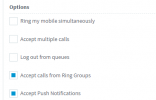
Under Forwarding Rules , check options to see if 'Accept Push Notifications' is enabled.

1629370652483.png
 
Can you see extension 10 under Phones ?
Yes I can

On 3CX IOS application , in the top right does it say 'Ready for Call's
Yes it does

Run the echo test by dialling *777, can you heard what you are saying back. - https://www.3cx.com/blog/docs/echo-test/
It doesn't work with ext 10. When I try to call echo, another ext or call out, it beeps 3x (not the ringing tone, but more like error tone) and it says "Not found' in the top right corner.

Under Forwarding Rules , check options to see if 'Accept Push Notifications' is enabled.
It is enabled
 
I would delete the 3CX account configuration and rescan the QR code or import the 3CX configuration file.

To delete the account info, top left click on the three bars - account - select the account , slide to left and select delete
 
I would delete the 3CX account configuration and rescan the QR code or import the 3CX configuration file.

To delete the account info, top left click on the three bars - account - select the account , slide to left and select delete
I tried to delete and add the extension many times, it doesn't help. I have just tried again, still cannot call *777
 
It the phone connected on the same network as the 3CX server or on LTE network ?

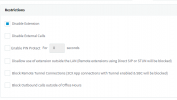
Is the extension disabled or 3CX tunnel block - Under Options

Both 'Disabled Extension' and 'Block Remote Tunnel Connections (3CX App connections with Tunnel enabled & SBC will be blocked)' should be unticked

1629372556390.png
 
Thanks for trying to help me @Saqqara
Nothing is ticked under restrictions.
Both phones are connected the same LAN. I have only one 3cx server
 
Check the IP blacklist on the first screen of the management console
 
The backlist is empty
 
The only other thing I can think of is if you have created a SIP Trunk and added very short DIDs like "*10" that could mess things up like this.
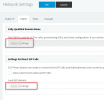
Also, check in Settings --> Network --> FQDN and check that your 3CX FQDN is in the "Local SIP Domain":
1629376889754.png

If all this is OK, then you need to enable Verbose logging, restart your services, then make another call from Ext 10 and check the Activity Log to see if that gives any clues what the problem is.

Tip: you can use the "Filter" option, then by the "Search by call" drop-down, select the largest number that corresponds to the last call made. Logs are read bottom to top.
 
Hi @NickD_3CX,
This look like a possible root cause. I have my own FQDN that I use for direct calls. Since this parameter is in the 3CX Networking setting, a wrong configuration should affect everyone right ?

Each extension is using my personal FQDN in the extension network settings.
 
It should be the FQDN that you have installed your 3CX with, so even if it isn't a 3CX FQDN specifically, it should be OK, as long as it is the FQDN you installed with.

This must also match the FQDN that is set in the device and uses to make a request.
Also in the case of the IOS, in the Extension Settings --> Phone Provisioning tab, make sure you have the right FQDN in the drop-down selected.

If none of these things help, then Verbose and the Activity Log would be the next step.
At this point you might also want to consider contacting a 3CX Partner to help you.
 
  • Like
Reactions: NickD_3CX
I enabled the verbose mode. Here is what I notice:
When 50 calls 10, the SIP server is identified by the ip address

But when 10 calls 50, 10 is identified by my personal FQDN and 50 is identified by 3CX FQDN.
08/20/2021 1:22:10 PM - [CM503010]: Call(C:1): Making route(s) from Extn:10 to <sip:50@<3CX FQDN>:0/UDP>
Any idea ?

I would prefer to use my personal FQDN rather than IP or 3CX FQDN.
Please also note that I don't have a local DNS server here, to my FQDN and the 3CX FQDN should return my WAN IP address. So once the packet reached the router, compare the dest address and re-route the packet to the NAT.

Please also note that my FQDN A entry goes to another IP address, I have configured a SRV entry "_sip._udp" to sip.<FQDN> and sip.<FQDN> is a cname to <3cx FQDN>.
Should I use sip.<FQDN> instead ?
 
On 3CX server side:
Changing the network to the IP or 3CX FQDN allows me to call.
I have another extension set to my personal FQDN, it still can make calls.

On DNS server side:
_sip._udp.<3CX FQDN> leads to my IP address
_sip._udp.<Personal FQDN> also leads to my IP address
 
Changing the network to the IP or 3CX FQDN allows me to call.
So with change it works now right? Ext 10 to Ext 50?
 
Excellent!

It makes then now that I understand what you did that it failed.

Setting the thread as "Solved".
 
Status
Not open for further replies.

Forum statistics

Threads
111,974
Messages
590,081
Members
164,899
Latest member
mazet