Solved Specific hours for extension do not automatically change its status

Status
Not open for further replies.

George Ts

Free User
Advanced Certified
Joined
Jul 3, 2017
Messages
184
Reaction score
12
Hi,
I am setting up an extension that has different office hours from the pbx (08:00 - 15:00 instead of 09:00-17:00).
However, I noticed that from 15:00 and on, when I go in 3cx management console, click on the extension and select 'Status", it still appears as "Available".
I would expect that it is set to DND when out of office hours.
What could I be missing?

In fact, I would expect the same for all extensions when the global PBX office hours are over, but they still appear as registered under Extensions - - > Status.

Thank you in advance.
 
When did you make the changes to the extension, sometimes the changes will not take affect until the next day when 3CX process the change.

Make sure your system is using default office hrs, dial *64 on a handset.

If you set the office hours on the incoming trunk, it does not change the status off the extension as routing of the calls is done at trunk level
 
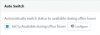
You will need to enable the option under the Forwarding Rules (Available) to "Auto Switch"

1596027679488.png

Then configure the specific Office Hours for the extension.

You can also edit multiple extensions and enable this option for all your extensions.

Just note that the timing is based on the Server's clock time and NOT the timezone of the extension, if you have defined a different timezone for the extension.
 
When did you make the changes to the extension, sometimes the changes will not take affect until the next day when 3CX process the change.

This is not entirely true. All it needs is the next trigger time. If he did the configuration at 14:30 it will switch over at 15:00.
 
Thank you for your responses. I set specific time for an extension to 08:00-15:00 and I set it today at 15.30, so i guess this will take effect starting from tomorrow. What if I restart all the PBX's services? Will the specific office hours take effect immediately or will I still need to wait until tomorrow?
 
Restarting your System Server service should be enough to trigger this.
 
In fact I would like to reproduce the following scenario:
1. Incoming call from a trunk
2. Call goes to Digital Receptionist. DTMF 3 triggers the call to go to the the Queue of the Accounting department
3. That department is there from 08.00-15.00, while the whole office is there from 09:00-17:00.
4. Now, we cannot define office hours for a queue. So, i thought of creating a "virtual" extension that has office hours from 08:00-15:00 and somehow routes the calls to the queue, depending on this virtual extension's status. More specifically, if the extension is available, calls go after 1 second to the Accounting call queue, if the extension is DND (out of office hours) calls go to the Queue's voicemail.
As simple as it may sound, this does not work.
First, we need a way to keep that extension appear as registered even if it does not exactly live on a 3cx client. One way I have found to do that, is by selecting "Ring My Mobile simultaneously". I have set its own number as the mobile and indeed, it appears as registered.
Second problem is that for some reason, it will just not go to DND when its office hours are over, even upon a 3cx server restart. Not sure if this might be related with the "Ring mobile simultaneously" setting.

Any comment is more than welcome.
 
Actually I will open a new thread for my question above.
My next pending question is why all the extensions will not change their Status when office hours (Global office hours under Settings-->Timezone,Office Hours,Holidays) are over.
Shouldn't they automatically switch to DND?
 
They should change automatically if they have the option to auto switch enabled.
 
Indeed, I had missed that very simple setting. Thank you for your support!
 
  • Like
Reactions: NicholasP_3CX
Status
Not open for further replies.

Forum statistics

Threads
111,955
Messages
589,926
Members
164,855
Latest member
parik24pro