Solved Speed dial using outbound rule issue

Status
Not open for further replies.

jim_f

Bronze Partner
Basic Certified
Joined
Jun 7, 2018
Messages
9
Reaction score
0
Hi All,

I have setup some speed dials on our personal system which worked no problem using: https://www.3cx.com/blog/voip-howto/speed-dials-using-3cx-outbound-rules/

Ive then tried todo the same on a customers system but it just says "Call failed, not found" when dialing the prefix even though they are setup exactly the same.

Does anyone know why this might be? Hopefully ive just missed something.

Any help appreciated.

Thanks,
 
Hello @jim_f

Can you please give us an example of the Outbound rule settings that are not working?
 
Hi YiannisH_3CX,

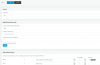
Sure, here are 2 screen shots. The rule named "test" is on our system and works.

upload_2018-6-7_12-47-52.png

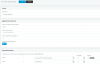
The rule named "Christian Speed Dial" is on the customers 3cx which doesnt work.
upload_2018-6-7_12-52-6.png

Thanks,

Jim
 
I am assuming that there are no extensions that match the prefix used that could cause a conflict. Check the activity log of the PBX and see if you can determine where the error is coming from. On the system that does not work can you call the number that is prepended without using the speed dial?
 
No, There are no other exstensions using 8010

It is logging the error: "
SIP Server/Call Manager ID: 12294
Call or Registration to 8010@(Ln.10000@Gamma (3CX SIP Port 5060 required)) has failed. 88.215.**.*** replied: 404 Not Found; from IP:88.215.**.***:5060"

When I call the number manually it works.
 
Is this the only outbound rule in the list? If not can you move the outbound rule to the top of the list and try again?
 
I moved all the speed dials to the top which has worked!!

Thanks very much for your help!
 
Glad to see the issue has been resolved
 
Status
Not open for further replies.

Latest Posts

Forum statistics

Threads
111,885
Messages
589,547
Members
164,745
Latest member
Herm77