Speed Dials

ThinkSmart

Bronze Partner
Joined
Jul 27, 2022
Messages
8
Reaction score
2
Hi Team, we have some clients who use three digit speed dials to ring contacts etc. In some cases there are over 100 speed dials setup. These are setup as extension numbers with also ring my mobile configuration, no phones attached to any of these extensions. With the new limits on extension numbers I can see this as being a problem. What is the alternative setup to keep these three digit speed dials, especially considering there are over 100 speed dials? I though about the company phonebook but this does not allow them to hit 500 to ring someone. Thoughts?
 
You can try using SIP ID. But i didt know it will work.
 
Hello ThinkSmart,

You could use the outbound rules, where you setup the short number.
The outbound rule will need to strip all dialed digits and replace them with the full number.

Paulo
 
Hello ThinkSmart,

You could use the outbound rules, where you setup the short number.
The outbound rule will need to strip all dialed digits and replace them with the full number.

Paulo
Now I understand the post. SIP ID isn't the right approach here. But with so many speed dials, I'm not sure you can set them via outbound rules (more than 100).

I'm still not entirely clear why so many speed dials. Aren't BLF keys an option?
 
Hello,

As this is used for dialing out, I do think this is the correct place to add the 'speeddials'.
There is no problem to use 100+ outbound rules.
To be sure, I did just add the 500...599 numbers on our system as outbound dial rule (with dummy numbers) with no problem.

Paulo
 
  • Like
Reactions: bitn2
Hello,

As this is used for dialing out, I do thing this is the correct place to add the 'speeddials'.
There is no problem to use 100+ outbound rules.
To be sure, I did just add the 500...599 numbers on our system as outbound dial rule (with dummy numbers) with no problem.

Paulo
Good to know!
 
  • Like
Reactions: paulodagraca
There are certainly situations where using a computer to invoke a speed-dial is infeasible. For example, a warehouse phone might be attached to a pilar with no computer in the area. But if a computer is available, you could use a CRM integration to search for a contact and use the browser plugin to make phone numbers clickable. However, defining this as a "speed-dial" implies that searching in a CRM for a contact introduces too much friction.

Still, in my mind, while technically possible, expecting a user to remember 100 different speed-dials seems .... unrealistic. You are doing it now, so I guess it works for your customer, but it seems infeasible to my little brain.

As a compromise to a full-blown CRM integration, perhaps a tiny little PWA application that can be placed on the corner of the screen, or minimized to your taskbar would work? The advantage of using a tiny application is that you can quickly search for a speed-dial by name or number and use the display as confirmation that your memory matches the actual speed dial number. Pressing Enter would initiate the call.
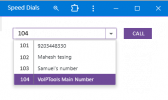
1776184214807.png
Yes, it would require access to a computer, and that might be a show-stopper. However, I will point out that maintaining the speed-dial list becomes trivial and would not require access to the 3CX console outbound rules. Users could manage the list without depending on the 3CX Admin. You could even pre-filter the list of speed-dials by department or user.

We have a commercial tool (3CX Caller ID) that has a UI that is remarkably similar to your needs and could be used as a template for a custom solution. We provide the ability to manage the list, assign number to departments and users. It would be trivial to repurpose our code to match your needs if this approach would work. Just a thought.
 
Last edited:
Thanks everyone, I will try using the outbound rules.

Every desk has a laminated A4 sheet with all of the speed dial numbers listed. Used in Doctor Surgeries mainly to call pathology, specialists etc. Doctors can then easily refer to the A4 sheet for speed dial numbers which are listed in specific order based on services etc.
 
I just tested the outbound rules and it works well.

Is there anyway to easily import these as I have 146 speed dials to setup. Searched the forum, it does not seem promising.
 
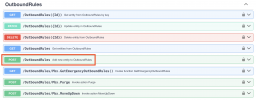
You could build an XAPI tool to do this:

1776229944424.png
 
Alternative to Outbound Rules that might be better suited if the numbers change often (but more initial work) would be some CFD that is reachable via a single digit (or normal extension number, this would be the same for everyone and could be a normal speed dial key on a phone) and then uses the remaining digits to make the external call - this can have the benefit of picking up the external number from a files/DB for easier management long term.
 
  • Like
Reactions: VoIPTools
Administratively, passing around an updated sheet should be fairly inexpensive, and not a huge amount of work. Not a bad idea.

I suppose it depends on how many people need the sheet and how frequently the list changes. It does mean 100+ outbound rules to manage, but it is not uncommon to manage 100+ DID, and 100+ users so that's not horrible.

I can visualize hanging the sheet on the wall of an exam room next to the phone which is easier than interacting with a computer, if there is one in the room. All pluses.

But, it does require a 3CX admin to be involved, and changes will not likely happen quickly, so "easy" depends on the perspective of the people enlisted into the process, and the urgency to get updates distributed.

Programmers frequently see every task needing a hammer, and old-school does not mean it is a bad or wrong approach. I am reminded of that fact regularly.
 
FWIW we have a client using the company phonebook like this (name "233 - John Smith"). The down side is someone (new?) recently complained they couldn't dial out and yes they were dialing 233 not the person's cell phone (via the visible "call" button on the contact).
 

Forum statistics

Threads
112,283
Messages
591,698
Members
165,406
Latest member
ARKC