- Joined
- Feb 6, 2020
- Messages
- 132
- Reaction score
- 8
Hi all,
I am using a custom FQDN with a GoDaddy SSL certificate by following the guide on 3CX. Unfortunately, I always need to disable 'Enable Trusted Certificates' on the Yealinks phone for the phone to auto-provision. I have spoken to Yealink and this is what they have said:
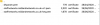
Please can someone assist, as in the directory where the CRTs are stored there is a CRT and Key file as well as the auto generated dhparam.pem:
I am using a custom FQDN with a GoDaddy SSL certificate by following the guide on 3CX. Unfortunately, I always need to disable 'Enable Trusted Certificates' on the Yealinks phone for the phone to auto-provision. I have spoken to Yealink and this is what they have said:
- I have checked the PCAP file, and I notice that the server only push 1 certification file to the IP PHONE, so it cause the issue.
Please kindly check from server side and the server should send full certification chain. Kindly let me know if any doubt.

Please can someone assist, as in the directory where the CRTs are stored there is a CRT and Key file as well as the auto generated dhparam.pem: