- Joined
- May 8, 2016
- Messages
- 12
- Reaction score
- 3
With the new and latest 3CX Windows Client version 16.3.0.264, we have a SSL error when we click on the button Start a 3CX Videoconference Now. This happens inside our corporate network or at home connected with a VPN. On the outside internet, no problem, the button uses our DNS.
The 3CX Windows Client opens a Chrome or an Edge browser to the private IP of our PBX in HTTPS port 5001. So the browser shows an error about the SSL certificate. Of course, our SSL certificate is bound with our FQDN.
We have a split DNS design. So the button Start a 3CX Videoconference could just use the same DNS.
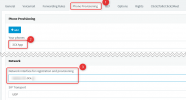
I tried to manually change the Network interface for registration and provisioning in the PBX without success.
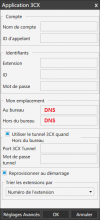
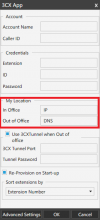
I tried to manually change the My location / In Office setting in the 3CX Windows Client Account setting without success.
Let me know what I can do, if there is another setting or if my users are the only ones to complain about SSL Certificate alerts in the web browsers.
Thank you

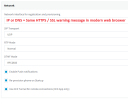
The 3CX Windows Client opens a Chrome or an Edge browser to the private IP of our PBX in HTTPS port 5001. So the browser shows an error about the SSL certificate. Of course, our SSL certificate is bound with our FQDN.
We have a split DNS design. So the button Start a 3CX Videoconference could just use the same DNS.
I tried to manually change the Network interface for registration and provisioning in the PBX without success.
I tried to manually change the My location / In Office setting in the 3CX Windows Client Account setting without success.
Let me know what I can do, if there is another setting or if my users are the only ones to complain about SSL Certificate alerts in the web browsers.
Thank you