Status settings: Option to "just ring" for internal calls while forwarding external calls?

Fabi_WVO

Joined
Apr 19, 2026
Messages
4
Reaction score
0
Hello Community ‍♂️,

I'm struggling with the status forwarding rules. I want to achieve the following:

  • External calls: Forwarded to a colleague or Voicemail.
  • Internal calls: No forwarding at all – the phone should just ring normally.
Currently, the management console/app seems to force a destination for internal calls as well. There is no "Do nothing / Ring" option for internal calls if external calls are being forwarded.

Is there still no way to differentiate this without using complex "Exceptions"? It feels like a basic requirement to stay available for the team while being "busy" for the outside world.

Best regards,Fabi
 
The statuses are for "unanswered" calls meaning the call was already ringing. If the call is not answered the first time, it should go somewhere. The exceptions are how to handle this. Or maybe Boss-Secretary depending on what you're trying to do.
 
  • Like
Reactions: Evolute IT
Thanks for the reply.

I think there is a misunderstanding regarding my goal. I don't want to define where a call goes after it wasn't answered. I want to define if it should ring at all.

My goal is:

  • External Calls: Should be blocked/forwarded immediately (Status: DND).
  • Internal Calls: Should ring my phone normally as if I were "Available".

Why is there no option in the forwarding rules to simply say "Accept/Ring" for internal calls while the status is set to DND or Away for external ones?
 
Within Forwarding, you can use the Exceptions - with a wildcard (*) after how external calls are presented to you, you can send those calls only to a specific destination when the conditions matched there are met, without affecting internal calls that would not match the exception definition.
 
  • Like
Reactions: Evolute IT
Thank you for the tip with the wildcard exception. However, this doesn't solve my problem for two reasons:

  1. No Profile Link: Exceptions are global and cannot be linked to a specific status profile. I cannot toggle this behavior by simply switching from "Available" to "DND" via my desk phone or the app.
  2. Lack of Manual Control: My daily routine requires flexibility. For example: If I'm talking to a customer shortly before closing time and tell them, "You can still reach me for the next 10 minutes even after hours," I have no way to quickly disable that exception rule.
If I use a wildcard exception, it’s "always on" or I have to manually delete/edit it in the settings every time, which is not feasible during a busy day.

This is why a simple "Internal calls: Ring / External calls: Forward" option within the status profiles would be so much more powerful than static exceptions. Are there any plans to make status handling more granular in V20?
 
Hi,

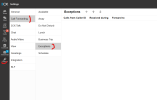
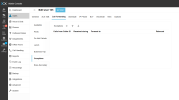
Forwarding Exceptions are available to configure per user, and the user may even manage them themselves: Settings->Call Forwarding Exceptions.
User's direct control:
1776666796848.png

Admin control:
1776666834562.png
 
I understand that users can manage exceptions in the settings. But my point is about Usability and Workflow.

In a real-world office scenario, users want to control their reachability via their Desk Phone (BLF keys) or the quick status toggle in the app.

  • The Problem: You cannot toggle an "Exception" via a DND button or a status switch.
  • The Workflow: If a user needs to stay available for colleagues but block external calls (e.g., during a focused hour), they want to press one button. They don't want to log into the web client, navigate to Settings -> Call Forwarding -> Exceptions, and manually enable/disable a wildcard rule.
By integrating this "Internal: Ring / External: Forward" option directly into the Status Profiles, we could control this sophisticated routing with a single click (Status Change).

Relying on Exceptions for this makes the system feel rigid and forces users to use the software for things that should be solvable via a simple status change on their hardware.
 
The closest to that is utilising the Boss-Secretary mode, that has a quick toggle in the app UIs (not BLF).
 

Latest Posts

Forum statistics

Threads
112,281
Messages
591,677
Members
165,402
Latest member
noufir