Strange bug exporting and importing ip blacklist JSON: entries missing

Status
Not open for further replies.

jsa

Forum User
Joined
Jul 2, 2021
Messages
22
Reaction score
2
Hello all!

I'm facing a strange bug using the ability to export / import IP blacklist on my 3CX System: when reimporting, some entries are not being imported.

The missing entries exists in the exported JSON
PBX Version: 18.0 (Build 965)

My steps to reproduce:
export IP blacklist as JSON and validate the content contain all entries: here are the 4 last entries:
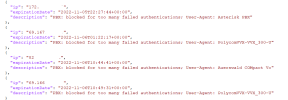

1659093261084.png

Delete all entries in IP blacklist

Import the just exported JSON list - control that all entries are well imported: Some entries missing: here the 172.X is missing.

1659093397828.png
Fun fact: it's alway the same IP's not being imported

Am i missing something?

Regards

JS
 
Last edited:
Hi, during import the contents of the file are normalized so that:
1) invalid entries
2) expired entries
3) duplicate entries
are removed.

So it could be #3 most likely.
 
Hi, during import the contents of the file are normalized so that:
1) invalid entries
2) expired entries
3) duplicate entries
are removed.

So it could be #3 most likely.
I did thinked about that but forgot to add in my post sorry.
I did checked if this IP already exist and this is not the case: this IP isn't listed at all once reimported.

Anyway, if the content is normalized, the export would only list it once no?

1659098982249.png
 
Normalization happens during import, not export
 
Normalization happens during import, not export
The IP is not listed twice in the exported JSON so it's not the case i guess
 
Normalization happens during import, not export
Did more tests: If i import the exact same file on different system i get a differnt number of ip blacklisted. How is this possible?
1660737949904.png1660737932627.png1660737914586.png

Regards
 
Please i am having a situation here 1671229832500.png
 
Please i am having a situation here View attachment 33230
Unban ip as administrator
Ensure you're connecting to the right portal /webclient or not
add a whitelisted IP range if needed
Anyway this is not quiet related to this thread.
 
Unban ip as administrator
Ensure you're connecting to the right portal /webclient or not
add a whitelisted IP range if needed
Anyway this is not quiet related to this thread.
Please i need assistance. i dont understand all you said.
What should i do now. Please
 
Please i need assistance. i dont understand all you said.
What should i do now. Please
I'd suggest you to start by reading the documentation and look for a certification but:
- connect as an administrator, not using the webclient portal
- find and click blacklisted IPs
- Find yours
- delete it
- Connect
EDIT: if you cant connect as administrator because of banned IP, change your IP address and follow steps above
 
Status
Not open for further replies.

Forum statistics

Threads
111,970
Messages
590,058
Members
164,885
Latest member
webcom2000