Student needing help with VoIP PBX Project

Status
Not open for further replies.

teejay1719

Joined
Apr 3, 2014
Messages
10
Reaction score
0
hey guys im doing my last year of my Networking degree adn have decided to do my project on VoIP PBX systems.
I have decided on a simple topology as follows in the attachment. I have installed 3CX phone system and have configured it with the windows management console, i have PC 0 (vlan 10) and PC 1 (vlan 20) connected and have each softphone talking to each other using the PBX server (3cx) which is fine and good :D
BUT what i need or would like to know is if it is possible to install a second PBX on a virtual drive or second PC that will act as a backup PBX in case the first goes down to offer redundancy. It should be able to backup the phone numbers stored and the users (softphones) should not see more than one PBX ever. Is this possible and since its a project i cant spend any money on it :S please help guys!!! Seriously stuck as i have never done VoIP before this project xD

Any and all help will be greatly appreciated!
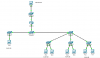
 

Attachments

  • Untitled (2).png
    Untitled (2).png
    25.9 KB · Views: 1,402
A little old... and at that point was not tested extensively...
https://www.3cx.com/blog/voip-howto/3cx-high-availability-system-active-active/


Just out of curiosity - why are your 2 computers on separate VLANS? Is this just to show communication setup between 2 VLANS?
 
hey man thank you for the fast reply! They are on seperate vlans to simulate two seperate companies that are in different parts on a city. The HQ and then the Branch. The different vlans on the branch side are to show different floors/departments of the branch building. I will go and have a look at the link now :D

*it says the both 3CX phone systems need to be licensed? would that involve any extra costs? As at the moment im using the free 3CX software?
 
the free might work for the demo... for a large company the free version would not allow enough simultaneous calls so they buy a license to allow more simultaneous calls. The article is just pointing out that both systems need to have separate licenses applied - they cannot be shared between the two.
 
Ahh ok i think i understand xD thank you again man, ill get to reading up on it :)
 
Hey sorry again Craig, would you mind helping me again. Im kind of confused on the step 2 part? Do i just get another pc and just connect the devices to it? Im confused as to the domain and password part too :S sorry for pestering!
 
I have never actually done this... If you are not on a domain you need to create a username and password that are the same on both so they can share files properly...

It could be a separate computer and probably should as you are using this to host the files that are being shared. You could use one of the phone appliances but could be issue if one fails...
 
sweet man i get you! and thanks again for helping! The page you linked me should help a lot man :)
 
Craig you might know by chance...
The current 3cxPhone application i don't think it is capable of doing a fail-over the way the steps describes. We had looked at doing something similar in a production setup. YeaLink phones allow you to specify a fail-over server IP which works with the steps since you can target the second 3CX setup. But the 3CXphone software application does not have any kind of function for a secondary server. So outside of having 2 profiles do you have any ideas how to accomplish this? Depending on the hardware phones though you could at least with the Yealinks?
 
Not having even tested this I am not confident about my answer - but I am guessing it would not be an easy process...
Perhaps a local DNS entry for a server name with a low TTL? Program the windows soft phone with a name instead of an ip...
But could the DNS entry be changed via script?

Or if everyone is in LAN with server - to use the external registrar as the backup. Once the primary is no longer findable maybe it will try to find the external connection (like the mobile app does)...

Just a couple of thoughts.
 
I think even if you could get the DNS to change with a low TTL you would also have to look at the registration time on the softphone as well. "This was also the case on Yealink" default being 120 seconds. So 120 seconds would have to pass before the softphone tried to re-register and then picked up the new address. In YeaLinks case it goes to re-register it tries the original IP if not available goes to the fail-over IP. Then 120 seconds later tries the original again. Once the original becomes available it connects back to that.
 
hahaha dont really know what you guys are talking about now :P But i saw this page http://www.3cx.com/phone-system/cloud-pbx-server/ - UPDATED LINK and was wondering if i could use the 3cx cloud server and maybe that could work? has anyone use this and would it work on the free 3cx phone system PBX? I just need to backup two instances of the PBX and then to have one as a slave and one as a master for redundancy? :(
 
Status
Not open for further replies.

Members Online Now

Forum statistics

Threads
111,834
Messages
589,287
Members
164,663
Latest member
svdDGS