Super admin password reset gone wrong - Unable to log into 3CX

gregoryeid

Bronze Partner
Joined
Sep 17, 2025
Messages
10
Reaction score
5
Hi,
I was logged into 3CX as super admin. I clicked on "Reset Password" then my session closed. I waited for the password reset email but it did not come. I clicked again on "Forgot password" but I am not receiving the emails. How do I regain access to 3CX
 
Hello gregoryeid,

I would guess that you mean that you lost access to the System Owner?
No other account of this level?

Paulo
 
Thanks for your reply.
No other account of this level unfortunately :(

I wanted to share a related issue I discovered while troubleshooting.

3CX sends email notifications through SMTP2GO, and I found that my email address was on their suppression list due to a previous hard bounce. The bounce error was:
550 5.1.1 The email account that you tried to reach does not exist.

We use Google Workspace and I am able to receive emails from other senders. My email is valid and working fine.

I’ve since gone into SMTP2GO > Reports > Suppressions and removed my address from the suppression list. However, even after doing so and verifying that my email account is active and working (it receives emails from other sources), I’m still not receiving the 3CX password reset email.

Just putting this out there in case anyone has experienced something similar or has suggestions on how to proceed. Is there any caching or rate-limiting in 3CX that might delay retries? Or does 3CX require any manual intervention to re-trigger email delivery after a bounce suppression is cleared?

Appreciate any insight!
 
Last edited by a moderator:
@gregoryeid
Is it a Debian 3CX and you do have shell access to the 3CX system (self hosted or on premise and you have root access)?
 
  • Like
Reactions: paulodagraca
@gregoryeid
Is it a Debian 3CX and you do have shell access to the 3CX (self hosted or on premise and you have root access)?
Yes I do have root level access to the 3CX on-prem server
 
  • Like
Reactions: gregoryeid
  • Like
Reactions: fxbastler
rate-limiting in 3CX that might delay retries
3CX's service won't attempt again for 7 days. You can open a ticket with them if it's not your NFR license. It sounds like you worked with SMTP2Go so I don't know how/if that impacts the 7 day window.
 
  • Like
Reactions: gregoryeid
3CX's service won't attempt again for 7 days. You can open a ticket with them if it's not your NFR license. It sounds like you worked with SMTP2Go so I don't know how/if that impacts the 7 day window.
This 7-day wait: Is it a setting that I can change in 3CX?
 
No. Based on other forum posts I understand 3CX support can remove the block.
 
  • Like
Reactions: gregoryeid
It worked! you are a genius :)
It appears that 3CX has a rate limit and will not send email notifications to my email address for 7 days. So how do I change my password? The only option that I see is "Reset Password", which will trigger a password reset email, which I will not receive AND I will be locked out again. Is there another way to reset my password?
 
  • Like
Reactions: fxbastler
Hello gregoryeid,

Log story short...
-Login and change the e-mail adres of your account, to anything else.
-Use the test send email function, to see if it works with the new e-mail adres.
-Now do a password reset, this should work fine.
-Once the password has been reset, log back in, and set the e-mail adres back... done
Just do not forget it or reset it again within 7 days :)

Paulo
 
  • Like
Reactions: gregoryeid
Is there another way to reset my password?
That is also mentioned in the linked post - how you can change your password at any time yourself. You should definitely do that.

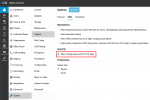
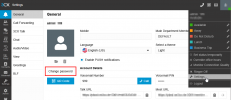
You don’t have to go through the email function. You can unlock the option to change your own password and use it afterwards.
 
Hello gregoryeid,

Log story short...
-Login and change the e-mail adres of your account, to anything else.
-Use the test send email function, to see if it works with the new e-mail adres.
-Now do a password reset, this should work fine.
-Once the password has been reset, log back in, and set the e-mail adres back... done
Just do not forget it or reset it again within 7 days :)

Paulo
This worked! thank you
 
  • Like
Reactions: fxbastler
That is also mentioned in the linked post - how you can change your password at any time yourself. You should definitely do that.
1758130559347.png

1758130679814.png
 

Members Online Now

Forum statistics

Threads
111,831
Messages
589,277
Members
164,660
Latest member
RJenkinsROCK