Superuser without full admin access

Status
Not open for further replies.

NJohnson

Premier Customer
Joined
Jan 30, 2021
Messages
28
Reaction score
13
Our company is looking to hire an I.T. helpdesk operator to help out with super basic tier one stuff. Can you setup an user in the 3CX console to be able to unblock IPs, change names or passwords and such without giving them explicit full admin rights? I've searched around the forums and web searches, but came up empty. If this has been previously asked, I apologize but would greatly appreciate it if someone could point me in the right direction.

Thanks,
Nate
 
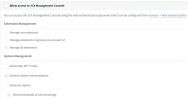
For the time being the only available options are the below:
1619528797522.png


To be able to both change passwords and delete Blacklisted IP entries means you will have to provide "Manage all extension" and "General System Administration" rights. That said, the user these rights have been granted to will be able to administer most components of the 3CX PBX. In v18 you will have the option to also either provide "System Administration" rights or "Phone System Administration" rights or both. "System Administration" rights will allow administration of security settings, Network Settings, Backup settings, etc whereas "Phone System Administration" will allow administration of PBX components such as Ring Groups, Call Queues, Inbound Rules, etc.
 
V18 sounds like it will be what we need as the blacklisting doesn't happen very often. Primarily resetting of voicemail PIN and web client password is the bulk of what we would need. Thanks for the info!
 
  • Like
Reactions: ChrisC_3CX
If that's the case, providing the "Manage All Extensions" right only should suffice.
 
Status
Not open for further replies.