System Owner to access Reports

Status
Not open for further replies.

healthy

Silver Partner
Basic Certified
Joined
Oct 26, 2012
Messages
148
Reaction score
13
I have a user who wants to have daily reports sent to them and to be able to access the data from reports. I was unable to give them access until I set their role to System Owner. What's the lowest permission level we can use to gain access to reports and scheduling automated report emailing?
Thanks
 
Hi @healthy

To have access to the reports and also schedule reports you need to provide access to the Management Console and access to the Reports to the extension.

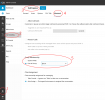
To do so navigate from the Management Console >> Users >> Select user >> go to Rights tab >> navigate to the bottom of the page and enable "Allow access to 3CX Management Console" and "Monitor (Has access to reports, chat logs, call logs & recordings)"

The extension which has access to the Management Console and Reports does not need any Group Membership role as long as you provide access to the Management Console and Reports as shown below.

2023-05-16_20h27_43.png
 
Thank you so much, I will give this a try. I had to get my access returned after the user took me out of all groups!
Appreciate the quick help!
 
We are glad to be of assistance!
 
Hi All,

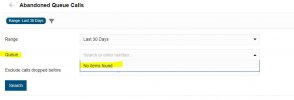
I have given a user "Group Owner" right. This give them access to reports on the Web portal. None of the Queue reports work. It will only work when I give them System Owner rights. But if they jump onto the managment portal all reports work fine. Is this by design or a system issue?
 

Attachments

  • Capture.JPG
    Capture.JPG
    30 KB · Views: 28
The queues have to be part of the group for the group owner to have access.
 
  • Like
Reactions: Alejandro_3CX
Thanks for the speedy response, Nick.
 
The queues have to be part of the group for the group owner to have access.
Hi Nick, probably I'm missing a little step here, but how to add a queue to a group?
 
Hi Nick, probably I'm missing a little step here, but how to add a queue to a group?
Hey there, from the admin panel you can do that 1695796021176.png
 
  • Like
Reactions: N_G
Hi Nick, probably I'm missing a little step here, but how to add a queue to a group?
You have to create the Queue from the web portal. In Advanced you will have the option to add the queue to the Group. If you create the Queue in the management console, you will not be able to add the queue to the Group.

I just worked that out now, so I may be wrong :)
 
You have to create the Queue from the web portal. In Advanced you will have the option to add the queue to the Group. If you create the Queue in the management console, you will not be able to add the queue to the Group.

I just worked that out now, so I may be wrong :)
Actually I have found this out as well.
That can only be a bug to be honest as I can't believe this is by design.
All our queues, and we are running 5 call centre sites are setup via management console and now I can't change them for reporting? We roughly have 100 queues in total where I need the teamleaders having reporting access to and I was hoping on the PWA which I really like. But this throws it all back.
Dear 3CX Team, please comment
 
Actually I have found this out as well.
That can only be a bug to be honest as I can't believe this is by design.
All our queues, and we are running 5 call centre sites are setup via management console and now I can't change them for reporting? We roughly have 100 queues in total where I need the teamleaders having reporting access to and I was hoping on the PWA which I really like. But this throws it all back.
Dear 3CX Team, please comment
I agree. A group owner can't see the reports. A manager can only see Logs but not the Queue Statistics. It just seems like to give access to all the reports through the web portal, the user has to be a System Owner. This would be fine for a small business, but for a business that has multiple sites, this becomes a nightmare.
 
I agree. A group owner can't see the reports. A manager can only see Logs but not the Queue Statistics. It just seems like to give access to all the reports through the web portal, the user has to be a System Owner. This would be fine for a small business, but for a business that has multiple sites, this becomes a nightmare.
Exactly, hoping 3CX staff will comment if it's a bug or per design. The latter would be a nightmare!
 
Exactly, hoping 3CX staff will comment if it's a bug or per design. The latter would be a nightmare!
In V20, we are depreciating the Management console in favor of the Admin Console as per our Blog Post, and we have simplified the configuration of a great many advanced features, I would suggest waiting until we officially release the V20.
 
  • Like
Reactions: NatalyS_3CX
In V20, we are depreciating the Management console in favor of the Admin Console as per our Blog Post, and we have simplified the configuration of a great many advanced features, I would suggest waiting until we officially release the V20.
That doesn't exactly answer my question, is there no option to add existing queues to groups? If no, but as an outlook of the coming V20, will that be possible then or just maybe?
 
Actually to add to Miras point:

Group owners and managers can see the reports relating to their group. So any users who are a member of their group and any queues who are a member of that group.

Now in v18 you can create queues as part of a group (department) but you can not yet change an existing queue to be a member of a certain group. So yes this is a little confusing.

In v20, you can put the membership of say "queue sales" into the group sales and then group managers and owners of group sales can see the reports of that queue.
 
Actually to add to Miras point:

Group owners and managers can see the reports relating to their group. So any users who are a member of their group and any queues who are a member of that group.

Now in v18 you can create queues as part of a group (department) but you can not yet change an existing queue to be a member of a certain group. So yes this is a little confusing.

In v20, you can put the membership of say "queue sales" into the group sales and then group managers and owners of group sales can see the reports of that queue.
Hi Nick, i have a group owner which can see the Logs report but not the queue Statistics reports. If i delete the Queue created in the management console and recreate it in the webclient, Will they be able to access the Queue reports?
 
Hi Nick, i have a group owner which can see the Logs report but not the queue Statistics reports. If i delete the Queue created in the management console and recreate it in the webclient, Will they be able to access the Queue reports?
Also, i have given access to the group owner to the management console but they do not have the option to the management console from the web portal.
 
Forget the management console, only Admin console..... And you have to recreate the queue in the group, not just recreate.....
 
  • Like
Reactions: Evolute IT
Status
Not open for further replies.

Latest Posts

Forum statistics

Threads
111,973
Messages
590,074
Members
164,895
Latest member
jasonkkrause