System v20, how to hide the other departments extensions question

Leo_B

Silver Partner
Basic Certified
Joined
Nov 23, 2020
Messages
104
Reaction score
22
Hello,

The v20 phone system in question serves three separate locations. Each location users aren't supposed to see extensions that belong to the other ones. In PBX settings, the mentioned locations appear as departments, all with option 'Publish department information for all extensions' unchecked, yet 3CX app still lists extensions available system wide, although other departments extensions display 'Not registered' status. So the question is, what would be the best approach to achieve the original goal, i.e. get other departments extensions hidden from the current one?

Appreciate anyone's assistance!
 

Attachments
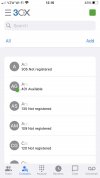
  • 3CX-Exts.jpg
    3CX-Exts.jpg
    57.2 KB · Views: 29
Last edited:
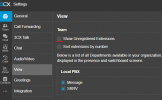
Be sure to Uncheck Show Unregistered Extensions
Screenshot 2024-12-12 102521.png
 
Be sure to Uncheck Show Unregistered Extensions
Nice hint, thank you! The problem is, it indeed removes 'non-registered' extensions from the 'Teams' section, while the 'Contacts' section still lists all extensions available regardless of department and online/offline status.
 
Be sure All Departments have Publish department information to all extensions UNCHECKED, I think that will fix it
 
Be sure All Departments have Publish department information to all extensions UNCHECKED, I think that will fix it
Just double checked, all three departments have 'Publish department information' option disabled.
 
Dont use the default department, create a new one and move them in.
 
Hi Nero,

Yes these are not in the default department, they are separate departments created with 3CX multi tenant.

I have hidden them under the view section, however they are still visible to the users unless they login to their individual web app and hide them using the show unregistered extension optinsd mentioned above.

I was hoping to be bale to control this myself as the admin rather than rely on the users to all go in and uncheck this individually.
 
Can you go to the "view" tab of these extensions and check that their "presence" is unchecked for the other depts.
 
Hello @Leo_B @sparklor and others who replied, in the time since this thread was started, the "Hide from Contacts" option has changed to "Hide User", which also hides from the Team view. We need those functions to be separate, otherwise users are either hidden from both Team and Contacts views, or, the Team view shows those in a user's Department but then the Contacts view shows ALL users across the entire system. FYI we're on the current build of V20 U5 Build 551.

So, I'm wondering how this impacts your original issue and your current use. I've posted a reply in a similar thread, with more details, here: https://www.3cx.com/community/threa...her-users-in-web-team-view.129747/post-632624

Any comments or insights are appreciated. Thanks!
 
Last edited:
  • Like
Reactions: Adrian ctgalega
Hi @Leo_B just following up on your previously posted issue, and my comment on March 17. Wondering how the updated Hide User function is affecting your systems. It is causing problems for us, as I explained above. Your thoughts? Thanks
 

Latest Posts

Forum statistics

Threads
111,964
Messages
590,000
Members
164,869
Latest member
hpgitsupport