Solved Systemowner role itself removed...

Status
Not open for further replies.

dave145346

Bronze Partner
Joined
Nov 5, 2022
Messages
4
Reaction score
0
Hello together

I must have shot myself out of the "Default" group in the web client under Admin Settings. Of course with the system owner account... Now I still have access to the Management Console, but I can no longer give a role on the group assignment. The "Admin" tab in the web client has also disappeared. What is the best way to restore the role on a 3CX Hosted?
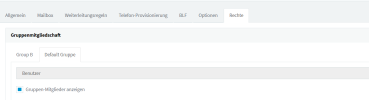
1682716716029.png
I am registered with the 3CX Hosted account that I received by email when I created the instance. There are no other extensions yet.

Thanks
Greetings
 
Hi @dave145346

The reason you are unable to change the role of the extension is because the extension now has the User Role which is not allowed to change the role of any extension.

To change the role of the extension, you need to log in to the PBX using the Admin credentials, which were created during the installation of the PBX.

You can retrieve the Admin credentials, by clicking the forgot password link in the Management Console login screen which will prompt you to enter the admin's email address, and will send a forgot password email to change the password.
 
Thank you very much for the feedback @NikolasA_3CX
I don't think that's the solution. I am already logged in with an admin on the admin console, otherwise I would not have permission to view it.
My email address is linked to the one extension that no longer has the role "Systemowner".

Is there another admin user I don't know about? What is its name and how can I log in with it? Resetting the password did not help, I still have to log in with my old password.

Thank you for your support.
 
And why not a pbx restore before the unfortunate event ?
 
Hi @dave145346

Please note that if you have logged in using an extension number or email address that is not the root admin, because the root admin does not have an extension. This means that the username is not an extension or an email, but it is whatever you have defined during the installation of the PBX.

The password you have reset is for the root admin account and not for the extension you are currently logged in to, that is why you are still able to log in using the old password.

You may also refer to the below post which refers to the same issue.
https://www.3cx.com/community/threads/system-owner-right-changed-to-user.119461/#post-556122
 
  • Like
Reactions: Evolute IT
@NikolasA_3CX
Thank you! I was able to find the admin username via the unencrypted backup file and then log in. Everything works now.
 
@dave145346
We are glad to be of assistance, and that the issue has been resolved.
 
Status
Not open for further replies.

Forum statistics

Threads
111,974
Messages
590,081
Members
164,899
Latest member
mazet