T46S failed to register the phone in the RPS service

Status
Not open for further replies.

Andrew Haigh

New User
Joined
Jan 4, 2023
Messages
2
Reaction score
0
Hi

I've got a number of Yealink phones that I've been donated for a Scout site which I'm trying to setup initially on the free hosted 3XC cloud instance. I've installed a SBC for them but when I try to register a phone we get the message "Failed to register the phone in the RPS service".
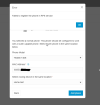
1672855496867.png

Has anyone come across this and a way around the message?

Cheers

Andrew
 
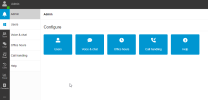
If you go to the Management Console (M. Console), in the Events, you should see a full error message describing why it fails.
 
I can't see events in the admin console, is there another link I should be using?1672857519630.png
 
Hi

I've got a number of Yealink phones that I've been donated for a Scout site which I'm trying to setup initially on the free hosted 3XC cloud instance. I've installed a SBC for them but when I try to register a phone we get the message "Failed to register the phone in the RPS service".
View attachment 33409

Has anyone come across this and a way around the message?

Cheers

Andrew
Please try removing the Ip phone from the user and try to add the IP phone again the same way, Check that the Mac address is correct, and if it fails to send an RPS request let us know, and please provide us with the FQDN you are using to access the webclient.
 
I've got a number of Yealink phones that I've been donated
Usually this type of failure indicates that the phones were already registered in a private RPS account with Yealink.

In this specific case, there is absolutely nothing that can be done to remove them from there via 3CX.

You will have to contact Yealink yourself and ask to have them removed from their RPS before you can proceed.
 
  • Like
Reactions: Evolute IT
Status
Not open for further replies.

Members Online Now

No members online now.

Forum statistics

Threads
111,832
Messages
589,285
Members
164,662
Latest member
DejanMDS