Solved Teams Presence Sync

Status
Not open for further replies.

husseinharb

Customer
Joined
Aug 25, 2022
Messages
17
Reaction score
6
Hello, We updated to V20 Alpha and love the presence sync between teams and 3cx. There is an issue. Teams set the user as away after some inactivity. this automatically sets the 3cx status to away and as you may know while on away mode in 3cx, phones or apps do not ring. what is a workaround to change this behavior? While on a teams Do not Disturb or busy, I understand that calls go to voicemail. But away is the problem. Thank you for your help.
 
This is not something that i managed from 3CX. Since Teams change to Away then this will also Sync presence according to guideline here. In this case you might need to check in Teams the possibility to always be Available when Idle.
 
Thank you. I understand how it works. Is there a way to remove the away status from 3cx? or make it behave the same way as the available status? I just want the phone to ring even if the teams status is away. For now, I disabled the presence sync but I would love to turn it back on.
 
I'm afraid this is not an option.
 
As more customers start updating to Version 20.0 Update 2 (Build 688 Alpha), I believe this will become an issue. Hopefully, it can be fixed in future updates. where do we send feedback about alpha updates?
 
  • Like
Reactions: Mark_McClain
This could work, with 3rd party tools this is no problem at all... Maybe 3cx can rebuild find a solution how others do this.
 
I'm afraid this is not an option.
I have been running a scripted 3CX <-> Teams presence sync for more than a year now.

* Due to the Auto-Away feature of Teams I totally ignore this presence state.
* The other wa around, I don't push any 3CX states to Teams as this confused my users. All I do is setting Teams busy when there is an active call on 3CX

Alex
 
I have been running a scripted 3CX <-> Teams presence sync for more than a year now.

* Due to the Auto-Away feature of Teams I totally ignore this presence state.
* The other wa around, I don't push any 3CX states to Teams as this confused my users. All I do is setting Teams busy when there is an active call on 3CX

Alex
Glad to hear. Can you share the script ?
 
Also noticed this issue. The concept is great, I just wonder if there is a way we can turn off the fact the users will not receive any calls on 3CX in a busy/away status? As some people have all-day events in their calendar or are away on their PC on teams but have the 3CX app and expecting to receive calls?
 
We've been experimenting with this today and it's so near to being great - I think if the idle state in Teams could be mapped to the "Available 2" status - it would be workable for most people.

It would also be really useful if the linking to Outlook Calendar and MS Teams state could be selected individually, ie being able to select either one or the other or both.
 
  • Like
Reactions: Tony Cox
It would also be really useful if the linking to Outlook Calendar and MS Teams state could be selected individually, ie being able to select either one or the other or both.
I agree this would be a welcomed change.

I've had to turn off this feature because of calendar appointment changing the status to DND.
 
The current status sync is not really useful. We have the most problems when, for example, we have scheduled an appointment for a visit in the calendar. If this visit is delayed by a minute and then calls me via the intercom or the receptionist, I am not available to take the appointment.

It would be helpful if each status had the same options as the custom status. For example, being able to set calls to go through even when you are set to "Away" or "Do Not Disturb," or being able to add exceptions.
 
The current status sync is not really useful. We have the most problems when, for example, we have scheduled an appointment for a visit in the calendar. If this visit is delayed by a minute and then calls me via the intercom or the receptionist, I am not available to take the appointment.

It would be helpful if each status had the same options as the custom status. For example, being able to set calls to go through even when you are set to "Away" or "Do Not Disturb," or being able to add exceptions.


Hold on, you're mixing different topics.

Here's what the O365 integration with 3CX does:

- Read Microsoft 365 users
- Read Microsoft 365 contacts & write personal Microsoft 365 contacts
- Synchronize Microsoft 365 Teams Presence
- [OBSOLETE] Read Microsoft 365 calendars for presence synchronization
- Use SharePoint for backup and recording storage
- Send emails via Microsoft 365

Calendar synchronization is obsolete but still available. You are not required to activate it. It's there to please users who want to continue using it. Many people criticized 3CX for removing features without warning. 3CX listened to its users and maintained this function but marked it as obsolete. Therefore, users are encouraged to transition to MSTEAMS synchronization.

Let’s look at Teams presence synchronization.
If the fact that a particular event changes your status bothers you, simply select the appropriate status when you schedule your meeting.
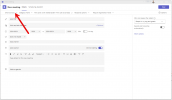
1722550575504.png

I’m not sure I understand the benefit of being in "busy" mode if I want to be able to accept calls despite being busy; then, are we available? Just select available. If I want my animal to meow, I adopt a cat, not a dog? (I'm not mocking you; this is an analogy.)

But I understand there can be several exceptional cases indeed.
I would have liked my animal to meow and fetch the stick when I throw it. But I must make a choice or have 2 animals!
Joking aside, if your goal is to publish a status independently of call behavior management, opt for two different systems or two different extensions for the same user.

- One extension for presence (and does not receive calls on this extension / or / redirects to the real extension)
- One extension for calls, whose presence is meant to apply different behaviors for calls.

If you don't like this integration, simply don't use it. Please don't say it's not useful. It just doesn't meet your specific needs, yet it is bug-free and performs as it was designed. However, if your goal is to provide constructive feedback, ideas, or share an edge case, as you did in your second paragraph, that’s different—but please use the appropriate channel with the correct topic. Your idea isn’t related to Teams presence synchronization. It's more about a request to add functionality related to each status in 3CX. :)


Sincerely,
 
I think the different status options that Teams provides should just be customisable within 3CX. We need to be able to decide how 3CX behaves when Teams changes the status to 'absent' (yellow) just because the user hasn't made any entries on their PC for 5 minutes or the screen saver comes on because the company policy requires the system to be locked.
It's pretty common for our technicians to be working on other systems than their own PC, for instance. Unfortunately, Teams then switches to yellow after 5 minutes and 3CX switches to red. This is really frustrating because the technician needs to be available. This is particularly the case for internal calls.
The way you can sync your presence is really great! We've been waiting for this for a while now. But it would be great if 3CX just turned red when the user is in a meeting in Teams. If they're not, 3CX should turn green again. We don't need anything else. The best way to do this would be to set what the status of 3CX should look like when Teams changes its status.

Just my 2 Cents
 
@kl - Exactly that!!

If we could map the Teams "Idle" state to the Available 2 status, at least that way the phone would still ring if you hadnt interacted with your computer for 5 minutes.
Screenshot of Google Chrome at 6 Sep 2024 at 09_32_13.png
 
  • Like
Reactions: Evolute IT and kl
I have an issue with updating the presence from Teams client to 3CX apps noting that it's working fine when updating from 3CX to MS Teams, any ideas?

Version 20.0 Update 3 (Build 762 Beta)
 

Attachments

  • Screenshot 2024-09-07 183430.png
    Screenshot 2024-09-07 183430.png
    9.9 KB · Views: 30
Hello,

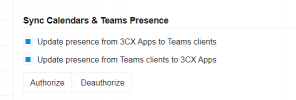
Did you click on Authorize?
If so, please click on Deauthorize.

When you click on Authorize, make sure to use an "Administrator" account from the Microsoft instance to grant the authorization.
 
  • Like
Reactions: Evolute IT
Hello,

Did you click on Authorize?
If so, please click on Deauthorize.

When you click on Authorize, make sure to use an "Administrator" account from the Microsoft instance to grant the authorization.
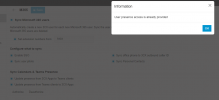
yes, it was authorized, tried to deauthorize and authorize it again but it still not working, noting that I granted the authorization by requesting approval from the Administrator, attached is the message to making sure that I have the authorization
 

Attachments

  • Screenshot 2024-09-15 195652.png
    Screenshot 2024-09-15 195652.png
    36.4 KB · Views: 27
Hello,
At the bottom of the page you captured, which option did you select? Sync All Except or Sync Only?
Do all users have their emails defined in their extensions?
Go to Admin > Integrations > M365
Click "Reconfigure"

Please share a screen capture.

And click "Connect."
Authenticate using an M365 admin user.
 
  • Like
Reactions: Evolute IT
Status
Not open for further replies.

Latest Posts

Forum statistics

Threads
111,952
Messages
589,894
Members
164,844
Latest member
abctel2