- Joined
- May 19, 2017
- Messages
- 15
- Reaction score
- 1
Hi All,
Not sure if any of these can be fixed but if so please help!
Scheduling meetings with 3CX is a NIGHTMARE!! some challenges:
1. Zero integration to outlook, so if the calendar needs to be updated you have to delete the meeting and create a new meeting? - seriously confusing
Ok so lets try simply create the meeting and copy the link from the client and send the meeting out with outlook.
2. NOPE! turns out you cant copy the link from the client, you need to log into the webclient to schedule meetings and get the link.
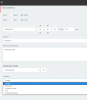
Ok, fine. lets use the webclient and do this!
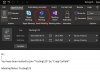
3. NOPE! tried scheduling the meeting with the webclient using O365 and the meeting invite is all over the show with no structure, doesnt even carry the date and time across?
How do people do webmeetings with 3CX? seems impossible
Not sure if any of these can be fixed but if so please help!
Scheduling meetings with 3CX is a NIGHTMARE!! some challenges:
1. Zero integration to outlook, so if the calendar needs to be updated you have to delete the meeting and create a new meeting? - seriously confusing
Ok so lets try simply create the meeting and copy the link from the client and send the meeting out with outlook.
2. NOPE! turns out you cant copy the link from the client, you need to log into the webclient to schedule meetings and get the link.
Ok, fine. lets use the webclient and do this!
3. NOPE! tried scheduling the meeting with the webclient using O365 and the meeting invite is all over the show with no structure, doesnt even carry the date and time across?
How do people do webmeetings with 3CX? seems impossible