


- Joined
- Nov 7, 2020
- Messages
- 12
- Reaction score
- 5
Hello !
I just installed 3CX on a Raspberry Pi 3 behind my FAI all-in-one router (Box plus SFR)
On the firewall test, I get " testing port 5060... full cone test failed " error.
Here is my NAT config
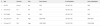
I cannot use external ports 5060 because it is reserved (the router probably use it for the phone. Is it why I have trouble with it, can I use another port instead ?
How can I get everything to work ?
Thanks !
You'll find attach a sanitized pcap capture of the test, captured on the raspberry pi interface (delete the txt extension). Please note that 192.168.79.92 is my laptop and should be filtered out.
I just installed 3CX on a Raspberry Pi 3 behind my FAI all-in-one router (Box plus SFR)
On the firewall test, I get " testing port 5060... full cone test failed " error.
Here is my NAT config
I cannot use external ports 5060 because it is reserved (the router probably use it for the phone. Is it why I have trouble with it, can I use another port instead ?
How can I get everything to work ?
Thanks !
You'll find attach a sanitized pcap capture of the test, captured on the raspberry pi interface (delete the txt extension). Please note that 192.168.79.92 is my laptop and should be filtered out.


