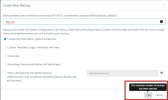
"The maximum number of backups has been reached"

Status
Not open for further replies.

alanjmcfL

Bronze Partner
Basic Certified
Joined
Nov 27, 2022
Messages
35
Reaction score
13
Getting this on one of my hosted systems. "The maximum number of backups has been reached" (screenshot)

Version: 18.0 Update 6 (Build 908)
Disk usage is 14%

backup
Location is local disk

I deleted some old backups - only three there now.

Nothing in the logs that I can see.

Anyone seen this? Google returns nothing.

Alan
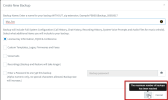


1675420793190.png
 

Attachments

  • 1675420787460.png
    1675420787460.png
    43.9 KB · Views: 6
Hello,

This is correct. Hosted by 3CX is limited for local backups.

If you want to have more backups, you need to change the backup location to Google/FTP etc and then you can have as many as you want.
 
  • Like
Reactions: GregG_3CX
I've only got three. Before I deleted some, I had six or so. What's the limit? How did I have six previously.

Has it changed in U6?
 
I don't remember what the limit was originally, But the official limit is either 2 manual backups, or a single scheduled backup.

By the way, we also keep a nightly backup of your machine, other than the ones you see in the management console. In case of a problem, we can also restore your machine for you even if you did not have any backups configured.

Beyond that, you can use an external service to keep as many backups as you want of course.
 
  • Like
Reactions: GregG_3CX and N_G
A quick follow-up. What’s the case in StartUP?
  • No way to run / download backups — as admin?
  • Is it like Dedicated, backups are run nightly by you. Rollback can be requested?
 
StartUP gives you access to the webclient and apps only (no management console). You do not have backups or anything like that.

Not sure why your specific backup solution is not working as intended, but have you considered Google Storage as an alternative?

In addition, we tested Filezilla and that works fine. Perhaps you could deploy that as a test and try to backup there? You might have better results with that software than your current FTP solution.
 
i agree that this issue sure looks like a bug. however, i don't necessarily think it is being investigating based on the replies above. right now, one of our hosted clients has only a SINGLE (1) 8 meg automatic backup on the "local"/3cx hosted server drive. We can make NO manual backups NOR change the autobackups rotation schedule to more than one -- we just receive that "The maximum number of backups has been reached" error. (As it is 3cx hosted, it is definitely running the latest v18 release. So, looks like the issue has been happening for at least 7 months based on the first post in this thread.
 
i agree that this issue sure looks like a bug. however, i don't necessarily think it is being investigating based on the replies above. right now, one of our hosted clients has only a SINGLE (1) 8 meg automatic backup on the "local"/3cx hosted server drive. We can make NO manual backups NOR change the autobackups rotation schedule to more than one -- we just receive that "The maximum number of backups has been reached" error. (As it is 3cx hosted, it is definitely running the latest v18 release. So, looks like the issue has been happening for at least 7 months based on the first post in this thread.

This is not a bug. The maximum backups you are allowed to have on the local storage of a hosted machine is 2 manual backups or 1 scheduled backup. If you want more then you need to use an external backup location.
 
Status
Not open for further replies.

Forum statistics

Threads
111,974
Messages
590,081
Members
164,899
Latest member
mazet