Three different places to set codec priority?

ASTERHC

Customer
Joined
Sep 8, 2025
Messages
27
Reaction score
8
I am trying to see if there is anything I can do to improve call audio quality which has lead me to checking codec priorities.

I have read through Which Codecs does 3CX support and when? and have a rough understanding of how codec priorities work. If I understand correctly there is a matching process of who has what codecs available and the person making the call is the one that dictates what codec is used during the call based on what codecs both the caller and receiver have available and the codec priority of the caller.

What I am confused by is there being three different places to set codec priorities, on the trunk, under advanced -> codecs and under user -> IP phone - codecs.

I had assumed that the trunk codec priority was all that needed to be set but even after having it set to the correct codec priority I was noticing a lot of codec mismatch.
1774833625101.png

Do I need to set the codec priority in all three locations to be the same order?
 
Ideally yes. However, 3CX can handle transcoding, so will always use one preferred by all parties.

Does your 3CX pass firewall test?
 
Is there some reason that you might want to have different codec priorities in each section?
 
If the question is "why are codec priority for providers and codec priorities for phones separate?", then keep in mind that a 3CX might have several trunks connected, very possibly in different countries, with different codec availabilities.
 
  • Like
Reactions: JohnS_3CX
What I am confused by is there being three different places to set codec priorities, on the trunk, under advanced -> codecs and under user -> IP phone - codecs.
You forgot DECT and ATA ;)
Each of these uses its own global 3CX parameter MLTACC_<MAC>.
 
Does your 3CX pass firewall test?
Firewall was showing a green tick and I risked it during business hours and re-ran the firewall check and it passed.

resolving 'stun-au.3cx.com'... done
resolving 'stun2.3cx.com'... done
resolving 'stun3.3cx.com'... done
resolving 'sip-alg-detector.3cx.com'... done
testing 3CX PhoneSystem 01 SIP Server... done

stopping service... done
detecting SIP ALG... not detected
testing port 5060... done
starting service... done

testing 3CX PhoneSystem Media Server... done

stopping service... done
testing port 5090... done
testing ports [9000..9398]... done
testing ports [10600..10998]... done
starting service... done
 
I can do to improve call audio quality


Hi,

I suggest we focus on discussing the issue rather than attempting a blind fix.

Could you tell us more about what you mean by “improving audio quality”?

What symptoms are you experiencing exactly?
1. Are calls dropping?
2. Are you losing audio?
3. Is the voice breaking up or stuttering?
4. Is there any echo?

Could you also clarify the following:
1. Does the audio quality issue also occur with the 3CX mobile app?
2. Does it happen with a desk phone?
——- • If yes, what is the brand and model of the phone?
——- • Are the firmware updates installed?
3. Does it also happen with the Windows app?
4. If you record a call and play it back on your PC, do you hear the same « poor audio quality » ?

A few additional questions:
1. Is your trunk provider a recognized and supported 3CX SIP trunk provider?
2. Which country are you located in?
3. Are you certain that G.729 and PCMA are the most suitable codecs for your setup?

It is quite possible that you may also need to adjust the codec priority order on your SIP provider’s side, and reprovision the desk phones after changing the codec order in the extensions.

Let us know.
 
Hi,

I suggest we focus on discussing the issue rather than attempting a blind fix.

Could you tell us more about what you mean by “improving audio quality”?

What symptoms are you experiencing exactly?
1. Are calls dropping?
2. Are you losing audio?
3. Is the voice breaking up or stuttering?
4. Is there any echo?
I will answer what I can for now and come back with the rest of the answers when I have them.

1. Not so far as I can tell.
2. I have a few reports of this. For this particular one I believe it is an issue relating to the 3CX Android app and either not having unrestricted battery usage or an out of date version of Android. Updating Android and allowing unrestricted battery resolves this one.
3. I believe it is breaking up. I am trying to get people to tell me what is going on and just get "the call quality is poor".
4. I don't believe so.

Could you also clarify the following:
1. Does the audio quality issue also occur with the 3CX mobile app?
2. Does it happen with a desk phone?
——- • If yes, what is the brand and model of the phone?
——- • Are the firmware updates installed?
3. Does it also happen with the Windows app?
4. If you record a call and play it back on your PC, do you hear the same « poor audio quality » ?
1. Yes.
2. Yes, Yealink T41S with the current firmware applied through 3CX.
3. So few staff are using the Windows app that I cannot accurately say for this. Most of our staff are on Android devices using the Android 3CX app. A few iOS users but I don't know if they are experiencing anything different or not (too few of them at the moment).
4. I will see about getting permission to listen to a call and get back to this one.

A few additional questions:
1. Is your trunk provider a recognized and supported 3CX SIP trunk provider?
2. Which country are you located in?
3. Are you certain that G.729 and PCMA are the most suitable codecs for your setup?
1. Yes, Breeze Connect
2. Australia
3. Yes, PCMA and G722 (G729 last) per Breeze Connect 2.0 Codec Priority
 
Are the users using headsets ?
 
Do you happen to have two trunks set up?
One with PortaSIP and the other with Breeze Connect?
 
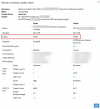
Your screenshot shows PortaSIP.
If that is the case, make sure the correct codec order has been applied on the PortaSIP side.

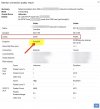
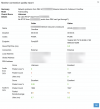
It would also be relevant to have a comparable example using a Yealink T41S. Your screenshot shows an Android device, yet you mentioned that there are no actual complaints coming from Android users.


Please share a sample quality report or a call where the conversation quality is poor. Do not send unrelated or irrelevant information.


IMG_3923.jpeg
 
We don't use PortaSIP, that it someone external to us calling as as seen by the Caller vs Callee.

Here is a call into us from a mobile phone (just so happens to also show PortaSIP) with a staff member using a T41S.
1775103542331.png

Please share a sample quality report or a call where the conversation quality is poor.
When 3CX says it is poor or when the user says it is poor?
 
Did you experience any issues with this call?
 

Latest Posts

Forum statistics

Threads
111,973
Messages
590,074
Members
164,895
Latest member
jasonkkrause