Timer on Transfer in 3CX Call Flow Designer

DidierDE

Bronze Partner
Joined
Nov 12, 2025
Messages
17
Reaction score
2
Hello,

I'm designing a call flow script for our duty call engineers.
We store the cellphone numbers of our duty call engineers in a database.

In the CFD script, I check the database to see which engineer is on duty and then I transfer the call to the cellphone of that engineer. So far so good...

When the engineer does not pick up the call after 20 seconds, his voicemail is activated. I would like to set a timer on the transfer so that I can stop the transfer at 18 seconds and transfer the call again.

Is this possible?

Kind regards
 
We've been looking at the same question as well, but transfering using a call flow script is not a monitored transfer. So no luck there.
 
Anyway you can utilise round robin and call mobiles of extensions instead?
 
Anyway you can utilise round robin and call mobiles of extensions instead?
Just to expand - whatever the call handling used, just set the ring time to be less that it takes for the mobile phone to go to voicemail.
 
  • Like
Reactions: Evolute IT
Just to expand - whatever the call handling used, just set the ring time to be less that it takes for the mobile phone to go to voicemail.
That is exactly the issue... I can't set a ring time on the transfer in CFD. I'm not calling a queue or ring group, I'm calling external numbers.
 
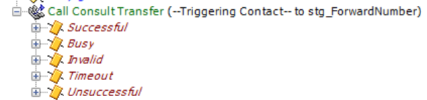
In Cisco, the transfer option is a Consult transfer, so we can monitor if the transfer is succesfull. It would be nice to have this in 3CX CFD as well...

1787738832095.png
 
That is why there is a suggestion to use ring groups, as they can have a timeout set.
 
  • Like
Reactions: Evolute IT
That is why there is a suggestion to use ring groups, as they can have a timeout set.
Yes, but in this case I'm calling external numbers.
There is a reason that I'm calling the cell phone numbers of the engineers, and not their internal extensions.
Some engineers like to set their phone to 'Do not disturb' at night, and then they only allow calls coming from certain numbers.
By calling their cell phone, I can manipulate the outgoing number in the Outbound rules. This way the engineers always see the number of our duty call system, so they can set their phone to 'do not disturb' at night and allow only that number to call them.
If I would call the internal extensions of the engineers, they would see the original caller number and they would not be able to filter that when their phone is set to 'Do Not Disturb'.
Or is there a way to change the Outbound Caller ID in the CFD?
 
A) would using the 3CX mobile app not help resolve this? Although if a mobile is on DND perhaps it will get silenced too.

B) In most cases these days, if you have "Also ring my mobile", the Outgoing number is going to be either your main trunk number, or whatever you set in the relevant outbound rule. Having the original caller's number appear on the forwarded to mobile would be what needs (if even doable) a special configuration.
 
I made some tests.
A) Indeed, when a mobile phone is on DND, the 3CX mobile app is muted too. However, I see that you can also exclude apps from DND. So this might be an option.
B) When I use 'Also ring my mobile', I see the original caller ID. This is also preferred in 99% of the cases. It is just for this case that I need to change the outbound caller ID to the number of our duty call system...
 
  • Like
Reactions: Evolute IT
Hi,

For B above, if you set an appropriate Outbound rule that should lock the presented Caller ID towards the mobiles to the desired one.
 
Hi,

For B above, if you set an appropriate Outbound rule that should lock the presented Caller ID towards the mobiles to the desired one.
The question in this case is, how do I create an outbound rule that only matches this specific situation.

Client calls duty number A with number B.
Call is routed to user internal extension C which has set its settings to 'Also ring my mobile' on number D.
If I check the call logs, I see that the call is made from the internal extension C of the user to his cellphone D.

If I make an outbound rule that matches the internal extension of the user, or his cellphone, this will apply to all his calls. I only want this rule to match if the duty call number A is called...
 
If a call gets diverted to the Cellphone D, then I would assume that call could only have originated from the duty number A. So a rule matching calls from C to D should be sufficient - at least as I read it. Would extension C call out to D in any scenario where you would want the original caller to be visible?
 
Perhaps the biggest challenge is determining what answered the call. It could be a human, or it could be the mobile phone's voicemail box. Remember, if the agent's mobile phone dies in the middle of the night, or if the phone is currently outside a cellular service area (traveling between towers), you are going to be sent to the voicemail box immediately regardless of what you do.

The answer is to make a call between a CFD application and the agent's mobile phone so that when the call is answered, user-input is required. For example, "This is a call from VoIPTools On-Call Manager. To accept this call, press 1". The mobile voicemail box is not going to press 1. Further, a child is not likely to press 1 if they pick up Dad's mobile phone. Or you could require a PIN, which further eliminates the possibility of a unauthorized person interacting with the on-call system.

Perform a makecall between a CFD application and the agent. If the call does not go through, or the agent doesn't enter the PIN, then you log the call was not accepted and you escalate to the next person in the on-call list.

It would be nice to be able to create a flexible recurring schedule too, and logging of who was contacted, and how (email, phone SMS) and how long it took for the agent to answer the call, and whether an agent is consistently allowing a call to escalate when they were supposed to answer the call, or if nobody answered a call, have it automatically redirect to a voicemail box where the caller can record a message and then start pounding managers about a missed call. That's what our tool does.
 

Forum statistics

Threads
112,097
Messages
590,739
Members
165,078
Latest member
KraGwort