Timer on Transfer in 3CX Call Flow Designer

DidierDE

Bronze Partner
Advanced Certified
Joined
Nov 12, 2025
Messages
16
Reaction score
2
Hello,

I'm designing a call flow script for our duty call engineers.
We store the cellphone numbers of our duty call engineers in a database.

In the CFD script, I check the database to see which engineer is on duty and then I transfer the call to the cellphone of that engineer. So far so good...

When the engineer does not pick up the call after 20 seconds, his voicemail is activated. I would like to set a timer on the transfer so that I can stop the transfer at 18 seconds and transfer the call again.

Is this possible?

Kind regards
 
We've been looking at the same question as well, but transfering using a call flow script is not a monitored transfer. So no luck there.
 
Anyway you can utilise round robin and call mobiles of extensions instead?
 
Anyway you can utilise round robin and call mobiles of extensions instead?
Just to expand - whatever the call handling used, just set the ring time to be less that it takes for the mobile phone to go to voicemail.
 
  • Like
Reactions: Evolute IT
Just to expand - whatever the call handling used, just set the ring time to be less that it takes for the mobile phone to go to voicemail.
That is exactly the issue... I can't set a ring time on the transfer in CFD. I'm not calling a queue or ring group, I'm calling external numbers.
 
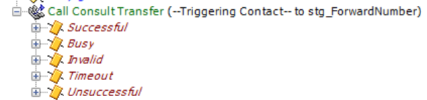
In Cisco, the transfer option is a Consult transfer, so we can monitor if the transfer is succesfull. It would be nice to have this in 3CX CFD as well...

1787738832095.png
 
That is why there is a suggestion to use ring groups, as they can have a timeout set.
 
  • Like
Reactions: Evolute IT
That is why there is a suggestion to use ring groups, as they can have a timeout set.
Yes, but in this case I'm calling external numbers.
There is a reason that I'm calling the cell phone numbers of the engineers, and not their internal extensions.
Some engineers like to set their phone to 'Do not disturb' at night, and then they only allow calls coming from certain numbers.
By calling their cell phone, I can manipulate the outgoing number in the Outbound rules. This way the engineers always see the number of our duty call system, so they can set their phone to 'do not disturb' at night and allow only that number to call them.
If I would call the internal extensions of the engineers, they would see the original caller number and they would not be able to filter that when their phone is set to 'Do Not Disturb'.
Or is there a way to change the Outbound Caller ID in the CFD?
 
A) would using the 3CX mobile app not help resolve this? Although if a mobile is on DND perhaps it will get silenced too.

B) In most cases these days, if you have "Also ring my mobile", the Outgoing number is going to be either your main trunk number, or whatever you set in the relevant outbound rule. Having the original caller's number appear on the forwarded to mobile would be what needs (if even doable) a special configuration.
 
I made some tests.
A) Indeed, when a mobile phone is on DND, the 3CX mobile app is muted too. However, I see that you can also exclude apps from DND. So this might be an option.
B) When I use 'Also ring my mobile', I see the original caller ID. This is also preferred in 99% of the cases. It is just for this case that I need to change the outbound caller ID to the number of our duty call system...
 
  • Like
Reactions: Evolute IT

Forum statistics

Threads
111,910
Messages
589,693
Members
164,776
Latest member
djbx83