Transfer a call to a group from the CFD

Status
Not open for further replies.

JulienM

Platinum Partner
Advanced Certified
Joined
Jan 4, 2022
Messages
66
Reaction score
32
Hello,
When activating the "Allow group to be called and routed" option on a group, it seems that it is only possible to assign an DID to this group. Since this group doesn't really have an internal number, how do I transfer to it from the Call Flow Designer?
I thought of using a virtual account just to make the transfer, but it is not possible to transfer to groups in the status options.
 
Last edited:
Hello,

This is not possible at the moment, you should create a Ring Group and then transfer the call to it. This is something that we're considering to be added in the future, however I can't tell if or when this will be available.
 
Hello,
Thanks for your feedback.
[...] you should create a Ring Group and then transfer the call to it.

I don't understand, it is possible to transfer calls to these groups via a ring group ?
 
No, you would have to create a separate ring group and manually add the same people to the ring group that are in your extension group.
 
  • Like
Reactions: edossantos
No, you would have to create a separate ring group and manually add the same people to the ring group that are in your extension group.
Ok, I understand. Thanks for your feedback.
 
Actually, there's something you could do to identify the ID to which you would need to transfer the call for this:
1) Make a backup of your 3CX installation.
2) Unzip the file, and open the XML containing the configuration.
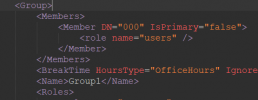
3) Search for the <Group> element, for example here I have a group named "Group1", and looks like this:
1690386616269.png
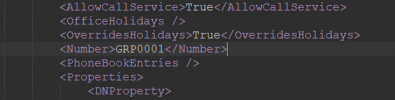
4) Scroll down until you find the <Number> element for this group, for example in my case:
1690386690787.png
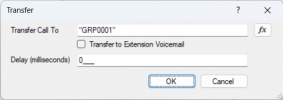
5) This means that my extension group is identified with the ID GRP0001. Then, from a CFD app, I can transfer the call to that ID, as follows:
1690386835686.png
 
  • Like
Reactions: jed
Thanks for your feedback.
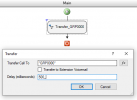
I just tested quickly, by creating a personalized group and by creating a call flow (n°555) which calls the group "GRP0000" :

1690438988523.png

I have voluntarily defined, in the schedules of the group, an exception to play an audio message :

1690439034839.png

When I call the group via the CFD (via the number 555), I call the group but the transfer to the sound file is not done.
On the other hand, when I call the group directly from the dialer (GRP0000), there I have the audio which is played.

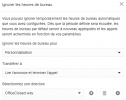
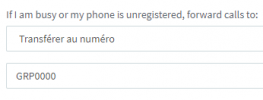
What is quite good, however, is that you can call the group directly from the dialer and forwarding via the statuses also works :

1690439139098.png
 
I just updated my test server just in case (18.0.312 to 18.0.906), but the problem is the same.
By calling directly from the dialer (GRP0000), no problem.
When calling from the CFD, I hear music on hold but nothing happens (no extension rings), forwarding is not taken into account.
 
I can reproduce this myself. The issue is that the Extension Group is "diverting" the call to the extensions in the group. This only works for ringing calls, but not for calls already answered. For calls which are already answered, we need to "transfer" the call.

This seems to be by design, I can see that you can't send calls to groups after a Digital Receptionist or Queue, which answer the call. So the same restriction applies to CFD apps. You will need to create a Ring Group, configure it with the same extensions, and then transfer the call to the Ring Group.
 
Thank you for the clarification.
Too bad that it is not possible to transfer calls to these groups from a queue or from the CFD, I hope it will be possible later.

As you say, we can create a call group with the same extensions, but in this case we lose the interest of having a group administrator and being able to forward calls where we want easily directly from the WebClient. In the end, it is this functionality that interests me.
 
  • Like
Reactions: edossantos
I have been searching for a while, reading forums, testing options in CFD and all I can find are pure improvisations in 3CX. Once it comes to complex routings with conditions, even with CFD we have to improvise. :)
I don't see an option to forward the call to a failover destination which is a submenu in CFD app.
I'm not sure to understand what you need. Do you want to transfer the call to another extension? Or you want to redirect the callflow to a specific sub menu inside the same app?
 
OK, but this is different, and creating such an app is a bit challenging, however possible....

Please note that from the CFD app perspective, when the call goes to the queue and is transferred back to the CFD app, this is treated as a new call, and the callflow will start from the beginning. The only way to "remember" where you were before transfering the call, is attaching data to the call before transfering the call, and then when you receive the call back, you read the attached data, and if you find it you continue where you left off. This is not as simple as it seems. The CFD app will start from the beginning, so you will need to add conditions to "take" the CFD app to the point in the callflow you need.....
 
  • Like
Reactions: VoIPTools
Yes, it might be simpler to split it in multiple CFD apps....
 
  • Like
Reactions: NatalyS_3CX
OK, but this is different, and creating such an app is a bit challenging, however possible....

Please note that from the CFD app perspective, when the call goes to the queue and is transferred back to the CFD app, this is treated as a new call, and the callflow will start from the beginning. The only way to "remember" where you were before transfering the call, is attaching data to the call before transfering the call, and then when you receive the call back, you read the attached data, and if you find it you continue where you left off. This is not as simple as it seems. The CFD app will start from the beginning, so you will need to add conditions to "take" the CFD app to the point in the callflow you need.....
A cleaver approach Ernesto. Adding data to the call is something I would not have considered. I will try to remember that!
 
  • Like
Reactions: jed and edossantos
Is it possible to make it within one app with adding a data to a call by just using predefined modules and options in the CFD or I need to use C#?
Yes, C# is not needed for this, but organizing the components for this is not an easy task...

I have tested what he suggested but attaching data before transfer results in skipping transfer. In my case it goes to the app exit.
You're probably doing something wrong, and the component throws an error and disconnects the call. Are you using a property name started with "public_"? This is mandatory.
 
  • Like
Reactions: elnino
Like this:

1696626861937.png
Change "data1" to "public_data1".
 
  • Like
Reactions: elnino
Thanks.

I will test it. Now I just need to read attached data when the call comes back and figure out which components are used to compare challenge the values and forward it to a desired option according to the data.
Unfortunately, I have no clue which component can be used for this... I guess this will take some time.
You should probably start by learning how to use the CFD before working on such a challenging project. I would recommend that you start from here: https://www.3cx.com/docs/manual/call-flow-designer-manual/

Check the manual, the examples, we also have some video tutorials.

In order to check the value of a property you need to use the Conditional component. Use the Expression Editor to build your condition without errors.
 
  • Like
Reactions: elnino
Hello,

So far I achieved what i wanted but without continuing where it was because that option is not yet needed. I will need that in near future. So far, reading call data and loops do the job. Anyway, how to transfer call from object to object? For example, If user selected option 1 in menu 1, how to send it to option 1 in menu 2 if certain conditions are met? This is something which will be needed for continuing where it was.
CFD is somewhere intuitive once You start using it.
Callflows are always executed from top to bottom. If you need to go up, you need to use the following technique with loops and conditions:
https://www.3cx.com/docs/cfd-navigate-upwards/

If you need to go to a sibling branch, you will need to go up, and then down again on a different direction. All this must be controlled with conditions.
 
I can reproduce this myself. The issue is that the Extension Group is "diverting" the call to the extensions in the group. This only works for ringing calls, but not for calls already answered. For calls which are already answered, we need to "transfer" the call.

This seems to be by design, I can see that you can't send calls to groups after a Digital Receptionist or Queue, which answer the call. So the same restriction applies to CFD apps. You will need to create a Ring Group, configure it with the same extensions, and then transfer the call to the Ring Group.
Hello,
I just tested again with version 20, it works now with CFD :). However, forward to depertment with the user statuses no longer works.
Ideally, there should be a new submenu “Transfer to department”
 
  • Like
Reactions: Evolute IT
Status
Not open for further replies.

Forum statistics

Threads
111,891
Messages
589,591
Members
164,758
Latest member
rmf