- Joined
- Oct 15, 2018
- Messages
- 12
- Reaction score
- 6
Hi,
I would like to share with the community what i did to improve the quality of the softphone dramaticly. I hope it helps you the same way, it did for me
Issue : Annoying noticable ticks in the audio, when using the softphone
Impacted : Softphone (windows) and Webclient (windows) . Don't know about Macs?
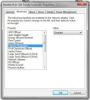
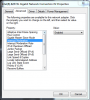
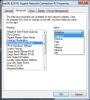
Network cards do some nifty stuff these days. The one network card more than others. For example If you have an Intel Network Card, You have a lot of chance that it has interupt coalescing enabled. It is a method to get more troughput on network interfaces. Other Network card vendors have a simular option.
It means that sometimes it can hold packets, and sends them with the next interrupt. Doing this can generate delta peaks, and these are noticable in the audio stream
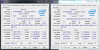
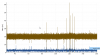
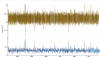
I have diagnosed this in wireshark. I have Enabled and Disabled the interrupt coalescing on my wireless network card, Please see the results in 2 graphs. It is quite clear that the deltas are better when the interupt coalescing is disabled
Interupt coalescing enabled
Interupt coalescing disabled
I think as a general advice, you should disable interrupt coalescing on all devices. Servers and Clients. If it is confirmed by the community, maybe 3CX should try do someting about it. Like a check by the windows installer , or...
Please tell me if it worked for you
Kr Tom
I would like to share with the community what i did to improve the quality of the softphone dramaticly. I hope it helps you the same way, it did for me
Issue : Annoying noticable ticks in the audio, when using the softphone
Impacted : Softphone (windows) and Webclient (windows) . Don't know about Macs?
Network cards do some nifty stuff these days. The one network card more than others. For example If you have an Intel Network Card, You have a lot of chance that it has interupt coalescing enabled. It is a method to get more troughput on network interfaces. Other Network card vendors have a simular option.
It means that sometimes it can hold packets, and sends them with the next interrupt. Doing this can generate delta peaks, and these are noticable in the audio stream
I have diagnosed this in wireshark. I have Enabled and Disabled the interrupt coalescing on my wireless network card, Please see the results in 2 graphs. It is quite clear that the deltas are better when the interupt coalescing is disabled
Interupt coalescing enabled
Interupt coalescing disabled
I think as a general advice, you should disable interrupt coalescing on all devices. Servers and Clients. If it is confirmed by the community, maybe 3CX should try do someting about it. Like a check by the windows installer , or...
Please tell me if it worked for you
Kr Tom