Troubleshooting my AI agents

Ryan_Fisher_Techmode

Titanium Partner
Advanced Certified
Joined
Feb 6, 2020
Messages
16
Reaction score
24
Hey everyone- Great update. Really looking forward to a lot of these features. I am running into two issues with the new alpha update. Is anybody else seeing something similar?

1. My AI Agents are no longer answering. I have tried on both realtime1.5 and realtime2.0 and the calls just hang up immediately. Our agents were working prior to the update.
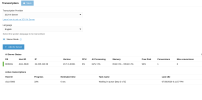
2. I created a new AI Transcription server and it shows successfully connected. However calls seem to get stuck "in queue". Screenshot below:

Screenshot 2026-07-30 at 2.12.00 PM.png


In event log i see the following occurring a few different times.

Error409607/30/2026 1:57 PMAI BridgeInternal Server Error


UPDATE:

Agents answer internal calls. They do not answer external calls. A call into an agent triggers the AI Bridge error above.
 
Last edited:
  • Like
Reactions: nikolascx
1. My AI Agents are no longer answering. I have tried on both realtime1.5 and realtime2.0 and the calls just hang up immediately. Our agents were working prior to the update.
Hi @Ryan_Fisher_Techmode I checked this on my side and it is working with my test agents. Could you please check the following:

  • Navigate to the updates menu and validate that you installed the AI version 1.6.10
  • From dashboard ---- click on services ---- restart the 3CX AI Service
  • go to the activity logs --- settings --- enable verbose logging
  • Go back to Integrations ---- AI --- Realtime API --- select the models for example gpt-realtime-2 and gpt-5.6 sol, terra or any of the new one available and apply the settings.
  • Then get a new incoming call and then check the 3CXAI.log, validate if you see there any error, exception.

About the Transcription server, you may troubleshoot the server by checking the server logs located under the path below. /var/opt/3cx/aiserver/logs
 
  • Like
Reactions: nikolascx
Hi @Ryan_Fisher_Techmode I checked this on my side and it is working with my test agents. Could you please check the following:

  • Navigate to the updates menu and validate that you installed the AI version 1.6.10
  • From dashboard ---- click on services ---- restart the 3CX AI Service
  • go to the activity logs --- settings --- enable verbose logging
  • Go back to Integrations ---- AI --- Realtime API --- select the models for example gpt-realtime-2 and gpt-5.6 sol, terra or any of the new one available and apply the settings.
  • Then get a new incoming call and then check the 3CXAI.log, validate if you see there any error, exception.

About the Transcription server, you may troubleshoot the server by checking the server logs located under the path below. /var/opt/3cx/aiserver/logs
Hello Alejandro-

As mentioned internal calls to an AI agent answer normally. External calls to an AI agent produce the AI Bridge error in 3CX Event Viewer.

Here is the failed external call in 3CX AI log.

Id: 28
sdpType: WRTCConfirmed
other_party_displayname: "RYAN FISHER"
other_party_number: "+12488xxxxxx"
transactionId: 1
sdp: ""
SIPDialogID: "OzSmLAi_BRcjMK5fNA1_zQ..0e5089cbe"

2026-07-30 15:21:16.884|Trace|{'call': 28, 'dir': 'ai'} RTCPeerConnection() iceGatheringState gathering -> complete
2026-07-30 15:21:16.885| Info|{'call': 28, 'dir': 'ai'} OpenAI request: POST https://api.openai.com/v1/realtime/calls client_secret_hash=785d7ef6c52bd3bf888be48713532502a63182e82d91f5920b3e0fe85544b291
2026-07-30 15:21:16.893|Trace|{'call': 28, 'dir': 'pbx'} RTCIceTransport(controlling) - checking -> completed
2026-07-30 15:21:16.893|Trace|{'call': 28, 'dir': 'pbx'} RTCPeerConnection() iceConnectionState checking -> completed
2026-07-30 15:21:16.895|Trace|{'call': 28, 'dir': 'pbx'} RTCDtlsTransport(client) - State.NEW -> State.CONNECTING
2026-07-30 15:21:16.901|Trace|{'call': 28, 'dir': 'pbx'} RTCDtlsTransport(client) x DTLS handshake negotiated SRTP_AEAD_AES_256_GCM
2026-07-30 15:21:16.902|Trace|{'call': 28, 'dir': 'pbx'} RTCDtlsTransport(client) - DTLS handshake complete
2026-07-30 15:21:16.902|Trace|{'call': 28, 'dir': 'pbx'} RTCDtlsTransport(client) - State.CONNECTING -> State.CONNECTED
2026-07-30 15:21:16.902|Trace|{'call': 28, 'dir': 'pbx'} RTCPeerConnection() connectionState connecting -> connected
2026-07-30 15:21:16.903| Info|{'call': 28, 'dir': 'pbx'} endpoint_pc.state > connected
2026-07-30 15:21:16.978| Info|{'call': 28} Connected
2026-07-30 15:21:17.070| Info|{'call': 28, 'dir': 'ai'} OpenAI response: https://api.openai.com/v1/realtime/calls (500) http_version=HTTP/2 openai_call_id=/v1/realtime/calls/rtc_u1_E7Qbc321dEAa855sNOyBa request_id=None cf_ray=a236b9b88df2d66f-IAD
2026-07-30 15:21:17.071| Info|{'call': 28, 'dir': 'ai'} realtime/calls conn: http_version=HTTP/2 local_addr=('10.0.0.22', 58932) server_addr=('172.66.0.243', 443)
2026-07-30 15:21:17.071|Error|{'call': 28, 'dir': 'ai'} realtime/calls error body: retry_after=None body=Internal Server Error
2026-07-30 15:21:17.072|Error|{'call': 28} [FATAL] AI Session entered fatal error state: Failed to start AI session: Server error '500 Internal Server Error' for url 'https://api.openai.com/v1/realtime/calls'
For more information check: https://developer.mozilla.org/en-US/docs/Web/HTTP/Status/500
2026-07-30 15:21:17.072| Warn|{} extract_call_api_error_message: unparsable HTTP error body: Internal Server Error
2026-07-30 15:21:17.072| Info|{} PBX eventlog report requested: type=fatal_error msg=Internal Server Error
2026-07-30 15:21:17.072| Info|{} PBX eventlog report SUPPRESSED (aggregated within window): type=fatal_error msg=Internal Server Error
2026-07-30 15:21:17.073| Info|{'call': 28} fatal fallback isn't configured: drop the call
2026-07-30 15:21:17.073|Debug|{'u': '1026'} Send RequestDropCall
2026-07-30 15:21:17.091|Debug|{'call': 28} PBX call closed, close scheduled
2026-07-30 15:21:17.091|Debug|{'call': 28} Closing the call
2026-07-30 15:21:17.091|Debug|{'call': 28} Closing endpoint_pc
2026-07-30 15:21:17.092|Debug|{'call': 28, 'dir': 'pbx'} Closing super
2026-07-30 15:21:17.093|Trace|{'call': 28, 'dir': 'pbx'} RTCDtlsTransport(client) - DTLS shutdown complete
2026-07-30 15:21:17.093|Trace|{'call': 28, 'dir': 'pbx'} RTCDtlsTransport(client) - State.CONNECTED -> State.CLOSED
2026-07-30 15:21:17.093|Trace|{'call': 28, 'dir': 'pbx'} RTCPeerConnection() connectionState connected -> closed
2026-07-30 15:21:17.093| Info|{'call': 28, 'dir': 'pbx'} endpoint_pc.state > closed
2026-07-30 15:21:17.094| Warn|{'call': 28, 'dir': 'pbx'} Endpoint PC lost connection; forcing idle & closing bridge
2026-07-30 15:21:17.094|Debug|{'call': 28, 'dir': 'pbx'} StunProtocol(Connection(9))#9 Socket RELEASED 10.0.0.22:59321 (close())
2026-07-30 15:21:17.095|Trace|{'call': 28, 'dir': 'pbx'} RTCIceTransport(controlling) - completed -> closed
2026-07-30 15:21:17.095|Trace|{'call': 28, 'dir': 'pbx'} RTCPeerConnection() iceConnectionState completed -> closed
2026-07-30 15:21:17.096|Debug|{'call': 28, 'dir': 'pbx'} Closing complete
2026-07-30 15:21:17.097|Debug|{'call': 28} Closing ai leg
2026-07-30 15:21:17.097| Info|{'call': 28, 'dir': 'ai'} downlink gate OPENED
2026-07-30 15:21:17.097| Info|{'call': 28, 'dir': 'ai'} OpenAI call CLOSE: openai_call_id=None
2026-07-30 15:21:17.098|Debug|{'call': 28, 'dir': 'ai'} Closing super
2026-07-30 15:21:17.098|Debug|{'call': 28, 'dir': 'ai'} StunProtocol(Connection(10))#11 Socket RELEASED 10.0.0.22:48147 (close())
2026-07-30 15:21:17.099|Trace|{'call': 28, 'dir': 'ai'} RTCIceTransport(controlling) - new -> closed
2026-07-30 15:21:17.099|Trace|{'call': 28, 'dir': 'ai'} RTCPeerConnection() iceConnectionState new -> closed
2026-07-30 15:21:17.099|Trace|{'call': 28, 'dir': 'ai'} RTCPeerConnection() connectionState new -> closed
2026-07-30 15:21:17.099|Debug|{'call': 28, 'dir': 'ai'} StunProtocol(Connection(11))#10 Socket RELEASED 10.0.0.22:57582 (close())
2026-07-30 15:21:17.100|Trace|{'call': 28, 'dir': 'ai'} RTCIceTransport(controlling) - new -> closed
2026-07-30 15:21:17.102|Debug|{'call': 28, 'dir': 'ai'} Closing complete
2026-07-30 15:21:17.102| Info|{'call': 28} transcript is enabled: True
2026-07-30 15:21:17.102| Info|{'call': 28} announcement type is: None, email extension is:
2026-07-30 15:21:17.103| Info|{'call': 28} USAGE CALL: {'duration_s': 1.0381203321740031, 'realtime': {'total_tokens': 0, 'input_tokens': 0, 'output_tokens': 0, 'input_text_tokens': 0, 'input_audio_tokens': 0, 'input_text_cached_tokens': 0, 'input_audio_cached_tokens': 0, 'output_text_tokens': 0, 'output_audio_tokens': 0, 'responses_count': 0, 'context_window_size': 0, 'model': 'gpt-realtime-2'}, 'transcription': {'usage_type': None, 'total_tokens': 0, 'input_tokens': 0, 'output_tokens': 0, 'input_text_tokens': 0, 'input_audio_tokens': 0, 'duration_seconds': 0, 'events_count': 0, 'model': 'gpt-realtime-whisper'}, 'analysis': {'total_tokens': 0, 'input_tokens': 0, 'output_tokens': 0, 'runs_count': 0, 'by_model': {}}}
 
Last edited:
  • Like
Reactions: nikolascx
2026-07-30 15:21:17.071|Error|{'call': 28, 'dir': 'ai'} realtime/calls error body: retry_after=None body=Internal Server Error
2026-07-30 15:21:17.072|Error|{'call': 28} [FATAL] AI Session entered fatal error state: Failed to start AI session: Server error '500 Internal Server Error' for url 'https://api.openai.com/v1/realtime/calls'
For more information check: https://developer.mozilla.org/en-US/docs/Web/HTTP/Status/500
This is the error:

2026-07-30 15:21:17.070| Info|{'call': 28, 'dir': 'ai'} OpenAI response: https://api.openai.com/v1/realtime/calls (500) http_version=HTTP/2 openai_call_id=/v1/realtime/calls/rtc_u1_E7Qbc321dEAa855sNOyBa request_id=None cf_ray=a236b9b88df2d66f-IAD
2026-07-30 15:21:17.071| Info|{'call': 28, 'dir': 'ai'} realtime/calls conn: http_version=HTTP/2 local_addr=('10.0.0.22', 58932) server_addr=('172.66.0.243', 443)
2026-07-30 15:21:17.071|Error|{'call': 28, 'dir': 'ai'} realtime/calls error body: retry_after=None body=Internal Server Error
2026-07-30 15:21:17.072|Error|{'call': 28} [FATAL] AI Session entered fatal error state: Failed to start AI session: Server error '500 Internal Server Error' for url 'https://api.openai.com/v1/realtime/calls'
For more information check: https://developer.mozilla.org/en-US/docs/Web/HTTP/Status/500
2026-07-30 15:21:17.072| Warn|{} extract_call_api_error_message: unparsable HTTP error body: Internal Server Error
2026-07-30 15:21:17.072| Info|{} PBX eventlog report requested: type=fatal_error msg=Internal Server Error
2026-07-30 15:21:17.072| Info|{} PBX eventlog report SUPPRESSED (aggregated within window): type=fatal_error msg=Internal Server Error
2026-07-30 15:21:17.073| Info|{'call': 28} fatal fallback isn't configured: drop the call
2026-07-30 15:21:17.073|Debug|{'u': '1026'} Send RequestDropCall

The OpenAI servers return an HTTP 500 Internal Server Error when receiving the request to start the real-time voice session.

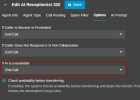
what do you have if AI unavailable?

1785440068835.png
 
  • Like
Reactions: nikolascx
This is the error:

2026-07-30 15:21:17.070| Info|{'call': 28, 'dir': 'ai'} OpenAI response: https://api.openai.com/v1/realtime/calls (500) http_version=HTTP/2 openai_call_id=/v1/realtime/calls/rtc_u1_E7Qbc321dEAa855sNOyBa request_id=None cf_ray=a236b9b88df2d66f-IAD
2026-07-30 15:21:17.071| Info|{'call': 28, 'dir': 'ai'} realtime/calls conn: http_version=HTTP/2 local_addr=('10.0.0.22', 58932) server_addr=('172.66.0.243', 443)
2026-07-30 15:21:17.071|Error|{'call': 28, 'dir': 'ai'} realtime/calls error body: retry_after=None body=Internal Server Error
2026-07-30 15:21:17.072|Error|{'call': 28} [FATAL] AI Session entered fatal error state: Failed to start AI session: Server error '500 Internal Server Error' for url 'https://api.openai.com/v1/realtime/calls'
For more information check: https://developer.mozilla.org/en-US/docs/Web/HTTP/Status/500
2026-07-30 15:21:17.072| Warn|{} extract_call_api_error_message: unparsable HTTP error body: Internal Server Error
2026-07-30 15:21:17.072| Info|{} PBX eventlog report requested: type=fatal_error msg=Internal Server Error
2026-07-30 15:21:17.072| Info|{} PBX eventlog report SUPPRESSED (aggregated within window): type=fatal_error msg=Internal Server Error
2026-07-30 15:21:17.073| Info|{'call': 28} fatal fallback isn't configured: drop the call
2026-07-30 15:21:17.073|Debug|{'u': '1026'} Send RequestDropCall

The OpenAI servers return an HTTP 500 Internal Server Error when receiving the request to start the real-time voice session.

what do you have if AI unavailable?

View attachment 52141
Alejandro-

It was set to End Call but the AI is available. If i call its internal extension number it answers no problem. The AI agents just don't answer calls from Externally.
 
  • Like
Reactions: nikolascx
Alejandro-

It was set to End Call but the AI is available. If i call its internal extension number it answers no problem. The AI agents just don't answer calls from Externally.
Hi @Ryan_Fisher_Techmode that is exactly how the AI fallback works, if the pbx gets an error response code from the AI service it will forward the call to the destination that you have set, in your case End Call, if you put there a user extension, is the call transferred to that user? For testing purposes try to make it with the default prompt and also validate the tests at least with another sip trunk.

You may also open a support ticket for further analysis. This way we don't fill this post with troubleshooting stuff.

Thanks!
 
  • Like
Reactions: rayt and nikolascx
Hi @Ryan_Fisher_Techmode that is exactly how the AI fallback works, if the pbx gets an error response code from the AI service it will forward the call to the destination that you have set, in your case End Call, if you put there a user extension, is the call transferred to that user? For testing purposes try to make it with the default prompt and also validate the tests at least with another sip trunk.

You may also open a support ticket for further analysis. This way we don't fill this post with troubleshooting stuff.

Thanks!
Alejandro-

If i change the behavior for AI fallback and that works as expected. The call fails and goes to the specified extension.
It doesn't change the fact that its still failing on external calls. I changed sip trunk provider and added a new DID and am getting the same results. I will move this conversation to a support ticket as to not clog up this forum post.

Curious if you tested using an external call on your test agents?
 
  • Like
Reactions: nikolascx
Curious if you tested using an external call on your test agents?
Yes, it worked for both on my side, internal and external calls.

So, I suggest to revert the prompt back to default, open a support ticket for further troubleshooting and recheck your account to validate tokens, etc.
 
  • Like
Reactions: nikolascx

Forum statistics

Threads
112,025
Messages
590,368
Members
164,978
Latest member
FringeIT-Eric