Turn Down Ringer in PWA

Status
Not open for further replies.

TagleRock

Silver Partner
Basic Certified
Joined
Apr 24, 2018
Messages
160
Reaction score
16
Hello Everyone. I am using a bluetooth headset connected to my PC and the PWA app for phone calls. The ringer is very loud though though and if I have it turned up loud enough to hear a caller, the next time a call comes in its ridiculously loud. There was a post someone had made about out modifying the ringer wav file, but since its PWA and its technically running out of Chrome, there are no installation files on my computer, at least if there are i don't know where they're at. Is there a way to turn down the ringer in the app? If not is there maybe a wav file on the server that gets pushed out to the PWA app that can be modified so that it gets pushed out on provision?

I also tried modifying the volume for Chrome in the volume mixer in Windows, this works slightly but when the app makes or receives a call, it maxes the volume slider out and greys it out. So this means that if I turn it down in the Windows mixer, it'll be a good volume when the call comes in, then when i answer it the volume gets maxed out and greyed out and i can't really do anything with it. One would think this means there is a way to control the volume in the app, but I have yet to find it.
 
Hi there.
The actual Webclient/PWA/Deskphone applications do not have the option to change the sound volume intensity, neither to change the ringtone there.
 
  • Like
Reactions: Alejandro_3CX
Is there a way to turn down the ringer in the app?
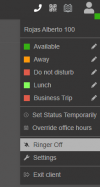
Hi @TagleRock In the next update sp8 this is possible

1689110118137.png

Please note that currently the sp8 is BETA version, recommended just for testing now.
 
  • Like
Reactions: OlegR_3CX
That is definitely handy for someone who also has a phone. It would be great though if there was a choice of ringtones in the App. I would concur a “half volume” option would be about right for me.
 
  • Like
Reactions: Gandalf
@Alejandrdo_3CX Is there any plans to to implement like a "half volume" feature, or a volume slider. I do want to ringer so I know that calls are coming in, I just want my ear drums to be intact after it finishes ringing lol. Like SteaveITS said, half volume would be great, and a volume slider would be perfect.

On another note how do I get access to that beta version?
 
  • Like
Reactions: Gandalf
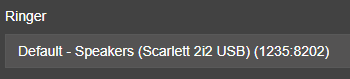
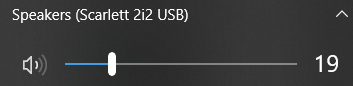
Hi @TagleRock you can set the ringer to the notebook speakers or audio interface and control de volumen from there instead using the ringing on your headsets:

1689256403398.png

1689256417111.png

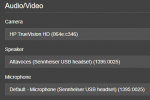
Then when answering a call, all the audio can be sent via the headset as shown in the pic below

1689256513170.png
 
@SweetAction I had actually checked there before posting that reply and it only shows update "7A Alpha Security Update". Do I need to opt in to betas or something?

@Alejandro_3CX I do have this setup and this works, but this to me is more of a bandaid than a solution, pretty much every other application on my computer has a volume adjustment setting independent from the operating system (which is why this works in the first place becuase I can adjust the volume of my music as turn down my speaker volume for the ringer). But since I do audio editing sometimes, and listen to voicemails which are pretty quiet, the level doesn't always stay the same, so sometimes i'll get a ringer blasting. Hopefully we can get a volume slider soon in the app itself. Thank you for your replies though!
 
@Alejandro_3CX Yes but then that lowers the volume for Windows, and I can't hear videos play through the speakers. So I turn it up, and then the ring is loud. One can set a volume for the App but AFAIK there's not a way to differentiate the volume for the App using speaker, vs. the App using headset.
 
it only shows update "7A Alpha Security Update".
Install that, then sequentially any other updates offered to get to 8 beta. Alpha/beta has to go in order.
 
  • Like
Reactions: Alejandro_3CX
@SteveITS Thanks for that info, I will try that.

Also its the same for me, it says I have insufficient privileges to post in the ideas forum.
 
The volume is still a problem since the "Ringer OFF/ON" doesn't change the behaviour of the headset. I purchased a Jabra Talk 65 which is supposed to be a supported headset, but the button would not pickup/hang up a call. the ringer volume on that was fine though. I also purchased a Shokz Open Comm2 headset, which works beautifully except for the deafening ring tone in my ear when a call comes in. Jabra doesn't show supported in the PWA, but the Shokz does show green and supported.
How can we adjust the ring volume, or how can we replace the insanely loud ring tone file?
 
Status
Not open for further replies.

Forum statistics

Threads
111,973
Messages
590,079
Members
164,897
Latest member
ferpeba83