Turning off ringing in Desktop App

Status
Not open for further replies.

Maurice Lefevere

Gold Partner
Advanced Certified
Joined
Mar 20, 2018
Messages
62
Reaction score
10
Gooooooood morning,


We have a customer that's using the 3CX Desktop App in combination with some plug 'n play Jabra USB headsets.
Now, the problem is is that when they are finishing some work from a previous call, and a new call is signaled they continiously hear the ringing sound.

Is there a way to just silence the sound completely. They will notice the new call on-screen so no need for the headset ringing.

I know it's possible to change the default device for ringtone playing, and it works in my case. I can select a HDMI monitor without speaker.
The customer has speakers in it sadly and there are no other devices selectable.
 
Hello, Maurice, ability to switch off Webclient/Desktop App call sound is planned on Update 7.
 
Hello, Maurice, ability to switch off Webclient/Desktop App call sound is planned on Update 7.
Hey Dmitry,

Thanks for the quick response. That would be awesome :) !!
 
Hello, Maurice, ability to switch off Webclient/Desktop App call sound is planned on Update 7.
Hello Dmitry,

On update7 now. I guess it's still planned.. ?
 
Hello, Maurice, ability to switch off Webclient/Desktop App call sound is planned on Update 7.
Is this ability ever coming?! Almost ALL of my users want to use the desktop app as a "sidecar" to monitor extensions etc, and a total of ZERO of them ever want to use the dialpad function or have it ring or receive calls at their desks (they all have desk phones). I'd REALLY love a way to turn off the ringer and/or disable the "phone" functionality of the chrome plugin/desktop apps!

Thanks.
 
Is this ability ever coming?! Almost ALL of my users want to use the desktop app as a "sidecar" to monitor extensions etc, and a total of ZERO of them ever want to use the dialpad function or have it ring or receive calls at their desks (they all have desk phones). I'd REALLY love a way to turn off the ringer and/or disable the "phone" functionality of the chrome plugin/desktop apps!

Thanks.
You'll be able to do that in the next update (that's currently in Alpha.)
 
You can also lower the volume of the 3CX desktop app in the Windows volume mixer (not 3CX version dependent)
 
  • Like
Reactions: Evolute IT
You can also lower the volume of the 3CX desktop app in the Windows volume mixer (not 3CX version dependent)

We use the Desktop App in a hosted environment, so that's not possible.
When will this be implemented?. It's frustrating to hear that ringtone all-day-long.
 
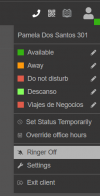
Hi @Maurice Lefevere there is an option on the next sp8 to disable the ringer, please note that currently is listed as RC.

1690985817538.png
 
  • Like
Reactions: Evolute IT
Just found this when looking at the same problem, which update is this planned for ? we are on update 8 currently (build 917)
 
Just found this when looking at the same problem, which update is this planned for ? we are on update 8 currently (build 917)
Its in this version. Please check if your desktop app is also up2date.
 
It appears it was , the customer has found it and sorted it , thank you for your response !
 
  • Like
Reactions: bitn2
Status
Not open for further replies.

Forum statistics

Threads
111,973
Messages
590,078
Members
164,896
Latest member
sameage