Twilio Inbound Caller ID blank

Status
Not open for further replies.

nighthawk

Free User
Basic Certified
Joined
Feb 5, 2022
Messages
6
Reaction score
1
I am moving a client from SIPTRUNK to Twilio Elastic SIP trucking as a means of cost savings. It appears it will lead to significant cost savings over time.

We have had their existing phone line forwarding from Spectrum to SIPTRUNK. When doing this Caller ID came through and worked just fine. I added Twilio trunk, disable e916 and changed the forward to go to Twilio instead of SIPTRUNK. Now none of the incoming calls show the Caller ID. We just get the name of the Queue they called into.

Does anyone have experience with this or ideas where I should start looking to get this working appropriately?
 
Hi @nighthawk so incoming calls from Trunk 1 (spectrum) are routed to an external number using Trunk 2 (Twillio), right?

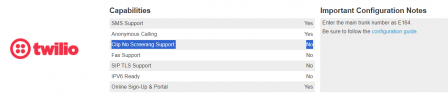
If so, then please note that Twillio does not support Clip No Screening, so you can only send as called id numbers associated to your account.

1697572771262.png

More info regarding the Twillio SIP Trunk available here
 
Hey @Alejandro_3CX,

Correct me if I am wrong, but that would only apply to outbound caller ID right? I am referring to incoming caller ID not appearing next to incoming calls. I have several Twilio SIP trunks with a few different systems and none of the inbound calls show Caller ID. Whether forwarded or not.

I am curious if there is a way to get Twilio to show inbound caller id.
 
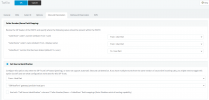
Ok, inbound calls to Twillio, you should be using the twillio default template which has these inbound parameters

1697573646408.png

Caller id must be sent in the field From User Part, you can validate that in the activity log (set logs to Verbose for turther info).
 
Thank you Alejandro, I can confirm that I have those Inbound Parameters correctly set to reflect your screenshot. I have also enable cname lookup in Twilio for origination. Yes I still just see the phone number with no caller ID. Is there something else on the twilio side I need to alter?
 
Thank you Alejandro, I can confirm that I have those Inbound Parameters correctly set to reflect your screenshot. I have also enable cname lookup in Twilio for origination. Yes I still just see the phone number with no caller ID. Is there something else on the twilio side I need to alter?
Hi, did you check the activity log as I mentioned before? in this way you can check if the caller id is sent in the From User Part or not.
 
@Alejandro_3CX
Sorry Alejandro, I just did verbose and made a call then reviewed the activity log. When I look, I see several items, and I do not see a field called User Part. I see user agent, but that appears to be the physical phone answering the call. Sorry for my ignorance here.
 
OK, from the management console you can click on activity logs ---- settings and enable Verbose.

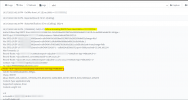
Once done, perform an incoming call, then from the activity log you can filter by call and you should see the incoming INVITE for example

1697587814523.png


So check the From and validate if the caller id is in that field or not.
 
Status
Not open for further replies.

Forum statistics

Threads
111,974
Messages
590,081
Members
164,899
Latest member
mazet