Twilio Incoming CNAM on V20

Status
Not open for further replies.

cspbx

Bronze Partner
Advanced Certified
Joined
Feb 19, 2024
Messages
4
Reaction score
0
Since updating to version 20, Caller ID Name is no longer displayed in 3CX. It was working with version 18 prior to the upgrade. This is for ALL 3CX servers I manage.

I can confirm that the information is being passed on from Twilio in the 3CX pcap logs.

I assume the changes need to be made here, but no matter what I change, I still get no Caller ID Name.

1710942974523.png
 
The mentioned parameters aftect outbound calls and not inbound. Have you made any changes to the Twilio template in your 3cx system?
 
No, do you have an article on this?
 
What I meant was that if any changes have been made, you should not need to make any.

Did you update from version 18 to v20, or is this a new installation on v20? Changes made in v18 may have already changed the inbound parameters, and now, when updated to v20, these changes have come over and are causing the inbound caller ID not to be displayed.

I can suggest opening a ticket with 3cx technical support via your partner portal to have this checked for you.
 
This is happening on all. Some were upgraded from V18 and some were new V20 instances. Caller ID Name is not working on any.
 
I also have the same issue with
20.0 Update 2 (Build 715)

were you able to solve this issue?
 
I also have the same issue with
20.0 Update 2 (Build 715)

were you able to solve this issue?

I actually found the issue, there is a mistake in the XML file of twilio in v20:

in v18 its this:
<field name="ParameterIn" custom="" parameter="FromUserPart">$CallerNum</field>

<field name="ParameterIn" custom="" parameter="FromDisplayName">$CallerName</field>

<field name="ParameterIn" custom="" parameter="ToUserPart">$CalledNum</field>

<field name="ParameterOut" custom="" parameter="RequestLineURIUser">$CalledNum</field>

<field name="ParameterOut" custom="" parameter="RequestLineURIHost">$GWHostPort</field>

<field name="ParameterOut" custom="" parameter="ContactUser">$AuthID</field>

<field name="ParameterOut" custom="" parameter="ContactHost">$ContactUri</field>

<field name="ParameterOut" custom="" parameter="ToUserPart">$CalledNum</field>

<field name="ParameterOut" custom="" parameter="ToHostPart">$GWHostPort</field>

<field name="ParameterOut" custom="" parameter="FromDisplayName">$CustomField</field>

<field name="ParameterOut" custom="" parameter="FromUserPart">$OriginatorCallerId</field>

<field name="ParameterOut" custom="" parameter="FromHostPart">$GWHostPort</field>

<field name="ParameterOut" custom="" parameter="RemotePartyIDCallingPartyUserPart">$OriginatorCallerId</field>

<field name="ParameterOut" custom="" parameter="RemotePartyIDCallingPartyHostPart">$GWHostPort</field>

<field name="ParameterOut" custom="" parameter="P-AssertedIdentityUserPart">$OriginatorCallerId</field>

<field name="ParameterOut" custom="" parameter="P-AssertedIdentityHostPart">$GWHostPort</field>


in v20:

<field name="ParameterIn" custom="" parameter="ToUserPart">$CalledNum</field>
<field name="ParameterIn" custom="" parameter="FromUserPart">$CallerName</field>
<field name="ParameterIn" custom="" parameter="FromUserPart">$CallerNum</field>
<field name="ParameterOut" custom="" parameter="RequestLineURIUser">$CalledNum</field>
<field name="ParameterOut" custom="" parameter="RequestLineURIHost">$GWHostPort</field>
<field name="ParameterOut" custom="" parameter="ContactUser">$AuthID</field>
<field name="ParameterOut" custom="" parameter="ContactHost">$ContactUri</field>
<field name="ParameterOut" custom="" parameter="ToUserPart">$CalledNum</field>
<field name="ParameterOut" custom="" parameter="ToHostPart">$GWHostPort</field>
<field name="ParameterOut" custom="" parameter="FromDisplayName">$CustomField</field>
<field name="ParameterOut" custom="" parameter="FromUserPart">$OutboundCallerId</field>
<field name="ParameterOut" custom="" parameter="FromHostPart">$GWHostPort</field>
<field name="ParameterOut" custom="" parameter="RemotePartyIDCallingPartyUserPart">$OutboundCallerId</field>
<field name="ParameterOut" custom="" parameter="RemotePartyIDCallingPartyHostPart">$GWHostPort</field>
<field name="ParameterOut" custom="" parameter="P-AssertedIdentityUserPart">$OutboundCallerId</field>
<field name="ParameterOut" custom="" parameter="P-AssertedIdentityHostPart">$GWHostPort</field>

<field name="ParameterOut" custom="" parameter="P-AssertedIdentityUserPart">$OriginatorCallerId</field>

<field name="ParameterOut" custom="" parameter="P-AssertedIdentityHostPart">$GWHostPort</field>


note the duplicate parameter="FromUserPart" on the 2nd and 3rd line above.
i'll wait for 3cx to confirm but it fixed it for me.
 
i just had a report on a new install of Version 20.0 Update 2 (Build 715 Release) of the same issue. Can you explain to me where & what you tweaked to make it work for you? i just want to make sure i am fixing & not breaking something, lol!
 
while we are still waiting for a confirmation from someone at 3cx; edit twilio.pv.xml and copy and replace this section:

<!--Source Identification - Use Default PBX Internal Source Identification-->
<!--<field name="MatchStrategy">1</field>-->
<field status="readonly" name="MatchStrategy">0</field>
<field status="readonly" name="Source" parameter="FromHostPart" custom="">$GWHostPort</field>

<!-- Gateway / Provider Inbound Parameters -->
<field name="ParameterIn" custom="" parameter="FromUserPart">$CallerNum</field>
<field name="ParameterIn" custom="" parameter="FromDisplayName">$CallerName</field>
<field name="ParameterIn" custom="" parameter="ToUserPart">$CalledNum</field>

<!-- Gateway / Provider Outbound Parameters -->
<field name="ParameterOut" custom="" parameter="RequestLineURIUser">$CalledNum</field>
<field name="ParameterOut" custom="" parameter="RequestLineURIHost">$GWHostPort</field>
<field name="ParameterOut" custom="" parameter="ContactUser">$AuthID</field>
<field name="ParameterOut" custom="" parameter="ContactHost">$ContactUri</field>
<field name="ParameterOut" custom="" parameter="ToUserPart">$CalledNum</field>
<field name="ParameterOut" custom="" parameter="ToHostPart">$GWHostPort</field>
<field name="ParameterOut" custom="" parameter="FromDisplayName">$CustomField</field>
<field name="ParameterOut" custom="" parameter="FromUserPart">$OriginatorCallerId</field>
<field name="ParameterOut" custom="" parameter="FromHostPart">$GWHostPort</field>
<field name="ParameterOut" custom="" parameter="RemotePartyIDCallingPartyUserPart">$OriginatorCallerId</field>
<field name="ParameterOut" custom="" parameter="RemotePartyIDCallingPartyHostPart">$GWHostPort</field>
<field name="ParameterOut" custom="" parameter="P-AssertedIdentityUserPart">$OriginatorCallerId</field>
<field name="ParameterOut" custom="" parameter="P-AssertedIdentityHostPart">$GWHostPort</field>


then - recreate your twilio trunk and delete the old one
 
i know i'm missing something obvious. i see how to export the pv.xml. how to i build the new trunk & have it load the changes?
 
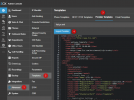
The importing of provider templates is under the Advanced menu of 3CX.

1722495635693.png
 
when you say replace this section were you just talking about this part?

<!-- Gateway / Provider Inbound Parameters -->
<field name="ParameterIn" custom="" parameter="FromUserPart">$CallerNum</field>
<field name="ParameterIn" custom="" parameter="FromDisplayName">$CallerName</field>
<field name="ParameterIn" custom="" parameter="ToUserPart">$CalledNum</field>
 
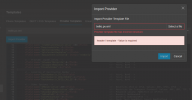
I'm trying to make the suggested changes mentioned in this thread, but keep getting 'incorrect structure' error messages when doing so. If informs that 'header / template - Value is required'.

I've tried doing a copy of the existing templates in the system it shows in the provider template page, made the suggested changes, but when going to import it, it throws the error.

I've opened the xml's in a browser, and its not really flagging anything as invalid or missing formatting.

Is there a certain way that 3cx needs to have these templates edited/formatted beyond what it already displayed in the web console?
 

Attachments

  • Screenshot from 2024-08-20 14-30-47.png
    Screenshot from 2024-08-20 14-30-47.png
    90.7 KB · Views: 20
here is the location of the files needed to be edited BEFORE adding the trunk:

./var/lib/3cxpbx/Instance1/Data/Http/Templates/provider/twilio.pv.xml
./var/lib/3cxpbx/Data/Http/Templates/provider/twilio.pv.xm

just copy the file attached over.
 

Attachments

Last edited:
does anybody know how to do this for a Gerneric SIP TRUNK?
 
  • Like
Reactions: Ron Gladski
Status
Not open for further replies.

Latest Posts

Forum statistics

Threads
111,990
Messages
590,163
Members
164,926
Latest member
tohoken1