Twillio SIP Trunk Configuration Guide

Status
Not open for further replies.

KaterinaK_3CX

Joined
Feb 24, 2016
Messages
246
Reaction score
36
This guide will walk you through the steps to create and configure a Twilio SIP Trunk with 3CX.

Take note of the below special configuration requirements for Twilio:
  • Enter the main trunk number as E164.

Read the guide.
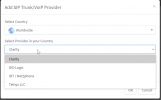
 
I just started using hosted 3CX and under worldwide SIP providers, Twilio is not listed. Is there a template that needs to be imported first?

1628561336880.png
 
OMG what? I just set up a brand new cloud instance just to find that Twilio is not supported...
Will this change?
 
I just set up a brand new cloud instance just to find that Twilio is not supported...
Twilio is generally a 3CX supported Provider. The only scenario where it is not supported is when using a 3CX Hosted PBX and this is for the reason jcostlow mentioned. This is also mentioned in 3CX Hosted requirements here: https://www.3cx.com/ordering/pricing/hosted-info/

Will this change?
There are many factors that come into play, however, first and foremost they would have to be able to offer a Register based SIP Trunk.
 
  • Like
Reactions: Evolute IT
love this article its holding my hand and keeping me sane

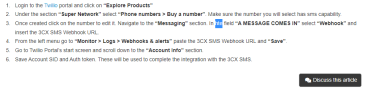
not a nitpick its just like a where's waldo while i'm procrastinating setting this up found a little hte
1663823402325.png
 
love this article its holding my hand and keeping me sane

not a nitpick its just like a where's waldo while i'm procrastinating setting this up found a little hte
Nice catch. We are right on it. Now you won't have an excuse to not set up SMS with 3CX :)
 
As someone only using SMS with Twillio, and not the SIP trunk, this article is not clear on how to configure that scenario, and migrate from using just SMS with the old messaging interface.
 
As Twilio is an IP based provider, you can just set up a dummy trunk and set your SMS there.
 
  • Like
Reactions: Evolute IT
Perfect, I tried and failed. But I will give it another go.

Recommend a note added to the manual.
 
  • Like
Reactions: YiannisH_3CX
The last line of the instructions is:

Save Account SID and Auth token. These will be used to complete the integration with the 3CX SMS.

But then there's nothing else. It doesn't tell you how to use the Account SID and Auth token to complete the integration.
 
I'm also not seeing any messages arrive in 3CX when I send them into Twilio after following the setup instructions. Any clues about how to debug the issue? I can see the messages in the Twilio logs, but they're not showing up in 3CX.
 
Status
Not open for further replies.

Latest Posts

Forum statistics

Threads
112,324
Messages
591,897
Members
165,476
Latest member
awan05