UDP DOWN | Pi SBC

Status
Not open for further replies.

jskinner97

Bronze Partner
Intermediate Cert.
Joined
Feb 6, 2020
Messages
132
Reaction score
8
Hi,

Just come back from deploying our first Pi 3 SBC, and the UDP is showing as down...
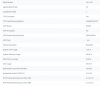
1593090241402.png

Calls are still working due to TCP working, guessing UDP is backup?

Please can someone let me know what firewall rules are needed on site? I have done the firewall rules for the PBX- 5186 SIP and 5286 Tunnel. All phones are registered on 5060 on the site, so would I just need to port forward 5060 to the PBX ?

Thanks
 
You do not do any port forwarding on the firewall protecting the SBC - you just need to allow out 3CX tunnel (udp / tcp 5090) and https port (port 443 or 5001)

Have you run the firewall test on the 3CX server, and does it pass ?

These are the ports needs by the 3CX server - https://www.3cx.com/docs/manual/firewall-router-configuration/
 
You do not do any port forwarding on the firewall protecting the SBC - you just need to allow out 3CX tunnel (udp / tcp 5090) and https port (port 443 or 5001)

Have you run the firewall test on the 3CX server, and does it pass ?

These are the ports needs by the 3CX server - https://www.3cx.com/docs/manual/firewall-router-configuration/

I have not done the 5090/443 on the router, would it be 5090? or would it be the custom port I made on the PBX side?

Yes, it passes PBX side.
 
Hi,

When using the SBC, you do not need to bother with ports (unless you are using a very strict policy that doesn't allow outgoing connections).

Also I noticed you are running our beta version of the SBC instead of the stable version. You may want to revert back to the stable
 
What do you mean by custom port ?

SBC uses the 3CX tunnel port 5090 to communicate between the sbc and the 3cx server
 
What do you mean by custom port ?

SBC uses the 3CX tunnel port 5090 to communicate between the sbc and the 3cx server

When installing 3CX you can change the default ports, so I changed it for security purposes.
 
Hi,

When using the SBC, you do not need to bother with ports (unless you are using a very strict policy that doesn't allow outgoing connections).

Also I noticed you are running our beta version of the SBC instead of the stable version. You may want to revert back to the stable

Ah, I see. We use Zyxel USGs - so probably would need to allow it.

Yes, I thought 15.5 would only work with the old 3CX software so I went with Version 16. Damn, I am not on-site anymore - hopefully, no issues arise from this UDP issue...
 
I know it is showing as UDP down, but what does that actually mean? because calls are still working, etc.
 
16.0.390 is the stable build
16.1.152 is a beta build (not for production, only for testing)

You should be fine. If you get the chance to SSH into the Pi, you can purge the 3cxsbc package, and install the latest candidate using

wget https://downloads-global.3cx.com/downloads/sbc/3cxsbc.zip -O- | sudo bash

It should come up and ask you for your Web URL and Authentication KEY ID

UDP has less delay than TCP, but that doesn't necessarily mean you will have an issue. If you can replicate UDP being down on our stable connection I would like to know what port you chose for the tunnel (as opposed to the default 5090)
 
Okay, thank you for the explanation. I will monitor it and hope it says live.


With regards to the port number, we chose 5286 for the Tunnel upon 3CX PBX setup on AWS.
 
  • Like
Reactions: JohnS_3CX
If it was a secret port number used for security now it's no more:oops:
 
If it was a secret port number used for security now it's no more:oops:

:eek: haha. Nah, should be fine - we use different ones per site
 
  • Like
Reactions: AWS2P
Status
Not open for further replies.

Latest Posts

Forum statistics

Threads
111,953
Messages
589,915
Members
164,850
Latest member
masvty