Unable te open sip trunk settings after V20 upgrade

Status
Not open for further replies.

JohandeZwaan2

Premier Customer
Joined
Mar 2, 2020
Messages
7
Reaction score
11
Hello,

On 3cx V18 we've added an belgian SIP trunk called Intellinet, they were an supported provider with an template already added.
After the upgrade to V20 the template seems to be gone and we cannot edit the sip trunk anymore.
We are getting an 404 in the browser (https://xxxxxx.3cx.nl:5001/xapi/v1/TrunkTemplates('intellinet.pv.xml')

How can we fix this?
 
Please note that if you added an unsupported provider template on v18 and then updated it to v20, the template would not exist in v20, and thus, the issue.
 
I understand, but that is not really an solution. ;)
We cannot edit the sip trunk anymore, when we click on the trunk under voice and chat, we are thrown back to the people startpage.
Is there an template available which we can add?
we noticed the same for the sip trunk Voiceworx.
 
So in the Voice& Chart, you can import the trunk (Add SIP trunk >> Import provider)
 
Ok, that doesn't help because you are adding an new sip trunk, after fiddling around we found the solution for this.

These are the steps to resolve this:
  • Under Admin, Voice and Chat, locate the trunk with the issue.
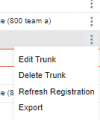
  • Click on the dots at the end and select export.
  • Rename the downloaded file to the xml filename located in the xml itself.
    • intellinet.pv.xml in our case.
  • upload the file to /var/lib/3cxpbx/Instance1/Data/Http/Templates/provider.
After this you can view and edit the sip trunk again.
 
Great!
We are glad that you found the solution that worked for you. Thank you for the feedback and sharing with the community.
 
Hi,
I have a similar problem, but unfortunately the option provided by colleague @JohandeZwaan2 does not work for me.

In v18 we had added a trunk against our primary Beronet type E1, with v20 the trunk works correctly but I cannot interact with it, a prohibited symbol appears, and I can only delete, I cannot export, I don't know if they have stopped supporting Beronet .

I don't understand if it is working correctly because I can't see the configuration.

Thank you.
 
Hi Toni.
There is no template to change to the FXO gateways, so in your case you are using Generic template? You can give that a try as a workaround and have the template name as GenericSIPTrunk.pv.xml
 
Hola Toni.
No hay ninguna plantilla para cambiar a las pasarelas FXO, por lo que en su caso está utilizando una plantilla genérica. Puede intentarlo como solución alternativa y tener el nombre de la plantilla como GenericSIPTrunk.pv.xml
Hola, he creado un nuevo trunk para probar con una plantilla genérica y funciona, no hay forma de migrar este trunk por lo que no tendré que migrar las reglas salientes y modificar la configuración de la puerta de enlace.
 
Perfect, at least you have a workaround for your case.
 
Perfect, at least you have a workaround for your case.
For me it is not a solution... I have created many rules and it means a lot of work, I do not understand how something supported in v18 and earlier stops working in v20.
 
Something has been changed, in V20 as you know and in your case the issue is not with the supported trunk etc., but something that we don't support.
 
I think I am not the same person who thinks the same... but we must try to maintain compatibility between versions, Beronet in old versions was compatible, in fact there was a template for Beronet and now suddenly it is not...
 
At one point of time, gateways used to be supported too, and at some point they are no longer are, and this was before V20
 
Until the latest version of v18 it works without problems


Now it works, but I can't change anything, nor do I want to see the settings to reconfigure.
 
V20 have a new interface and this is given from now. As mentioned before, you to change options that you can see from the interface, you will need to export the trunk and then modify it using notepad application and then re-import to the server.
 
Gracias, pero no puedo ver la información del tronco, cuando paso el cursor sobre él el cursor está prohibido y la opción de exportación está deshabilitada
 
I am not sure if i understand you correctly, so you don't have these options :
1717736279087.png

how does it look for you?
 
In this trunk it only gives me the option to delete.
 
Is this an old gateway and not the SIP trunk?
 
Status
Not open for further replies.

Latest Posts

Forum statistics

Threads
111,990
Messages
590,163
Members
164,926
Latest member
tohoken1